

How to run a usability test
In our May Content Improvement Club session, we focused on how to run a usability test. We ran through the basics of putting a script together, watched a clip from a test and had a go at prioritising some issues.
Two problems for people working with content
We started this session by outlining two problems for people working with content.
We don’t see people using our websites
The first problem is that we don’t typically see people using the things we create. We build a website based on our best assumptions of what our users need and how we think they will interact with it. Then at some point in the future, someone uses the site. They might find it easy to use. They might find it difficult. But we don’t know, because we don’t get to see.
It’s hard to self-assess our own website
The second problem is that it’s hard to self-assess a website that we’re already familiar with. When we look at the site, we bring our understanding of the structure and the context it sits in. We know what the acronyms mean. We know where to find the contact form. We know where the links go.
This isn’t necessarily the case for a user coming to the site for the first time.
Here’s Steve Krug, author of Rocket Surgery Made Easy:
“If you’re building something, you’re not going to be able to see where it’s going to confuse people. It’s not going to confuse you. You know too much about it.”
Steve Krug interviewed on the Brave UX podcast
This is sometimes known as the ‘curse of knowledge’. Erika Hall, author of Just Enough Research, explains:
Whenever we learn things, we forget what it’s like not to know those things. […] The more you know, the more you expect other people to know. And if you become a real expert in a topic, forget it.
Erika Hall writing in the Mule Design Studio newsletter: Don’t chicken out about talking to people
Usability testing is a way of addressing these problems. It gives us a chance to see what it’s like for someone visiting our site for the first time and it counteracts the curse of knowledge. That gives us valuable insight into where a design is working and where it isn’t.
A quick definition of usability
Before we go any further, a quick word about what we mean by ‘usability’.
In short, usability refers to how easy, effective and satisfying something is to use.
The cover of Don Norman’s book ‘The Design of Everyday Things’ features a coffeepot with a spout and handle on the same side. This would score poorly in a usability test as it wouldn’t be easy, effective or satisfying to use.

One of French artist Jacques Carelman’s impossible objects, as featured on the cover of the Design of Everyday Things.
ISO definition
There’s also an international standard (ISO 9241-11) definition of usability:
“The extent to which a product can be used by specified users to achieve specified goals with effectiveness, efficiency and satisfaction in a specified context of use.”
This is a more technical definition, but it’s worth bearing in mind. It emphasises the fact that we need to think about specified users and their goals. That will come up when we get to writing our script.
A simple usability test
The simplest usability test you can do takes about 5 minutes:
- Grab a colleague / friend / family member who doesn’t know your site.
- Sit them at a computer and open the homepage of your site.
- Set them a task. For example: “Imagine you’re a student and you want to get a replacement student card”.
- Sit quietly and watch as they try to complete the task.
This doesn’t take much effort, and sometimes you uncover a usability issue or two.
In Content Improvement Club, we looked at how to run a more extensive usability test. But we wanted attendees to know from the outset that usability testing doesn’t have to be a big complicated process. It can still be beneficial even if you do it on a small scale.
There are three roles in every test
In a usability test, there are three roles:
- A moderator, who reads the script, sets tasks for the participant and asks questions.
- A participant, who completes tasks on a website, thinking out loud as they do so.
- An observer, who watches and takes notes.
There can be any number of observers, who watch the test live or on a recording.
We watched an example of a usability test
The best way to understand how a usability test works is to watch a recording of one.
Here’s Steve Krug demonstrating how he runs a test:
Usability Test Demo by Steve Krug (YouTube video, 24 minutes)
In Content Improvement Club, we watched a short clip of someone completing a task on a library website at a UK university.
This was the task:
You’re working on a presentation with four other people from your course. You need to find a study room in the library for the four of you this weekend. Can you find out if a suitable study room is available at the library?
We noted down the issues that we saw, and then we shared them on a Microsoft Whiteboard. Even though it was a single task, there were a lot of issues, which is fairly typical. That’s why it’s often helpful to follow your observations with a prioritisation exercise.
We prioritised the issues
In the session, we demonstrated how you can prioritise issues using a matrix like this:
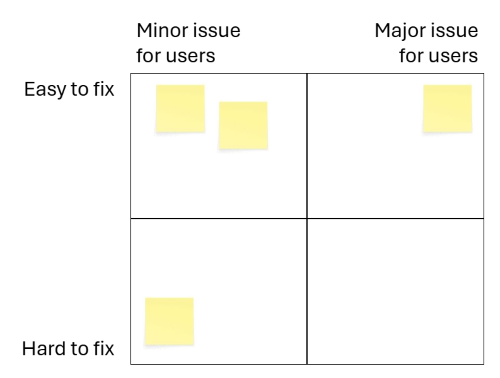
To place things on the matrix, you make a quick assessment of how significant the issue is. Then you assess how easy it would be to fix. The issues you typically want to focus on first are those in the top right quadrant: major issues that are easy to fix.
It can be helpful to have a set of questions to establish whether an issue is major or minor.
These are adapted from Dave Travis’s work on Red Route usability testing:
- Does the problem occur in a task that is highly important to you or your users?
- Is the problem difficult for users to overcome?
- Did multiple participants experience the same problem?
Red route usability: The key user journeys with your web site (Dave Travis / archive.org)
Using questions like these give you a shared set of criteria when assessing the significance of usability issues in a group.
But we’re getting ahead of ourselves. How did we get to this point?
How to write a script
Before you can run a series of tests, you need a script.
Use a template
We shared our usability testing script template, which draws on the work of Steve Krug:
Research brief and usability testing script (DOCX, 51KB)
The template includes:
- a brief, where you articulate the goals of the testing
- a lead-in script, which you read to participants before testing begins. This covers what the session will involve and sets expectations.
- a set of tasks, presented in a table with two columns. One column contains the task, and another the expected path to complete the task.
Come up with tasks
We start by identifying tasks and then develop them by adding a scenario.
We practised this in the session. Attendees suggested tasks that someone might need to carry out on a university library website. For example:
- Check opening times
- Find a book on your reading list
Develop tasks by adding scenarios
Next, attendees developed these tasks by adding a scenario.
For example, “Check opening times” becomes:
- You’re a student and you want to check the opening times of the library during the winter break. How would you go about doing this?
“Find a book on your reading list” becomes:
- You’re a new student and you want to find the book “Campbell’s Biology”, which is on the reading list for your course. Can you show me how you would find out if the library has a copy of this book?
Tips for writing good tasks and scenarios
We shared some tips for turning tasks into questions:
- Aim for 5 to 10 scenarios per session.
- Keep tasks focused: one goal per task.
- Frame tasks as realistic scenarios, not instructions.
- Add light context to make it realistic.
We recommend running a pilot usability test before going ahead with a round of testing. This helps you see how the full usability test flows from start to finish. It also gives you a chance to refine the script and ensures the session runs smoothly for participants on the day.
Logistics
Ahead of the Content Improvement Club session, we asked attendees if they wanted us to cover any topics in particular. Most of these came under the wider topic of logistics.
When should you test in a design process?
Test earlier rather than later. Testing earlier in a design process is ideal because it’s easier to make changes based on what you learn. If you’re creating something new, this usually involves creating rough drafts or prototypes, and then later, a high-fidelity version.
Changing a prototype is easy because no one is very attached to it. But when a design is a later stage of development, it tends to be more painful to learn that something isn’t working. By this point, you and your colleagues have usually invested a significant amount of time in an idea. If the fix involves changing something fundamental to the product, you might have to undo work that’s already been done.
How long does a testing session take?
It varies, but we usually run testing sessions of about 30 minutes.
How many tasks do you set?
In 30 minutes, we can usually fit in between 5 and 10 tasks.
How many participants do you need?
Three to five participants is a good target. Jakob Nielsen argued that five participants is enough for one round of tests. This is because when you run the same tests with multiple people, you tend to see the same usability issues reoccurring. It’s a case of diminishing returns: by test number six, you aren’t usually learning anything new.
Why you only need to test with five users (Nielsen Norman Group)
In Rocket Surgery Made Easy, Steve Krug recommends three participants per round of testing. This way you can run more rounds of tests – for example, by testing an initial idea and then a later iteration of the same design.
How do you recruit participants?
Mailing lists, Teams channels and surveys are great places to put call outs. We advise that you avoid revealing the testing topic or content in advance.
Aim for participants who reflect real users where possible. This can prove difficult, so don’t let it stop you if you can’t find participants who don’t match the profile of your users.
How do you take notes?
Obviously, you can scribble notes anywhere you like. When we’re running a series of tests, we often take notes in a spreadsheet. This allows us to quickly spot which tasks caused problems for multiple participants.
Usability test results spreadsheet (XSLX, 36KB)
How can we make testing more accessible and inclusive?
Accessibility and inclusivity should be considered from the very start of the testing process. One important step is asking participants early on whether they use any assistive technology, so you can understand their setup and make any necessary arrangements. Our own introduction questions and templates include this for that reason. In the template, this is an introductory question, but if you’re recruiting via a survey, you could mention this there.
Having a diverse participant group will usually lead to more useful and representative findings. For example, if you’re testing a student-facing service, including both undergraduate and postgraduate students can help capture a wider range of experiences and needs. Again, this can sometimes be a challenge, but if possible something to aim for.
Ideally, usability testing should include participants who regularly use assistive technologies. This provides valuable insight into accessibility barriers that might otherwise be missed. However, this can sometimes be challenging due to recruitment costs, specialist panels, or limited budgets.
Some resources that can help:
- Deque: Considering accessibility when designing a usability test
- Scottish Government Service Manual: Usability testing with disabled and non-disabled people
Acting on the findings
So you’ve run a round of testing. What happens next?
Involve senior colleagues in playbacks
In 2015, Caroline Jarrett wrote about a phenomenon she and Steve Krug had noticed when working on websites. They would run a set of tests on a website and uncover some usability problems. But then six months later, the problems were still there: no one had gone in and fixed them. To investigate why this was happening, they ran a survey of UX professionals.
Caroline Jarrett and Steve Krug’s analysis of why usability problems go unfixed
Out of 131 responses, the most common reason was that findings from usability testing conflicted with a decision maker’s opinion.
One way to address this is to get decision makers in the room (or on the Teams call) when you watch a highlights reel of test recordings. There really is no substitute for seeing user behaviour first hand. Reading about it in a report doesn’t carry the same weight.
Use the momentum created by testing
Testing creates a shared motivation to fix things. Use this to your advantage. If you can, take action to fix usability problems while people’s memories are fresh.
Make small changes first
Sometimes usability testing highlights small problems that are easily fixed. A link that doesn’t go where someone expects it to. An item missing from an A-Z.
Sort these things out first. Small wins like this give you the motivation to sort out the knottier problems.
If you want to find out more
This was a quick introduction to running your own tests. If you want to learn more, Steve Krug’s introductory guide is a great place to start:
Rocket Surgery Made Easy by Steve Krug (listing on DiscoverEd)
We post about case studies of usability testing at the University on this blog:
- How usability testing guided user-centred improvements of the Digital Collections Platform (Emma Horrell)
- How usability testing helped the Library to improve their website (Nick Daniels)
The Prospective Student Web Team do the same:
- Usability testing the display of multiple entry years in the undergraduate degree finder (Pete Watson)
- Usability testing of new programme search and page navigation features (Nicole Tweedie)
Acknowledgements
Various points made in this blog post are taken from this 2015 post by Neil Allison:
Making usability testing agile
How to hear about future sessions
We promote these sessions via our mailing list. If you’re interested, please sign up:
Join the UX and Content Design mailing list (University login required)
Suggest a topic for a future session
We picked usability testing following a suggestion from the community. We’re keen to continue covering topics that colleagues across the University would find useful. It would be really helpful if you could let us know any ideas you have using this form:
Suggest a topic for Content Improvement Club (University login required)
Other training that we offer
More training is listed on the User Experience Service website:

