

Videos and images – when do they add value and not just page weight?
The carbon cost of using images and videos on a webpage often goes unnoticed but cumulatively can add up. Dono Abdurahmanova and I have presented at both the UCISA digital sustainability conference and the Green Software Foundation Scotland meet up in the last week or so on the topic of sustainable media use.
The key theme of the talk was around intentional use of media and our efforts to shift the narrative around the perceived necessity for videos and images to create effective content. We also shared how we’ve been working with web publishers at the University to quantify the impact of their media content. You can read more about this aspect of the work in Dono’s blog.
Do students actually watch videos on websites?
We finished by highlighting some steps you can take to make your images and videos more sustainable, if you decide they are the right medium to communicate your message.
The environmental cost of media use
Media is and will continue to be a key part of digital content strategies, that is a given and it undoubtedly does have its place as an effective communication tool – although the environmental impact cannot be underestimated.
Every page view, video stream and file download consumes energy and generates emissions. This is a fact which often goes unnoticed, as it’s not visible or as well known as other types of day-to-day activities which everyone knows create emissions.
When talking about the ‘weight’ of a web page (as I do in the title of this blog) this refers to the cumulative size of the files that are needed to load a webpage, such as images, videos, text, scripts, etc. These elements add weight to the page and the heavier the page, the greater the estimated CO2 emissions generated.
Here are a few statistics around the environmental impact of media use which provide a bit of context around why we felt it was important to think of ways to raise awareness about digital sustainability.
Digital content generally
When thinking about digital content generally, on average digital content consumption emits around 229kg of CO2 per person per year, which is up to 4% of our individual carbon footprint.
Transition Templates AI & Digital: Pathways to Net Zero+ Dr Joanna Boehnert
Webpages
When it comes to webpages – globally the average web page produces approximately 0.36g of CO2 equivalent per page view. For a site with 10,000 monthly views, that is 43kg of CO2 equivalent per year.
Website Carbon™ Calculator v4 | What’s your site’s carbon footprint?
Images and videos
Then drilling down further into images and videos – streaming one hour of video content generates approximately 55g of CO2 equivalent.
Carbon impact of video streaming | The Carbon Trust
Despite their environmental impact, images make up between 49-58% of the total size of an average web page.
The starting point is to consider the value of the image or video
Often the messaging around digital sustainability can be dominated by talk of optimisation, compression and technical aspects like images formats and file sizes. However, this is actually a step ahead of where the starting point should be, which is whether the image or video adds value to the user in the first place. This is a principle which is also included in the Institute for Sustainable IT – Handbook of Sustainable Design for Digital Services.
When considering the value of media, it can be helpful to ask the following questions:
- Does it enhance clarity, context or understanding?
- Could you convey the same information without it?
While the answers will be context specific, often you can still provide the user with effective, useful information without it.
Intentional rather than automatic use of media is often not only better for the environment but also your engagement too, as it can reduce the cognitive load for the user and will likely resonate more with your audiences when used in targeted ways rather than in abundance.
“The process of behaviour change starts with awareness”
This is a quote taken from James Clear, author of Atomic Habits, which refers to the fact that people can’t change their habits if they aren’t aware of them in the first place. To this end we’ve been trying to spread the word about digital sustainability and in particular the impact of using images and videos. In doing so encouraging people to rethink their habits in relation to media use.
We’ve done this through reshaping our image guidance for the central content management system and also including the topic in our Content Improvement Clubs.
Reshaping image guidance
Working with the EdWeb service team, we reshaped the ‘Sourcing the right image’ guidance page for EdWeb 2, our central content management system. The page was heavily focused on where to find images and which were the best images to use, as these are often the first questions asked, based on an assumption that images are a necessary part of creating content.
We shifted the emphasis and tone of the page, so that it focused first on considering whether you need to use an image, highlighting the importance of both digital sustainability and accessibility when making this decision. After this we included the guidance to follow if an image is required and how to source one.
We hope that this change in approach helps to reframe the messaging and thinking around image use and encourages more intentional use of images.
You can find the new guidance on the EdWeb 2 hub.
Best practice for image use (University login required)
Including digital sustainability in our Content Improvement Clubs
Each month the UX Service runs Content Improvement Club sessions for anybody within the University who works with content. It’s a chance for them to meet up with other publishers and learn more about content design. At the beginning of the year, we ran a session on ‘5 top tips for improving your content in 2026’ and we made one of the top tips effective image use.
As part of the session, we invited attendees to look at the various different images from across the University web estate and think about which of them added value and what that value was. It was an interesting exercise and once people started to apply their mind to the question, they soon realised that some images added more value than others.
For example, having a stock image of a beach for an internal staff pensions guidance page was deemed to be more decorative, rather than aiding understanding, or helping users complete their task. Whereas the images of students on campus tours, or using University facilities, had more value in attracting prospective students by giving a human feel to events and give an idea of life at the University.
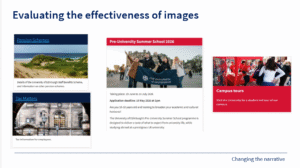
A slide from our training session on evaluating the effectiveness of different images from the University web estate.
Tips for sustainable image use
If you decide images are the right medium to communicate your message – here are some tips on how you can make them more sustainable.
- Avoid generic stock images – eye tracking studies show that people tend to ignore large or generic images. Using real-life images of people interacting with services or buildings, which are relevant to the objectives of your content is likely to increase their value / impact and make them a more worthwhile addition to the page.
- Consider the format of your image – there are various optimisation and compression tools that can help you to reduce the file size of images, without impacting on quality. At the University, we use the WebP format for images in our central content management system which results in files being 25% to 34% smaller than JPEGs.
- Consider implementing an image upload size – this can help to reduce the usage of energy-intensive large files. At the University, we’ve implemented an image upload size of 1MB for the central content management system.
Make sure that images are accessible
Whilst the focus of this blog is on sustainability, as online content grows, accessibility becomes increasingly important.
When adding an image into your content, including alternative text (‘alt text’) ensures that more users can access the information it provides. Assistive technologies such as screen readers rely on alt text to convert content (such as text, buttons, images and other screen elements) into speech or braille. This allows blind or partially sighted users to access the same information as sighted users.
You can read more about how to write good alt text in my colleague Mel Batcharj’s blog.
How to write good alt text – what we covered in our March Content Improvement Club session
Tips for sustainable video use
- Disabling autoplay – this is a simple yet impactful action that can reduce energy consumption and lower the data demand. Autoplay adds unnecessary weight to the page, causing videos to load and stream regardless of whether the user has chosen to engage with it.
- Including a written summary and transcript – this can support users who prefer reading as well as making your content more accessible. Both summaries and transcripts can help users get the key information they need and reduce the likelihood of them loading a video only to abandon it partway through as it didn’t meet their needs.
- Keep videos short and well signposted – we’ve seen from our research that user attention spans are shrinking, particularly when they are task-focused, looking to find the information they need. Therefore limiting the length of videos could help with engagement as well as sustainability. In addition using timestamps or chapter markers means that people don’t necessarily need to watch the whole video, they can skip to the relevant sections, reducing the amount of time the video is playing for, therefore reducing the energy usage.
- Avoid repetition of information – try not to repeat the same information in the video as you already cover on the webpage. If you notice that think about whether you need the video – what extra value is it adding, that the text on the page doesn’t already offer.
- Think about alternative formats – rather than video could audio files, or podcasts work? Can you communicate your message without the video? Where audio adds value but visuals are not needed, consider using the MP4 audio format instead. Audio files are significantly smaller, require less energy to stream, and can carry the same content at a fraction of the environmental cost.

