

Embedding the rules: What we learned UX testing a style guide helper tool built with Drupal Editoria11y
Our Editorial Style Guide contains many conventions and we know from research that publishers struggle to remember to apply them. Could automation help? We experimented embedding style guide rules into a Drupal module that checked content against the rules in the editorial interface and suggested corrections when the rules weren’t followed.
As part of a concentrated effort to make it easier for publishers to apply our style guide rules, Mostafa Ebid, a student who came to work with us in summer 2025, installed Editoria11y, an open-source Drupal feature and configured it with selected rules from our University style guide. Applying this feature to a site with demo content, he tested it with University staff to see how well it worked, and how useful and usable they found it.
Read more about our ongoing style guide work:
Collection of blog posts about the Editorial Style Guide
Drupal Editoria11y is an open-source accessibility checker
Editorial accessibility ally (shortened to Editoria11y) is a module developed by John Jameson from Princeton University that enables automated content checking directly in the editorial interface. Originally created to help content editors catch accessibility issues, its configurable architecture makes it well suited to embedding other kinds of rules, such as institutional style guide conventions. The checks can run in real time as content authors type, and can also be applied to content in published pages and previews, to flag issues to be corrected.
Editoria11y can include more than 50 built-in content tests covering image alt text, link quality, heading structure, and general content issues. Flagged issues are noted at the page level by an indicator bar, which includes a count and a categorisation of the type of issues (default categories are headings and alt text). Through this bar it is possible to identify the precise inline location of the problematic content with visualisers. Each visualiser is associated with a modal that contains detail about the problem element and plain language tips explaining how to fix it.
In addition to the on-page alerts, it is possible to review issues across a site via a reporting dashboard which can be configured to log recurring issues or most problematic pages, as required.
Read more about Editoria11y on Drupal.org:
Editoria11y Accessibility Checker project page
We designed tests to learn if Editoria11y would be useful and usable to embed style guide rules
Editoria11y presented itself as a mechanism to enable web publishers to check their content against style guide rules, and we wanted to understand the kind of experience this provided in EdWeb2. In particular, we wanted to understand:
- If Editoria11y could effectively check content against our style guide rules
- How Editoria11y presented results of the checks in the editorial interface
- If publishers could use Editoria11y to correct content that misaligned with the style guide
Moreover, we wanted to learn if the addition of Editoria11y to the EdWeb2 editorial interface improved the publisher experience or not.
We picked deterministic rules about dates and numbers for the tests
Like many Drupal features, Editoria11y is very flexible and customisable to fit a range of different use cases. Since it was new to our publishers, we were keen to avoid overengineering it, taking care to configure it to present the minimal information necessary to achieve our testing goals.
The University’s Editorial Style Guide contains between 60 and 70 separate rules, of which fewer than half are deterministic (in other words, can be applied directly without editorial judgement). It made sense to include deterministic rules in the tests, to enable us to accurately assess how effective Editoria11y was at checking them.
Rules in the dates and numbers section of the style guide seemed a good fit for the tests, so these were configured into Editoria11y.
We set up Editoria11y to display an indicator bar, visualisers, modals and a dashboard
The module was set up to display the indicator bar, the inline visualisers and the reporting dashboard. Content that contained sentences with dates and numbers was saved in draft in a demo interface which had Editoria11y applied. In the test scenario, participants were asked to assume they had been asked to review this draft content before it went live and to use a checker tool to help them with this.
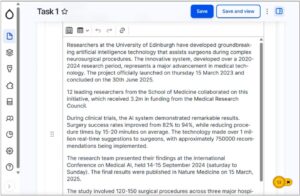
Screenshot of the Drupal Editori11y tool in action, showing the yellow indicator bar at the bottom right of the interface, tallying the total number of style guide errors on the draft page
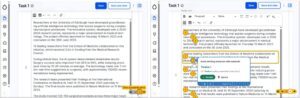
Screenshot of Editoria11y showing on the left, the indicator bar at the bottom right of the draft page, and on the right, the same draft page, but revealing the locations of the style guide errors (activated when the indicator bar is pressed) and an example of the modal giving detail of the error and the suggested fix
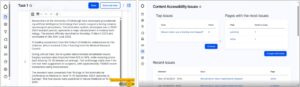
Screenshot of Editoria11y showing on the left, the display with the indicator, and on the right, the reporting dashboard summarising all the errors (which opened in another window in the interface)
Watching participants use Editoria11y, we learned what worked and what didn’t
Tests were carried out with seven participants. Observing how they made sense of the different parts of Editoria11y and interacted with it, we were able to draw conclusions about how useful and usable it was to support the context of web publishing in EdWeb2.
Participants understood the relationship between the indicator and the visualisers
The first part of the tests involved showing participants the draft content in the editorial interface with Editoria11y applied. All of them were able to understand that the number of style guide errors on the page were tallied in the indicator bar at the bottom right of the page, and that they could use the indicator bar to reveal precise locations of the errors on the page, together with a modal for each error, explaining the error and the suggested fix.
Placement of the visualisers and modals often made it hard to read the draft content
Taking an overview of the visualisers in the draft content, participants commented that they felt a bit overwhelmed to see so many. Some felt the placement of the question mark visualisers made it difficult to ascertain which parts of the content needed to be corrected, which was slightly helped by yellow outlines around the text. Placement of the modals masked the text beneath, however, meaning participants found it difficult to engage with the original context of the errors to be corrected to assess whether to accept the suggestion or not
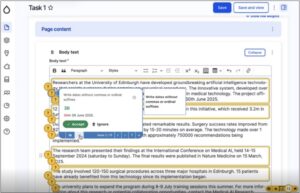
Screenshot of Editoria11y showing a view that some participants found overwhelming: indicator bar, question-mark indicators, yellow outlines and an open modal
Descriptions of the errors in the modals were not clear to some participants
Reading the information in the modals, some participants were unclear of the error it was pointing out. Specifically, in a modal describing the rule to write dates without including ‘th’ or ‘rd’ after numbers was written as ‘Write dates without commas or ordinal suffixes’. Some participants were unfamiliar with what ‘ordinal suffixes’ were, but seeing the suggested change presented as a ‘before and after’ tracked change with the error crossed out (in red) and the suggested change presented in green helped participants understand the proposed correction.
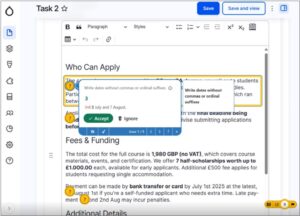
Screenshot of Editoria11y showing a modal explaining the rule to not include ordinal suffixes when writing dates
Participants were able to use the modals to correct some style guide errors
When they had read and understood the errors being highlighted, most participants were able to assess whether to accept the suggested fixes and apply them based on the information contained in the modal. Several participants entered into a flow of using the arrow keys in the modals to clicking through the different errors and accepting the fixes, especially when the fixes related to a recurrent error – for example, capitalising the first letter when writing days of the week. They appreciated a notification alerting them that the fix had been applied, which temporarily appeared at the top right of the screen, although some said they would have appreciated this notification to remain for longer as it was easy to miss. They were also unclear whether they needed to save after applying each fix, or if this could be done when they had worked through all of the fixes on the page.
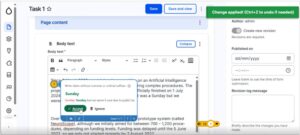
Screenshot of Editoria11y showing a notification in the top right of the interface to confirm the fix had been applied
Not all errors were fixable with automatic rule application – some required interpretation and judgement
Viewing the suggestions in the modals, several participants noted a problem with the fixes being based on automatic application of the style guide rules. Specifically, relating to the rule about omitting ordinal suffixes for numbers, there were several instances where it didn’t make sense to apply this rule directly. For example, a date written as ‘5th of December’ contained a suggested fix to remove ‘th’ but not to remove ‘of’. Another relating to ‘4th year’ of studies suggested removing the ‘th’ but not writing ‘fourth’ as a way to make the sentence readable, and similarly, another advised removing ‘st’ from ‘1st floor’ which was an incomplete fix.
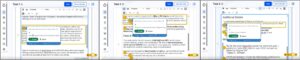
Screenshots of Editoria11y showing instances where the ordinal suffix corrections couldn’t be directly applied
Some participants’ trust in the checker waned when they realised it didn’t catch all the errors
Of those who took part in the tests – some were more familiar with the rules of the style guide than others, and this impacted the trust they placed in Editoria11y. When they reviewed the Editoria11y outputs against the draft content and spotted corrections that hadn’t been picked up or flagged by Editoria11y, they were inclined to disregard the tool and check the content for themselves to ensure the text was completely compliant.
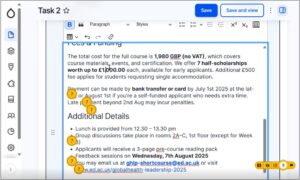
Screenshot of Editoria11y showing a style guide error where the pound sign is missing from an amount that the tool has not picked up
Few participants said they would use the dashboard as they felt that was for a site administrator
Navigating through the different options on the indicator, participants were able to access the dashboard interface, which was titled ‘Content Accessibility Issues’. Reviewing what was there, in sections called ‘Top issues’, ‘Pages with the most issues’ and ‘Recent issues’ most participants said they didn’t feel they would use this feature, and presumed it would be for someone with full responsibility for the whole site.
Editoria11y has potential as a style guide helper tool, but would need contextual refinement
Taking the findings together, Editoria11y showed promise as a way to embed the style guide rules into draft content, to avoid web publishers needing to navigate away from the editorial interface to check the rules in the guide itself to then apply them. Participants understood what the indicator bar was there to achieve, and liked the idea of being able to check off corrections to their content through the modals. Some identified areas for improvement included:
- Refinement of the style guide rules embedded in Editoria11y, to include examples, exceptions and applications based on scope and context
- Embedding a more complete set of style guide rules into Editoria11y to help build trust in the tool
- Adaptation of the modal options to include ‘Accept with edits’ as well as ‘Accept’ and ‘Ignore’ to account for instances where editorial judgement needed to be applied to the suggested correction
- A way to show corrections in categories (for example, all those relating to numbers together, all those relating to punctuation together and son on) which could be addressed by the editor in sequence, to avoid overwhelm in the interface
- Suggestions for correcting content when reworked sentences were required – powered by an LLM such as ELM
As well as Editoria11y surfacing style guide rules, there is potential to use it for its intended purpose, as an accessibility checker, containing checks about the heading hierarchy and alt text on images. If this was to be included as well as style guide rules, however, progressive disclosure of the information should be used to avoid the interface becoming too cluttered.
Many of these areas overlap with work currently progressing in open-source Drupal, firstly develop a Context Control Center – as a way of handling rules to enable AI-assisted content production, and secondly to develop an AI Content Review feature, capable of reviewing content against defined rules and conventions.
Read more about these Drupal developments in my related blog post:


Interesting. As you know, I included Editoria11y as part of the Drupal CMS a11y tools recipe, and it was interesting to read about its own Dashboard issues. That Dashboard being overwhelming was something I had anticipated at the time. I opened some issues on Drupal.org and got a “My content” block created. That block will then be available elsewhere, where it may be more useful. It only shows the issues from a user’s own content.
I would be keen to explore what other content tools/blocks may be useful, so we could build out a really useful jumping-off point from a personalised Dashboard.
Would be good to see the ‘My content’ block in action – drawing from what we’re learning with CCC and AI content review there’s a need to layer review or correction info to prevent the overwhelm and allow editors to work with all errors of a certain type together (like ‘show me all the number errors, ok done, now show me all the punctuation errors’). A feedback loop would also be cool – like ‘remember this for future’ for example. Honestly, research is just the best innovation mechanism ever. *gets off soapbox