

Think like a machine: How building a Drupal context-handling feature is providing a new lens on content design and style rules
AI tools to support content tasks are becoming more and more widespread. As part of my contributions to open-source Drupal I’ve been researching how to prepare and package content design and style rules that these tools can use effectively.
Using AI to help with content design tasks (and indeed, any other type of tasks) is now standard practice for many. As anyone who has experimented with it knows, the value the AI can provide is largely dependent on the prompt it receives, and the contextual data and information it is given to work with.
The way you provide your chosen AI with context affects the results you get
I have encountered two main methods for providing AI with context data. The first is the ‘prompt and pray’ approach, where you start with vague instructions and then engage in back-and-forth to drip-feed the AI the necessary information in the conversational turns. The second is the ‘context engineering’ approach, where you front-load information to proactive guide the AI, for example, defining its role, setting explicit goals, providing background and adding contextual constraints and rules.
Context engineering is more proactive than prompt and pray
Prompt and pray is better suited to a standard LLM interface or chat assistant (like ELM or Claude), and is the preferred choice when you’re looking to brainstorm and experiment, and are happy to take variable outputs. Context engineering relies on a more structured interface, designed to handle workflows (like Claude Skills) and is therefore the best choice if you’re looking for consistent, predictable outputs within set parameters, but it requires you to prepare your context data upfront, and for your chosen AI mechanism to have a way of handling it.
The Drupal Context Control Center is a management system for context data
In January 2025, our team was fortunate to spend a day of Drupal AI experimentation with specialist company Freely Give, in which we applied AI solutions to some of the web content management and design problems faced by the University. One of our experiments involved prototyping a basic style-guide checker into EdWeb2.
Read about this early experiment in my blog post:
An automated Editorial Style Guide? Experimenting with Drupal AI Automators
Looking back, this experiment was a very basic form of context handling, and since then, following the launch of the Drupal AI Initiative in June 2025, there have been rapid developments in thinking about AI and context. The Drupal Context Control Center (CCC) was initiated specifically for the purpose of enabling AI to handle context data and I am proud to have worked on its design, collaborating with Kristen Pol, Aidan Foster and others from the AI Initiative.
Read about the Context Control Centre on its project page on Drupal.org
To design the CCC architecture we brainstormed context application scenarios
Starting with a blank page, we started trying to come up with the main building blocks that the CC needed to have, but we found it very difficult. Drupal is phenomenally flexible which meant every function we wanted could be achieved in various ways. We quickly moved from thinking in the abstract to considering real-life scenarios when people would want to use AI to make use of context data to control what happened with their content which helped us tease out the tasks we wanted the CCC to support.
An example scenario was as follows:
Content creator wants to refresh a prospective student recruitment campaign. They ask the AI, integrated in the content management system, to help. Acting on the instructions, the AI prepares a sample campaign page which includes a slogan that doesn’t match the voice and tone and contains images from winter when the campaign is for summer. The content creator rectifies this by providing the voice and tone guidelines and updated imagery. The AI tries again, it’s better but this time there’s a word spelled differently from the style guide. The creator uploads the style guide rules. The page looks good, but the content creator wants another version to compare. The AI comes up with a version 2. The content creator wants to track interactions with the first version and swap to the second based on performance. To do this they connect their Google Analytics Acquisition reports and give the AI instructions of the thresholds to look for, to initiate the change.
We defined building blocks of the CCC and the relationships between them
Considering what would be needed to support the scenarios we came up with, we identified that the CCC needed to house several types of data and we thought about the dependencies and interactions the CCC would need to support.
1. Data items that set out ‘the What’
First and foremost, the CCC needed to include the context items (rules and guidelines) such as:
- Brand guidelines
- Voice and tone rules
- SEO keywords
- Campaign or project briefs
- Style guide
- Image bank
- Pattern library
In addition, it needed to contain subcontext items (more refined versions or child/subsets of the context items) such as:
- New product brand guidelines
- Seasonal campaign copy
- Seasonal image set
- Landing page pattern set
2. Data that set out ‘the When and How’
As well as the various sorts of rules and guidelines, the CCC also needed to include details of the circumstances and situations in which to apply them. Collectively, these were called the context scopes and they mapped out boundaries and constraints such as:
- Global (site-wide)
- Site sections
- Content types
- Use cases (for example – writing teaser copy, working with images)
3. Mechanisms that control how agents select context
Connecting the ‘what’ with the ‘when and how’ relied on AI agents identifying context scopes and selecting appropriate context items to apply. For this to occur successfully, the CCC needed to include some means of facilitating as well as guardrails to steer suitable choices. These included:
- Context limits (limiters on numbers of context items and tokens)
- Scope subscriptions (agent configurations to define opt-in or opt-out)
- Target entities (specified content entities with context built-in)
We tried out terms in practice before deciding on labels
Labelling parts of interfaces is always tricky, particularly within Drupal where certain words have legacy meanings and, owing to its flexibility the functionality associated with terms may change over time. It was especially important to make careful label choices for the different parts of the CCC architecture, given its anticipated universality.
To inform my work on the CCC I decided to re-read ‘Design by Definition’ by Elizabeth McGuane, which book sets out and appraises a range of approaches for deciding upon terminology, labels and names for objects.
When choosing a name to fit a system, the author recommends appraising the options against three criteria:
- Novelty – how standard or unique the name needs to be
- Flexibility/mutability – how well the name works in different contexts
- Memorability – how easily the name is recalled
Applying this idiom helped us decide upon several key CCC terms, including:
Context item: any piece of information fed into an AI powered mechanism (typically an agent) to help the AI’s working memory to produce responses and outputs that are accurate and tailored to the users’ requests.
Context source: origin of any piece of information fed into an AI powered mechanism (typically an agent) to help the AI’s working memory to produce responses and outputs that are accurate and tailored to the users’ requests.
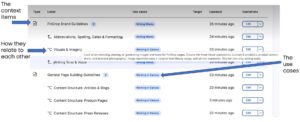
A screenshot showing an interface from the beta release of the Drupal Context Control Center showing the main building blocks
For the CCC to work as intended, inputs need to be machine-readable
With key parts of the CCC defined and the architecture mapped out, we started to consider how well the CCC could handle variations of context data loaded into it. This required us to think more broadly about how AI makes sense of information.
In the excellent book ‘Machine customers: The evolution has begun’ by Katya Forbes, the author outlines many use cases where people enlist AI agents to take care of tasks for them and diagnoses the underlying factors necessary for the AI to satisfactorily work on behalf of the people concerned.
In one such use case she breaks down the stages required for a human to take a purchasing decision compared to a machine.
For a human to decide on a purchase, they go through the following stages:
- Awareness – ‘I have a problem’
- Interest – ‘This might solve it’
- Consideration – ‘Let me evaluate my options cognitively and emotionally’
- Intent – ‘I’m leaning toward this choice’
- Purchase – ‘This feels right’
For a machine to decide, the stages are different:
- Query initialisation – parameters received ready to begin search
- Discovery – options identified that meet basic criteria
- Evaluation – comparing options against weighted parameters
- Verification – validating performance claims and reliability
- Selection – optimal choice identified based on data
From this comparison use case, it is clear that designing contextual data such as guidance documents to be used by AI requires a different approach to designing content to be read by humans. In particular, writing guidance information that relies on sentiment and/or subjective interpretation will be lost on AI and therefore not applied in the ways intended.
In its current form, our Editorial Style Guide is only partially AI-ready
Last year, in the early days with ELM, members of the UX Service tested ELM’s ability to apply the rules of the style guide to check content. They found it had limited success and found that in some cases, ELM applied its own rules to checking the content which couldn’t be traced to the style guide. Reviewing this experiment in light of the machine customer journey, it becomes clear that for an AI like ELM to faithfully and consistently apply style guide rules, the rules need to be written in a way that demands minimal interpretation, in other words, a deterministic way.
Read John Wilson’s blog about experimenting with ELM and the style guide:
Testing ELM’s ability to return useful results with prompts about the Editorial Style Guide
Adopting a ‘machine-first’ lens to the Editorial Style Guide to analyse content in selected sections, it is possible to pull out some of the deterministic (automatable) rules to compare with non-deterministic (requiring judgement) ones.
Analysis revealed deterministic and non-deterministic rules in the Editorial Style Guide
I completed a quick review of three sections of the style guide to assess how AI-ready they were.
Deterministic rules:
- Do not skip heading levels
- Do not use H5 or H6 headings (maximum four levels)
Non-deterministic rules:
- Use word and language your users will be looking for and familiar with
- Write descriptive headings – avoid vague words
Deterministic rules:
- Do not put full stops or spaces between letters of an acronym
- Do not abbreviate Professor to Prof
- Do not use eg, ie or etc
Non-deterministic rules:
- Spell out acronyms multiple times on long pages or pages with accordions
- Well-known acronyms don’t need spelling out
- Use abbreviations only when better known than the full version, or when space is limited
- In the Links section
Deterministic rules:
- Do not use a URL as link text
- Do not use ‘click here’, ‘more information’, ‘learn more’ as link text
- Put links on a new line, not inline in a sentence
Non-deterministic rules:
- Add details about what a link will do (open in a new tab, require a University login) where relevant
- Avoid duplicating links where you can
- Reserve button styling for the most important links
Going through this short exercise with our style guide established that before we can make valid use of AI-powered features like the CCC, there is preparatory groundwork required to some of our content design guidance and rules more AI-readable, and potentially to create a new machine-readable version of the Editorial Style Guide.
I’m looking forward to investigating the potential for the CCC at the University
My work with others in the Drupal community on the CCC has led to a successful release of a beta version, with a release candidate coming soon, planned alongside the regular Drupal AI module release cycle.
Building on our early AI experiments with the style guide, I am keen to lead the UX team to explore the CCC’s potential to handle and apply editorial rules within a Drupal-powered CMS like EdWeb2. Our previous research with web publishers tells us that applying the style guide consistently can be genuinely difficult, and as AI-powered content design tools like the CCC continue to emerge, there is real opportunity to put this to work on the challenges our publishers face.
Read about our previous research with publishers about using the Editorial Style Guide
An analysis of responses to our Editorial Style Guide survey by Hannah Watson
Usability testing the Editorial Style Guide site by me in my previous Content Designer role
Full automation of good content design is unlikely and undesirable but it may be possible to offload some of the more straightforward rules to an AI mechanism like the CCC, freeing publishers to focus their attention on the trickier aspects of content preparation. Taking a machine-assisted view will also provide the chance to revisit existing non-deterministic rules to assess whether some could be made more granular, broken into sub-contexts or context scopes for more precise application.
In line with our broader aim of improving the tools available to content publishers, I am excited to see what the CCC can offer for real-world content design challenges at the University.


Let’s get together and progress this. I’d love to help provide whatever is needed to get this tested. I have been watching this space and would love to see how we can tie this together with our Style Guide to provide more tools for the editors.
Yes please, RC 1 due soon.