

Stop chasing, keep researching: Why continuous contextual learning is the only way to build useful AI features
AI development keeps evolving as do the ways people seek to use AI. Traditional software development runs the risk of trying to perfect AI features people won’t use. Revisiting our previous AI research helped me tease out new opportunity spaces for AI features to help with content design tasks.
Last summer, Mostafa Ebid joined the UX team for a summer internship and built an AI assistant tool which integrated the University’s main AI provider ELM into EdWeb2, our Drupal content management system. The idea for the tool came from hearing University describe the difficulties they experienced when publishing web content. The tool included the capability to write content, design content and proofread, and was designed to work by typing prompts in a chatbot interface, right-aligned to the main part of the editorial interface. When prompted, an orchestration of AI agents were triggered to read textual content and use ELM to make suggestions for improvement based on what the publisher had asked for. Improved text was displayed in the sidebar chatbot interface for the publisher to review and consider using.
Read Mostafa’s blog post about how he developed the tool:
Integrating ELM with EdWeb – Building an AI tool for publishers
Initial tests of the tool with publishers revealed some potential, but identified the need to do further tests, specifically to understand limitations around the user interface display and to learn if the tool was useful to publishers in the context of content they were familiar with (as opposed to generic stock content that was used in the first round of tests).
Read my blog post about the initial tests of the tool:
Initial insights from UX testing our Drupal AI content assistant tool
Mel Batcharj accessibility tested the tool, focusing on keyboard navigability, and Nick Daniels ran tests with two publishers in October last year. I recently reviewed the findings of this research to consider advancements in Drupal AI in the past 12 months, to assess whether the original premise for the tool was still valid, and to think about residual content design challenges AI could potentially help with.
Advancements in Drupal AI have resulted in improved AI features
The Drupal AI Initiative began in April 2025 with a group of participating organisations making a commitment to collaborate to build the future of AI in Drupal. As a result of the initiative, various workstreams began to shape Drupal’s infrastructure to support AI, to experiment with new innovations and to improve the UX.
Read more about this workstream:
Drupal AI Initiative project page on Drupal.org
A more accessible AI chatbot is now available as a Drupal recipe
Our original AI content assistant tool was built into a panel of the editorial interface as a custom build, which worked well when using a mouse, but which accessibility testing showed was restrictive when navigating using a keyboard. Since the tool was built, however, accelerated development in the wider Drupal AI community prompted the creation of an open-source AI chatbot freely available to apply. Adopting this chatbot was preferable as it avoided the need to maintain custom code and it was possible to use it with a keyboard only.
There’s an active Drupal issue to address the need for the AI chatbot interface to be expandable
Several of the participants who took part in Mostafa’s tests of the tool last year found it awkward to scroll through the AI chatbot output as it was presented in the narrow left-aligned interface. The same problem had been noted in the wider Drupal community, and therefore I raised an issue to have this rectified, which is being worked on as part of the AI Initiative task backlog.
We did more tests on our AI tool – this time using participants’ own content
In the first round of tests, four participants were all presented with the same piece of content (on the topic of safety procedures) and asked to use the AI tool to improve it in specific ways (such as writing it for user needs, making link text better, and so on). This approach turned out to be limited, as since participants were unfamiliar with the content, they were unable to assess whether the outputs of the AI tool were an improvement on the original content or not.
In a subsequent round of tests we therefore adopted a looser approach – asking participants to supply a piece of content they were already working on, and then asking them to use the AI tool to improve it to suit their needs. The results from these tests were more indicative of how useful publishers found the tool to make content improvements.
Results of these tests highlighted how the AI tool needed to change
Since we placed participants in a situation where they were using AI on content they knew well and could critique and appraise authentically, the results of these second-round tests gave clearer indications of what worked with the existing tool, what didn’t and where AI could be best applied to help with content design tasks.
Participants didn’t notice the content options in the AI tool, or the help text
The tool contained three different content options: Design Content, Write Content and Proofread, presented in a dropdown menu in its interface.
Initially, participants didn’t notice these options and used the default Write Content option. When they later experimented with the Proofread option they found no discernible difference between these options in terms of outputs, which led them to believe that a simpler version with a single conversational interaction option would be preferable.
The tool defaulted to reading the content on the page, and working on this when prompted. Participants were initially unclear that this is how it worked, and they didn’t notice the help text to enable or disable this mechanism presented in the tool interface. Taken together, this feedback suggested that a simpler version of the AI chatbot, such as the one from the Drupal recipe, would be easier for publishers to use.
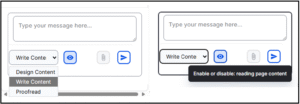
Close-up screenshot showing the content options and the help text on the AI tool
The AI tool had some value as a writing partner to suggest restructures to textual content
Responding to the task to experiment with the AI tool to improve their content, the participants quickly got used to how the tool worked, and recognised its use as a writing partner to prompt about their content and receive suggestions for improvement in a conversational way.
Prompts they used to improve a page of content in the body text field included:
- ‘Rephrase copy to condense, highlight key messages and make it accessible to pet owners looking to join practice’
- ‘Proofread copy so that it appeals to pet owners non clinicians’
- ‘Turn this page into web ready content. It needs to be concise, easy to scan, readable to a wide range of audiences’
These prompts resulted in edited versions of the page content, typically including structural elements like headings, bullet points and calls to action, delivered in the chatbot interface.

Side-by-side screenshots showing the prompt entered in AI tool to improve content for an audience (on the left) and after (on the right), with the output response to the prompt.
The tool lacked capacity to tweak or iterate on previous versions of content – which participants wanted
Once they had reviewed the tool’s initial outputs, both participants entered conversational turns with the tool, asking it to perform successive tasks on the content it had previously produced, to edit it further, in line with their specific requirements and rules.
Prompts they used to tweak initial AI outputs included:
- ‘Remove adjectives and exclamation marks’
- ‘Remove brackets’
- ‘Remove any unnecessary words, fix typing errors, suggest improvements for SEO’
With every new prompt in the conversation, the tool produced a fresh output, meaning the publisher was left to review a succession of different versions of the edited content, presented in the chatbot interface, without any indication of what had been changed. Participants found it difficult to review edits, as they would usually do when working on a piece of content, in order to compare the ‘before’ with the ‘after’ – ultimately to assess whether the AI tool outputs were to their satisfaction.
They said they would have liked the tool to have presented the edits in a ‘tracked changes’ format that they were familiar with from word processing programmes.
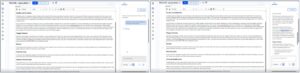
Side-by-side screenshots showing a prompt entered to improve existing content (on the left) and (on the right) the output from this prompt – showing a new version of the content
Participants didn’t really need the tool in the interface as they tended to edit text content elsewhere
When describing their usual content process, participants said they would usually prepare their content in a word processing programme like Microsoft Word rather than edit directly in the Drupal editorial interface. There were several reasons they chose this method – a key reason being the need to involve others to check (and in some cases, sign off) their content in preparation for the website. They were more familiar with referring others to check their content or proofread it when it was in the Microsoft suite, than when it was in the Drupal editorial interface.
Furthermore, Microsoft Word accommodated the addition of comments and tracked iterative changes to pieces of content which was not possible within the Drupal editorial interface. This content preparation habit suggested that while the AI tool was useful to suggest content edits, this would have been more useful before the content was in the interface, and therefore could be achieved by pasting content to be edited into a browser-based AI tool or app (such as ELM).
Within the interface, the tool only had use as a ‘final check’ mechanism, to catch any typos, errors or style misalignments before the content was ultimately published.
The tool needed to be able handle more than text as pages were typically made of multiple elements
Reviewing the test set-up and comparing it to their usual ways of working with EdWeb2, the participants said the pages they worked on would usually be made up of more than just textual content in the body text field. They would typically work on pages with multi-column layouts, making more extensive use of Drupal paragraphs or including structural elements like accordions, feature boxes and cards. They were interested to know how the tool may make appraisals or suggest improvements for those sorts of pages to help them arrange their content in appropriate ways.
We identified new opportunities for AI content publishing features
Extrapolating on the feedback from the tests, several use cases and scenarios for applying AI to content design tasks emerged, which will help inform our ongoing work to apply AI to make content design tasks easier for publishers.
AI-assisted content structuring
Describing their typical content writing workflow, participants said they found it difficult to move from a text-based editor like Microsoft Word into the Drupal editorial interface where they needed to make use of Drupal Paragraphs as well as page elements like accordions to structure the content. Potential areas for AI development could therefore include:
- A mechanism to convert textual content into appropriate structural elements
- A way to make suggestions for accordion labels or structure
- A feature to ensure uniform creation of cards or feature boxes
- A means of cross-checking style consistency of pages made of multiple elements or with a specific layout
AI- assisted content design for SEO/GEO/AEO
Having their content picked up by search engines or being machine read was something participants wanted, but they were unsure how to write, tag and structure their content to make this happen effectively. Potential areas for AI development could therefore include:
- A way to have their content analysed for SEO effectiveness, based on signals like content quality, scannability and key word alignment
- A mechanism to suggest content changes aligned to specifically defined SEO goals and target user engagement measures
AI assisted content reviews – against specific style conventions and contexts
As well as ensuring their content followed the rules of the University’s Editorial Style Guide, both participants mentioned other conventions that they needed to apply to their content, that existed at a more local website level. For example, one participant’s site had a rule not to use brackets or exclamation marks, or to overuse adjectives, so they would have found it helpful to have a way to cross check content against these rules before publishing.
The Drupal Context Control Center is an emerging feature designed to handle the application of context rules within a site across various scopes and use cases, and Drupal AI Content Review is a related feature, designed to appraise content against given context rules and conventions. Together, these Drupal features may be a good fit to help University web publishers make use of AI to shape their content with the uniformity they require.
Read more about the Drupal Context Control Center and its development in my recent blog post:
Read about AI Content Review on Drupal.org
We’re changing the direction of the AI tool based on what we’ve learned
Last summer it seemed certain that an in-interface AI chatbot content assistant helper was what we needed to build. A few improvements to the UI to make it expandable and navigable with a keyboard and it would be ready to go. As it turned out, things had moved on, and these problems were addressed by the wider Drupal community. This meant we could go back to our research findings to re-examine how AI could be best applied to aid content design tasks, and to consider how it could best fit into existing workflows of our publishers to assist them with difficulties they faced. As we continue with internships this summer, we’re excited to re-focus and plan more research to explore some of these emergent opportunity areas. Aligning with in-progress Drupal AI developments, we’re open to learning how we can apply and adopt the work of the Drupal community to our University digital publishing context.

