

AI-friendly entry requirements pages: how we built them and what I discovered in testing
In 2025, we discovered that AI tools like ChatGPT were not able to “read” the entry requirements on our 2026 undergraduate degree finder and often returned incorrect information. Inspired by the University of Dundee, we implemented a solution, which – according to my latest testing – has successfully boosted the accuracy of results.
The project background: the ‘dropdown’ problem
Last year, we began looking into AI usage among our applicants. We wanted to know whether prospective undergraduates and postgraduates were using AI tools like ChatGPT to search for information about our degrees, and if so, what kinds of results they were getting back.
Read about what we discovered in my blog from 2025
I found that, when searching for entry requirements for our 2026-entry degree programmes, AI tools struggled to bring back the correct results. It became obvious that this was because of how entry requirements are presented on the 2026 degree finder: essentially they are hidden behind a dropdown interface that requires the user to make two selections: country and qualification type.
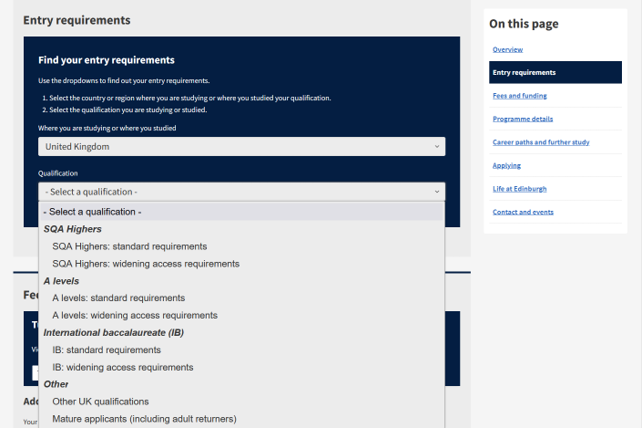
The dropdown tool for entry requirements on the 2026 undergraduate degree finder, showing selectors for country and qualification type.
To AI tools, entry requirements on the 2026 degree finder effectively did not exist.
This was a problem as it meant AI tools either had to pull information from other sites (not all of which are reliable sources) or simply did not return entry requirements.
In the worst examples, the AI tool would hallucinate repeatedly and return with multiple ‘lies’. For example, a query about nursing programmes returned information about:
- a BSc in Mental Health Nursing (we don’t offer this)
- lasting three years (our nursing degree is four years)
- requiring BBB at Higher (the minimum required was ABBB)
We knew this was a problem as, according to our research with applicants, 20% of our undergraduate applicants were using AI to find information about university study.
The question was: how could we fix it?
A GEO solution inspired by the University of Dundee
Around the time that our team was considering solutions for this issue, we learned that another institution, the University of Dundee, had the same problem and they were already working on a solution for it.
Our Technical Lead, Aaron, discussed the fix with Dundee and with the rest of our team, before getting to work on implementation.
The solution required creating a companion page for each degree programme page where we would list every single UK qualification with no dropdown filtering. The relevant degree programme page would contain a link to the corresponding entry requirements page, helping guide AI tools to it.
(I want to note here that we only required the solution for UK qualifications as these were the ones contained within the dropdown; our international entry requirements live on separate pages. Additionally, we would only need this solution for our undergraduate degree finder as our postgraduate entry requirements are not stored behind a dropdown.)
In our degree finder’s content management system, entry requirements are stored as individual blocks for each qualification (for example ‘SQA Highers: standard entry requirements’), which display depending on what the user selects in the dropdown menus. To create these new entry requirements pages, we simply had to display all the qualifications together on one page.
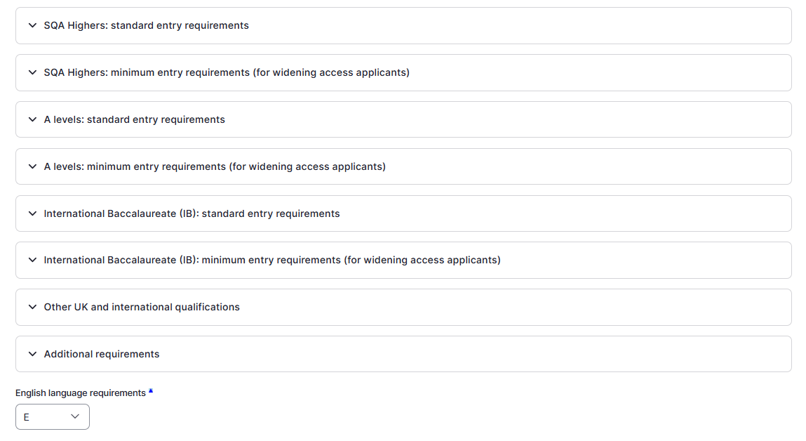
Entry requirements for UK qualifications in the undergraduate degree finder content management system.
This is an automated process. The pages do not have to be created manually and do not even ‘exist’ in the way other pages in our CMS do; instead, they are generated when a user visits the URL. This means the content management overheads are the same as if the pages did not exist.
Content design choices for our human users
While these pages were designed with AI tools in mind, we had to also consider the needs and behaviours of our human users.
It would not be a disaster for humans to end up on these entry requirements pages, but we knew the pages would go against good content practice: they would be very long and repetitive, and contain confusing guidance, for example references to a dropdown selector that did not appear on the page.
Working with our senior content designers, Lauren and Jen, Aaron implemented two content design features that would:
- deter human users from visiting these pages
- guide them back to the degree finder if they did end up on these pages
The first feature was a link out to the entry requirements page, a necessary thing to include for the AI tools that would come crawling our site. To try and prevent human users from clicking this link, we placed it at the bottom of the page, just above the page footer, making it an unlikely location for human users to arrive at.
If users do arrive there they will encounter deliberately uninspiring link text: ‘Source data of all entry requirements for this programme’.
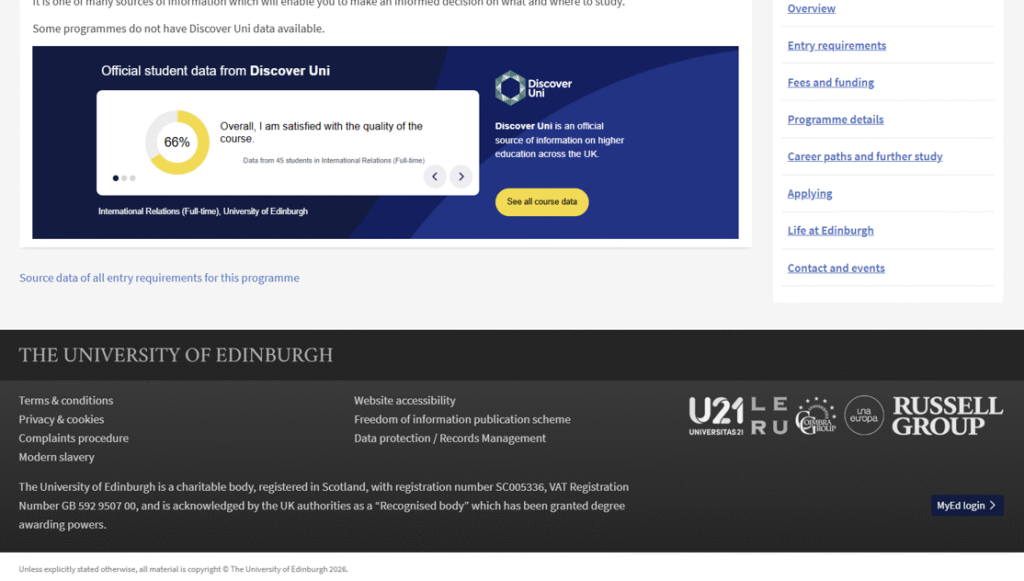
A link to the entry requirements page at the bottom of the degree finder programme page.
The second feature was a box at the top of each entry requirements page, designed specifically to draw the attention of our human users. The text in this box informs them that this page contains a full listing of UK requirements and, if they want to find their specific requirements, to navigate back to the degree finder.
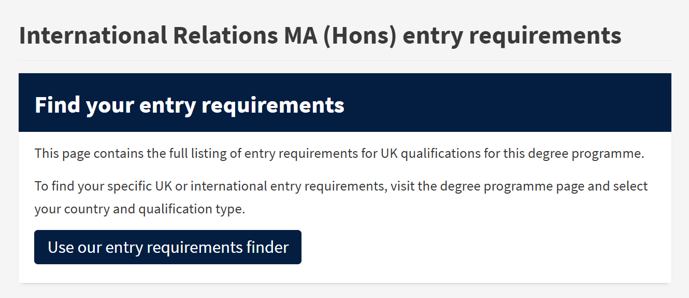
A card at the top of the entry requirements page guiding users back to the degree finder.
Entry requirements pages in search?
One question that came up during this process was whether or not to hide these new entry requirements pages from search engines, using a “noindex” metatag. Ultimately, Aaron decided against this, concerned that this would hide the pages from the AI tools we had specifically designed them for.
In short: these pages do show up in search.
Using GA4 to track users to and from our entry requirements pages
With the knowledge that these pages are findable by human users, I was interested in doing some research to see if people were visiting them and – if so – where they were going next.
In GA4, I was able to see that people were, as expected, visiting these pages and reaching them most often from Google.
When I looked at the two most popular entry requirements pages from the past couple of months, Psychology and Law, I found that around a third of users moved on from these pages directly to the degree finder programme page that is linked to at the top of the page.
Users who did not go to the degree finder clicked guidance links within the entry requirements content, all of which go to helpful pages on our undergraduate study site.
The takeaway? It does not seem to be a problem for us that human users are accessing these pages, as many still end up where they are supposed to be.
Testing AI tools on our entry requirements
The entry requirements fix was implemented in December 2025. To test how successful it was at improving entry requirements information returned by AI tools, I decided to do some testing.
2025 vs 2026 ChatGPT searches
First, I looked back at searches I had carried out in 2025, before the pages went live. Going to my ChatGPT history, I was able to pull 11 searches for entry requirements. I compared the results from these searches to entry requirements on the 2026 degree finder, making a note whenever the required Scottish Higher grades were correct.
I then repeated these searches, using exactly the same wording each time, and again making a note whenever the required grades were correct.
In both cases, I also looked at citations: did ChatGPT cite our pages or others?
- In 2025, 3 out of 11 searches returned the correct required grades; in 2026, 9 out of 11 searches returned the correct required grades.
- Citations remained similar across both years, with 13 citations for the Edinburgh University website.
- Not every successful 2026 search cited the new page.
100 searches on Gemini, Perplexity, Claude and ChatGPT
The next thing I did was select 25 undergraduate programmes and make searches for Scottish Higher requirements across Google Gemini, Perplexity, Claude and ChatGPT. I was interested in how AI tools were performing across the board, when dealing with a higher number of searches.
This time I was looking for a more comprehensive answer: the correct response would have to include correct required grades and required subjects and accurately describe all other conditions.
- Gemini and Claude performed the best, returning correct entry requirements 84% of the time.
- ChatGPT was the next best, with a 76% accuracy rate.
- Perplexity came last, with a 72% accuracy rate.
Overall, this is an accuracy rate of 79%.
As before, I did not see what I expected to with citations: Gemini cited the new pages 72% of the time, but Claude – just as accurate as Gemini – cited them only 20% of the time.
Where I expected to see citations for our site, I saw instead many citations for UCAS, University Compare, Planit Plus and The Uni Guide.
This must come down to the way these AI tools are hardwired to look for authoritative sources. For whatever reason, tools like Claude (and to a lesser extent, Perplexity) do not favour our site, or at least, our new entry requirements pages, when it comes to these searches.
Next steps
To sum up, the new entry requirements pages seem to be working well for us:
- Entry requirements returned by ChatGPT are 3 times more accurate than they were in 2025.
- 79 of 100 searches across four different AI tools returned correct entry requirements.
- Google Gemini, the next most popular AI tool after ChatGPT among our users (according to referrals in GA4) cites our new entry requirements pages 72% of the time.
- Human users who are ending up on the entry requirements pages are still managing to get where we want them to be.
- Content management overheads are minimal due to the pages being automatically generated.
In terms of next steps, Aaron is investigating ideas like markdown format to strip away styling and make pages easier for AI tools to read. I’d like to look closer at how and when AI tools cite our pages and others, and perhaps investigate a few of the websites that are our closest competitors when it comes to citations.
I’d be really interested in hearing from anyone who has expertise around this area – please get in touch if you’d like to share, or to chat more generally about optimising for AI.