

How usability testing helped the Library to improve their website
The User Experience Service worked with colleagues from the Library to assist with their content development work. In this post, we’ll summarise what this collaboration involved and how it helped the Library to improve their site.
Aims for this work
In Autumn 2025, the Library team got in touch with the UX Service to get help with a project to improve their website.
Working with the Library, we established that some user research would help us to know what needed to be improved. Through this research, we wanted to:
- find out if users can complete important tasks using the Library website by locating content
- understand if the Library website is easy for users to navigate
- identify any usability issues with the current Library website, which can then be prioritised and resolved
- understand users’ perceptions of the Library website and its purpose
- understand what role the Library website plays in users’ information-seeking behaviour
We agreed that running a short series of usability tests would help to identify where the existing site design was working well and where it could be improved. The testing would also provide an opportunity for staff to talk to students and learn about both their impressions of the site, and the role it plays in helping students to answer queries about library-related topics.
How a usability test works
In a usability test, you ask people to complete tasks on your site while you sit on the sidelines and watch. Participants are asked to share their thought process as they navigate through the site. Sometimes you find that participants can complete the tasks easily and without too much fuss. With other tasks you notice that participants encounter obstacles and have difficulty getting to an answer.
By testing like this with a small number of people, you get an indication of where users might be struggling with your site. This then helps you to identify which elements of your site design you might want to change.
We created tasks for test participants
In this work, the Library wanted to focus on the experience of students using their site. We started by making a list of the tasks that students need to complete. These included tasks like:
- check if a book is overdue
- request a book for an assignment I need to write
- find the opening times for the Main Library
We then worked with the Library team to develop these tasks into scenarios that we could include in a usability test.
Developed into a scenario, the tasks looked like this:
- You need to find a study room in the Main Library for four people to work on a presentation at the weekend. Where would you go to find out if a suitable study room is available at the Main Library?
- There’s a book chapter you need to read for an assignment, but there’s no e-book available, and the only print copy is at the University Collections Facility. One of your friends says that the Library can provide a scan of a book chapter, but you’re not sure how to request one. How would you find out how to request a scan?
With the test script finalised, the Library recruited six student interns working within Information Services to take part in the testing.
Running the tests
The UX team ran a pilot test session with the Library to try out the script and to demonstrate what’s involved with running a usability test. For the rest of the testing, Library staff ran the tests. This upskilled their team in this method of user research, which supports any future testing that they want to carry out on their site.
When running a usability test, Library staff needed to:
- read through the script
- make participants feel at ease
- ask questions where appropriate
- make notes of any usability problems that occurred
It was also important to hold back from helping participants to complete a task. In usability tests, we often find that we learn the most when a task doesn’t go smoothly. So although it can be difficult to watch, it’s useful to see where people get tripped up and work out what might be causing the problem.
The tests took place over Microsoft Teams, with members of the UX team sitting in on the call to make observations of any common themes.
What we found out
When the testing was complete, we all met up to compare notes.
Some of our observations included the following:
- The horizontal navigation menu was an important way for participants to get to the content they wanted. Getting the language right in this section was therefore critical to participants being able to find key content.
- The meaning of some section names such as ‘Academic Support Librarian’ were not sufficiently clear to participants, and this proved to be an obstacle in some tasks.
- Information about laptop loans was difficult to find, with some participants looking for answers in the wrong part of the site.
As a result of the testing, the Library made changes to their site design. These included changes to the menu.
In the tests, the menu looked like this:

The Library menu as it looked during the testing.
After the testing, the Library renamed the ‘Academic Support Librarians’ section to ‘Study Support’. This also addressed an issue where participants were looking in the Research Support section for a task that really called for study support.
In addition to this, the order of the menu items was changed to better align them with the order of cards on the homepage.
The new menu looks like this:

The Library menu following changes made after the testing.
Finding out about how to borrow a laptop was identified as a challenging task to complete. As a result, the Library created a new ‘Laptop loans’ link in the menu to make this service easier to find:
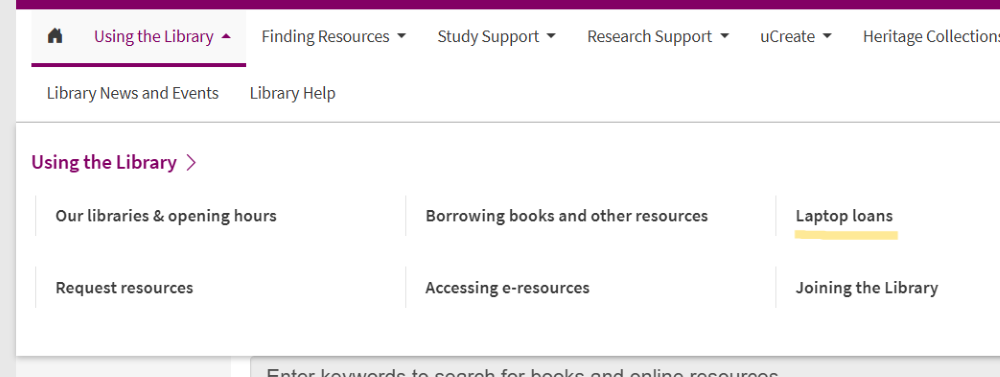
The Library menu now has a link to information about laptop loans.
The Library have also noted several other areas of the site that they plan to address at a future date. In particular, the testing uncovered a need to clarify the relationship between location information used in DiscoverEd and corresponding information on the website.
Looking back on the work
We were delighted to hear that the Library team benefited from this collaboration.
Working with your team was such a positive and useful experience. I really appreciated that you were able to steer us through the whole process from writing the scenarios, to doing a test run and providing independent feedback from observing the testing. Not only has it made us look at our web content with new eyes, but we now have a group of experienced UX testers.
– Angela Laurins, Library Learning Services Manager.
The Library is a high-profile site at the University and it was a privilege to help them review their content. We enjoyed collaborating with the team and it was interesting to learn about how students are interacting with EdWeb 2.
Find out more about usability testing
If you would like to learn more about how usability testing can help to inform decisions about your site, get in touch.

