

Finding efficiencies through process diagnosis: Refining the Effective Digital Content coursework marking and feedback protocol
As we approach the first anniversary of the launch of the new Effective Digital Content course it was timely to review our approach to marking the content design exercises completed by learners to look for ways to simplify and potentially automate aspects of the process.
In May 2025 the UX Service launched a new version of the Effective Digital Content (EDC) course. The course covers content design fundamentals relevant to digital publishing at the University. To ensure we continue to improve the quality content across our digital estate, all those who publish content for our institution are required to complete the course.
Read more about the Effective Digital Content course, its contents and its development in the blog post from the UX team:
The new Effective Digital Content course is now live
Completing exercises within a workbook is a key part of the EDC learning experience
Content design is a practical discipline that is best learned by doing, therefore, when we redesigned the EDC course, it was important to include an interactive element that ensured learners gained practice trying out key techniques as part of the learning experience.
This practical element manifests as a workbook – as learners work though the different modules of the EDC course, they complete related exercises in a workbook. When they have finished all six EDC modules, they submit their workbook with their completed exercises to the UX team. We mark their exercises, return feedback on their work in the form of comments within the submitted workbook and then issue them with accreditation in the form of a digital badge.
The UX team devised a workflow to manage marking workbooks and providing feedback
The workbook submission, assessment and feedback process represented a new way of training publishers in content design, and back in May 2025, Nick Daniels, Katie Spearman and Mel Batcharj from the UX team came up with a series of steps to ensure they could access the submitted workbooks and mark them, to provider the learners with feedback on their work:
- Receive the submitted workbooks from the EDC course to a Microsoft OneDrive via a Microsoft Form
- Allocate them to be marked by members of the UX team using a Microsoft Excel spreadsheet
- Once marking is complete, the marker returns the workbook with feedback to the learner via email
A year after launch, we observed some kinks in the process
With a steady influx of workbooks from learners, the process worked well, with Nick, Katie and Mel splitting the marking and feedback provision between them. That said, when there were spikes of increased numbers of learners completing the course, prompted for example by reminders to complete it to gain web editing access, the process revealed itself to have some areas of inefficiency. Working as a team, we took some time to map out the existing process in granular detail to pinpoint some areas for improvement, detailed below.
Keeping track of submissions involved manual additions to a spreadsheet
An Excel spreadsheet was set up to keep a record of all the workbook submissions along with their marking history. This spreadsheet was in a different location to the OneDrive where the workbooks were received, however, therefore it was necessary to copy and paste the names and details of learners into the spreadsheet each time a submission was received, to keep it up-to-date. On occasion, this had meant that the Excel spreadsheet and the OneDrive were out of synch – with workbooks to be marked in the OneDrive that hadn’t yet been logged on the spreadsheet.
Notification of submissions came via individual emails and were easy to miss
When a learner submitted a workbook having completed the EDC course, a notification was sent to Nick, Katie and Mel’s email accounts from a Microsoft Forms account email address. These emails could sometimes be overlooked as they existed alongside other emails in individual inboxes, meaning the step to log the submissions in the Excel spreadsheet was delayed.
Returning marked workbooks from individual email accounts made it tricky to keep track
When marking of a workbook was complete, the marker (either Nick, Katie or Mel) composed an email to the learner with the marked workbook as an attachment. In some cases, learners replied directly to Nick, Katie or Mel either with comments in response to their workbook or with feedback on the EDC course or process. As a team, it was helpful to keep track of these interactions with learners as they were a valuable source of feedback, but this was difficult to achieve in a streamlined way since the responses were held in individual email accounts.
There wasn’t an easy way for the team to share marking and feedback approaches
As they marked more and more workbooks, Nick, Katie and Mel developed more and more efficient ways of handling workbook marking and feedback issuing. They shared best practices through meetings and calls but it was clunky to keep track of the tips and techniques they had found since the marked workbooks were passing through individual email accounts.
Issuing digital badges required learners’ UUNs which needed to be manually extracted
Once the marking was complete and the feedback issued, the final step was to issue an EDC digital badge to the learner. This process was managed by the UX team using the learner’s email address to assign the badge. If the learner had submitted the workbook using their alias email address, there was an additional step for the marker to find their UUN email address in order to award them their badge.
We identified ways we wanted to automate and streamline the process
Since the end-to-end process was handled entirely by Microsoft products, using learner data available in the same system, we felt that it should be possible to streamline and automate certain aspects of it. We mapped out a wish-list of areas to improve, largely focused on alleviating active effort required from the team, and on automating aspects of the process that were prone to human error associated with the manual data handling. These were as follows:
- Workbook submissions automatically dropping into a central location to be marked without the need to log them in a separate spreadsheet
- Correspondence regarding workbook submissions (including notifications, sending out marked workbooks and emailed feedback responses) centrally handled through a single, universally accessed account
- Learner data associated with workbook submissions automatically formatted to facilitate returning marks and feedback and issuing digital badges
With help from the SharePoint Solutions team, we were able to make improvements
Several of the UX team had researched the potential of Microsoft’s Power Automate to achieve the identified changes but we had little experience of using this service. We reached out to the SharePoint Solutions team and Richard Sharp, SharePoint Solutions Specialist helped us build a Power Automate flow handling data through a SharePoint site and a central EDC Online Course email account to achieve the automations we had requested, helping us optimise the process.
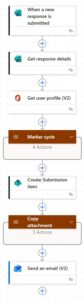
The Power Automate flow beginning with when a workbook is received, through to marker allocation and return of the marked workbook with feedback to the learner by email
AI culture prompts us to embrace automation but it starts with reviewing processes
In an age where every day brings a new AI-powered innovation, there’s an inherent urge and temptation to seize opportunities to apply AI to our processes and procedures to free up human time and avoid human error. Identifying such opportunities must start with looking at the processes and procedures in granular detail, however.
In this case, AI intervention wasn’t an appropriate solution to the inefficiency problem, but as it turned out, going through the groundwork mapping out the process was still helpful to spark thinking about another automation mechanism to save our team time and effort.
Going through the EDC marking and feedback process diagnosis made me reflect on the broader value of applying AI thinking as a mindset shift to bring in new ways of thinking to old problems, to effect change making best use of the tools available to us.

