

Comments: Reimagining the degree finder to enable easier collaboration
Over the last year, we launched our revamped undergraduate and postgraduate degree finders, complete with a host of new, user-friendly features in the content management system (CMS) for editors and administrators to utilise in the backend. One of these features is a built-in comments function, which allows users to interact with one another by leaving comments on text content blocks. The feature was widely used during the annual update cycle for the 2026 postgraduate degree finder, and we’ve seen it enhance teamwork and efficiency within the context of the degree finder.
What is the comments feature?
Editors in the CMS can make a comment on almost any piece of text by highlighting the relevant text and clicking on a speech bubble icon. Once saved, these comments can be edited, replied to, resolved or deleted, and remain hidden from the degree finder’s frontend. As comments are visible to all users in the CMS, this feature is ideal for communicating within and across teams, namely by asking questions, seeking clarification, or notifying others of changes or updates.
One of the many benefits of the feature is that it is very intuitive. Most digital media platforms now have a commenting feature in some form, so users can navigate the feature with ease and confidence.
Additionally, editors can tag users by typing their UUN with the “@” symbol. This triggers an email notification to the tagged user’s Outlook inbox once the programme is saved. This helps direct questions to specific individuals or draw someone’s attention to particular text. From an edition’s list view of programmes in the CMS, users can also see which programmes contain unresolved comments, find the comment in the ‘edit’ mode of a programme by scanning for yellow-highlighted text, and even resolve the comment once it has been appropriately addressed. Resolved comments are stored in a comments archive, so that users can easily refer to any discussions or decisions at a later date.
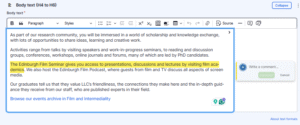
Screenshot showing highlighted text, button to add a comment (speech bubble with + icon), and the comment popup that appears once you click the comment button.
Read our SharePoint guidance on how to use the comments feature (staff login required)
How we used the comments feature for the 2026 postgraduate degree finder
When setting up the new degree finders, our team was tasked with transferring the previous year’s content into the new system and new programme templates. As our updated degree finder template is considerably different, with additional sections and mandatory fields, the comments feature was especially helpful for notifying editors of changes during the translation stage and explaining why they were made.
For example, our new template includes optional ‘Teaching’ and ‘Assessment’ sections to organise information ‘in the right place’, so that prospective students can easily find what they are looking for. Previously, this information may have been buried under the ‘Programme Description’, which contained course information, learning outcomes, and other details. As our team transferred the previous year’s content, we could match information to the right sections and add comments so that editors knew the text had moved and wasn’t missing.
Learn more about the new programme templates
How school editors have used the comments feature
During the annual update cycle for the 2026 postgraduate degree finder, editors primarily used the comments feature to raise editorial, content and administrative questions to our team, fellow editors, and subject matter experts.
The comments feature also helped editors leave notes for future reference, such as reminders to cross-check information or revisit sections. This further served as a safety measure to catch unresolved issues before publication, as any outstanding comments during the ‘PSW review’ stage prompted us to query editors appropriately.
For the 2027 undergraduate degree finder, comments mainly signposted changes and communicated updates. Given our extensive portfolio of joint programmes, editors from each school need to know when reviews are ready or completed, and when everybody has reached a consensus on the degree finder copy. The comments feature greatly helped with this, ensuring colleagues were on the same page and could move their programmes up the workflow with ease.
How the comments feature has changed how we approach the postgraduate degree finder annual update cycle
With the launch of our new degree finder, we’ve also significantly changed how we approach the annual update cycle for postgraduate programmes. Previously on the old legacy system, editors had to submit individual edit requests for their programmes, which our team then reviewed and rejected or approved with necessary revisions. Editors couldn’t modify their submissions or provide additional context, and we couldn’t ask follow-up questions without opening a new channel of communication via email or Teams chat. This was time-consuming and could get challenging when managing updates for about 500 programmes, often with multiple edit requests per programme.
Being able to localise our discussion and feedback directly on the CMS has increased transparency on how and why we approve or amend requested edits; we can provide context and start a conversation with editors. The comments feature has ultimately streamlined communication within and across teams involved with the degree finder, speeding up the review process by facilitating collaboration among school editors and subject matter experts (SME). These positive outcomes contribute to and illustrate our wider reimagining of the annual update process becoming a more collaborative effort.
Upcoming blogs
Stay tuned to discover more about our new degree finder CMS features through upcoming blogs, and feel free to share which features you’d like us to cover in the comments section!