

Learning about the needs of deaf and hard of hearing students
In September, Nick and Mel from the UX team attended Assistive Technology Day, a training event organised by the Scottish Sensory Centre. Sessions focused on how technology can support deaf and hard of hearing students, with talks from educational audiologists and the JISC accessibility team.
Part of our role in the UX Service is to provide guidance on how to create accessible content. In our online training course Effective Digital Content, for example, we outline how publishers can make University websites better for users of screen readers (text-to-speech software) by adding alt text to images and by following best practice on how we write headings and links.
We’re always keen to learn more about assistive technologies and the role they play in making people’s lives easier. By attending this event, we learned about the needs of deaf and hard of hearing students and we got a better understanding of the technologies that these students use. It was an interesting series of sessions. In this post, we’ve written about what we learned and what got from the day.
This event was organised by the Scottish Sensory Centre at Moray House School of Education and Sport.
Nick’s reflections
We learned about hearing aids and induction loops
In the first sessions, Brian Shannan and Joe O’Donnell talked about various types of hearing loss and explained how hearing aids work. They also discussed how induction loops interact with hearing aids. I found this part of the day interesting, and it provided useful context for the rest of the day. Brian and Joe emphasised the importance of always using a microphone when presenting, which is useful for us to remember in our in-person training sessions. They reported that colleagues in the Staff Disability Network have said that it can be annoying to have to declare a hearing loss when attending an event. This can easily be avoided if more presenters at events wear a microphone by default.
We discussed British Sign Language in digital communications
In later sessions, we learned about British Sign Language (BSL) and how digital technology can support BSL users. Presenters from the JISC accessibility team talked about how auto-generated BSL videos are being used at train stations for information display boards, and there was discussion about how effective this could be in other contexts. I learned about how BSL works and how it provides richer information than you get from text such as video captions. I had some basic knowledge about this but came away from these talks with much better understanding of why we need to consider BSL when we’re thinking about digital communications.
The day also piqued my interest in how we cater for BSL on the web. Since I attended this event, I’ve been noticing articles in my feeds about this topic:
Designing accessible services for BSL users: key principles (Neil Phillips, Kainos Design)
Find British Sign Language content (NHS Digital)
This report gives some interesting background to BSL use in the UK, and includes demonstrations of how BSL has been incorporated into content from the Department of Work and Pensions:
The British Sign Language (BSL) report 2022 (GOV.UK)
I also recently saw this post from our colleague Stephen Dishon in the Learning Spaces Technology team, which covers some of the developments that are happening with induction loops.
Hearing Assistance Systems (Learning Spaces Technology)
What I got from the event
I was glad I attended this event, not just because of the knowledge gained, but because it made me think more about the needs of people who are deaf and hard of hearing. It was also an opportunity to meet colleagues with an interest in accessibility and assistive technology and this has broadened my network in this area. I came away from the day with a better understanding of how deaf and hard of hearing students use technology to support their learning and how the provision of BSL on the web benefits users.
Mel’s reflections
We saw how hearing aids work in real environments
One of the most interesting parts of the day for me was the hands-on demonstration of hearing aids in different physical environments. Seeing how directional microphones respond to various room layouts and sound sources made it easier to understand how deaf and hard of hearing students experience lectures, classrooms and events. A short video also helped illustrate how hearing aids perform in challenging spaces, bringing these experiences to life.
Hearing Aid FM Simulation video
We also had the opportunity to try the Roger On hearing aid system ourselves. Being able to experience how users can discreetly control what they hear (for example, by focusing on a specific speaker or reducing background noise) gave me a new appreciation for how sophisticated and empowering this technology can be, particularly in group teaching settings.
We discussed how inclusive practices benefit everyone
A strong message that stayed with me throughout the day was the importance of inclusive practices that improve the experience for everyone, not just those with identified access needs. Simple actions such as using microphones consistently or enabling captions in large rooms can make a noticeable difference to communication and engagement. While technology plays an important role, the sessions reinforced how much depends on the environments we create and the everyday choices people make.
This strongly resonated with our UX work, where we promote accessible digital best practice as a shared responsibility and regularly emphasise how these approaches benefit everyone. Although the examples discussed focused on physical spaces rather than digital content, the underlying principle felt very familiar. Accessibility improvements are not niche fixes, they support clearer communication and better understanding for all.
At a later conference, I spotted a poster promoting the consistent use of microphones, titled: ‘Have your voice heard: Using the microphone makes a difference’. This was something that had been highlighted during this session as a simple but effective accessibility practice. The poster focused on how using a microphone ensures lecture recordings are usable, helping to provide an alternative format for students and improve the overall accessibility of a lecture. It was encouraging to see this practical advice being shared in these spaces, showing how small, thoughtful changes can make a real difference for learners.
Accessibility and lecture recording information
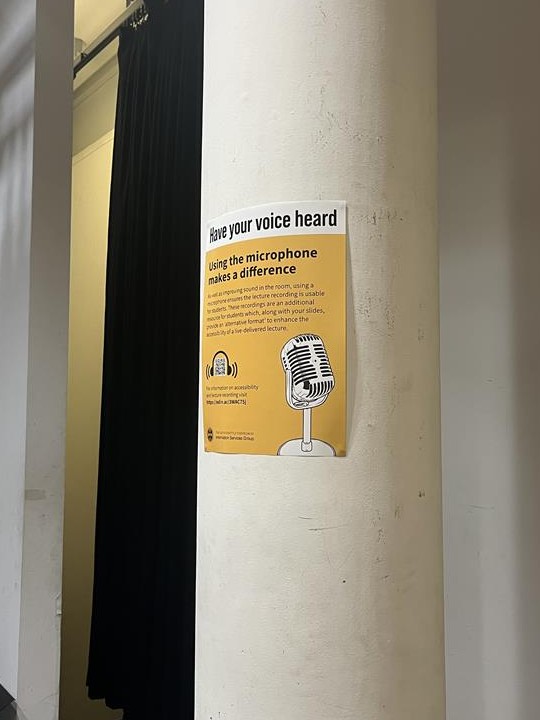
Have your voice heard: Using the microphone makes a difference poster
We considered the relationship between AI and assistive technology
We also took part in a brainstorming activity focused on AI and accessibility, which encouraged us to think about both its potential benefits and its limitations. Examples such as AI-supported note-taking and automated captions highlighted how AI can increase independence and agency for students. What I found particularly interesting was reflecting on how many accessibility tools already rely on AI, and how this complicates wider conversations about regulation and acceptable use as AI becomes more prevalent in other areas.
What I got from the event
I valued the chance to connect with others working in accessibility, particularly through the JISC community. Although our focus areas differ, there was a clear sense of shared purpose in making learning environments more inclusive for everyone.

