

Reflecting on a Drupal 7 to Drupal 10 Migration
Project Overview
In 2023, I started work on migrating three Drupal 7 websites over to Drupal 10. All three sites used a custom sub-theme based on Bootstrap 3. Each site had its own purpose, but they needed to look and feel similar. The main reason for the migration was that Drupal 7 was reaching its end-of-life.
For one of the sites, there was an extra concern because it contained potentially sensitive data, and we did not want to risk any security problems by keeping it on old software.
My main goal was to keep the websites familiar for users, but I also wanted to add some improvements for editors and administrators to make their work easier.
Major Challenges
Inherited Complexity
I did not build these sites myself, so I spent a lot of time trying to understand how they worked. There were many outdated modules, confusing settings, and very little documentation. Just understanding the existing setup was a big task.
Originally a bespoke CMS created by an external agency, the first of these websites was created in Drupal 7 almost eight years ago in collaboration with our sorely missed DLAM colleague Richard Lawson.

A Drupal 7 admin page with outdated modules highlighted
Module Compatibility
Many modules used in Drupal 7 do not exist for Drupal 10. I had to look for alternatives or decide if some features were still needed.
Theme and Template Overhaul
We wanted the sites to look the same as before, but Drupal 10 uses a different theming system. I could reuse most of the CSS, but I had to rewrite every template from the beginning.
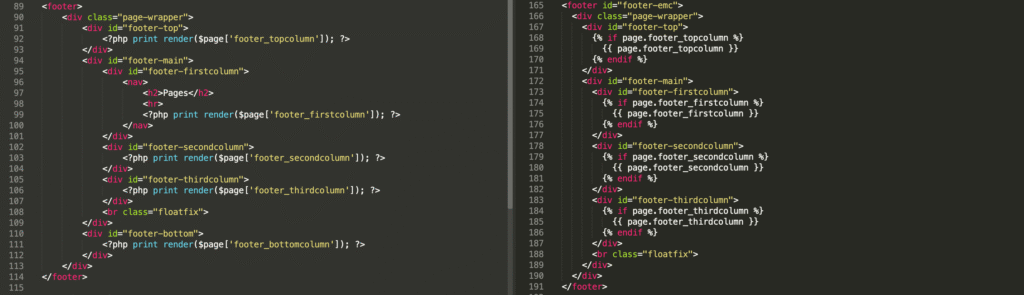
A side-by-side snippet of a Drupal 7 PHP template and a Drupal 10 Twig template
Data Migration
Moving the content was not as simple as exporting and importing. I needed to understand the data structure before I could automate anything. Because of time limits, I had to choose which parts to automate and which to do manually.
What Worked (and What Didn’t)
Starting Clean and Small
I started by moving the CSS and rewriting templates for just one simple content type (like Basic Page). This helped me learn how sub-themes and templates work in Drupal 10 without feeling overwhelmed.
Content Type Isolation
Working on one content type at a time made it easier to see which modules were needed and how the site was organised. Once I finished the basics, it was easier to rebuild the homepage, navigation, and mobile support. This also helped me understand what I could finish within the time I had.
Dropping Non-Essential Features
Some features were not worth keeping. For example, there was a homepage slider with moving images, but it used a third-party JavaScript library that was not available as a Drupal module. Adding it would have taken too much time, so we decided not to include it.
Manual Data Migration
Most of the content was just text, and there was not a large amount. Since I did not have time to fully understand the data structure, I moved the content manually. This was actually faster than writing a migration script.
Quality of Life Improvements
- Controlled Text Formats: I restricted the text formats so editors could not use Full HTML. This made the site safer and less likely to break.
- Paragraphs Module: I added the Paragraphs module, which lets editors manage accordion sections themselves. Before, they had to edit raw HTML, which was not easy. Now, it is much simpler for them.
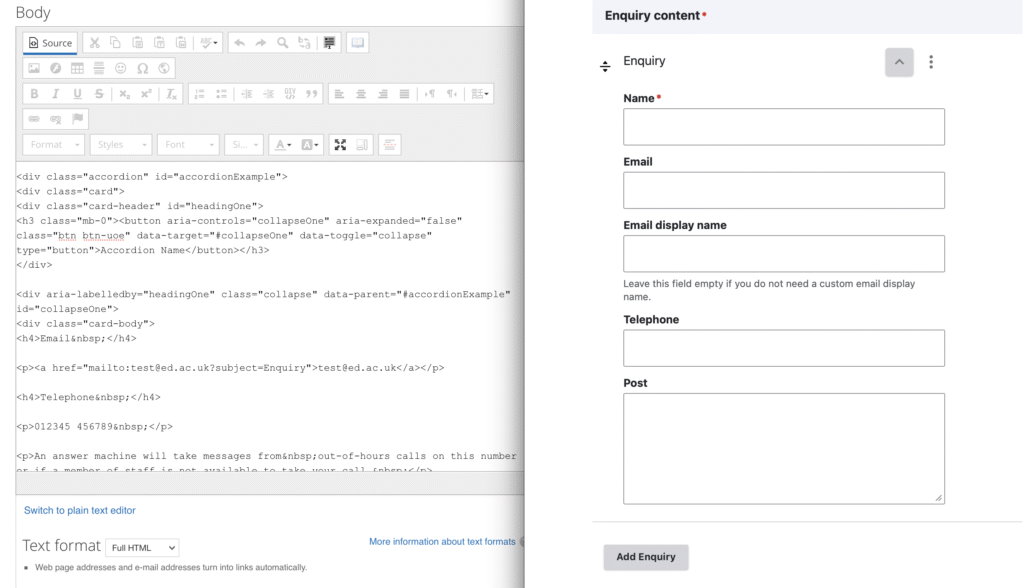
A before-and-after screenshot of the editor interface
Advice for Others
- Break the work into small tasks: Focus on one content type or feature at a time.
- Consider Modern Themes: If you do not need to keep the old look, try some of the modern Drupal 10 themes. They can save time.
- Prioritise features: Not everything needs to be migrated. Focus on what is important, and do not be afraid to remove features that are too difficult to keep.
- Think about editorial experience: Small improvements, like better text formats or the Paragraphs module, can make a big difference for your content team.
- Identify potential opportunities: We timed our launches to best coincide with our annual website accessibility audits. This avoided any redundant D7 testing and ensured our new D10 sites had up-to-date compliance.
Final Thoughts
Migrating from Drupal 7 to Drupal 10 is a big job, especially if you are working with sites that have little documentation. But if you take it step by step, stay flexible, and focus on both security and usability, you can create a site that is easier to maintain and better for users.
Image credits
Featured image by Moondance from Pixabay

Share



N.B. Closing date now extended to 23:59 on Wednesday, 4th of March.
Thanks Stewart for your encouragement!
Thank you Miki. I very much enjoyed reading this with my morning coffee. It was lovely to have such a…
Hi Otis
What an insightful blog post, I've learnt a lot