Maybe ELM Can Help Me Innovate
Over the years, I have tried more productivity systems than I can count. Todoist, Notion, NotePlan, markdown files, plain text files, and plenty of others. I tried free versions, paid versions, systems I was curious about, systems I wanted to love, and systems I convinced myself might work if I just used them properly. I watched countless YouTube videos to see how other people were using these tools, hoping I might find the missing piece. I tried frameworks like PARA method to organise my thoughts, my projects, and my work.
Some of these tools were useful. Some were beautifully designed. Some offered far more than I actually needed. But I kept coming back to the same thought: none of them quite worked the way I wanted them to.
What I wanted was not a system scattered across different places, but one that worked with the way my mind actually moves. I did not want something that treated random thoughts, half-formed ideas, and the tendency to forget things five seconds later as problems to be fixed. I wanted something that could work with that, not against it.
That is not really a criticism of those tools. Most of them are designed for broad use. They need to work reasonably well for lots of different people and lots of different workflows. But I have always had a fairly specific picture in my head of the kind of tool I wanted for myself: something that fits how I think, how I capture work, and how I want information to move through a system.
For a long time, that idea stayed in the category of maybe one day. Not because I did not know what I wanted, but because building a custom tool for yourself used to take far more time, energy, and consistency than most of us realistically have. Even if you had some technical background, there was still a big gap between having an idea and turning it into something you could actually use. That gap feels much smaller now.
One of the things I find most interesting about LLMs is not just that they can help us write faster or summarise faster. It is that they can help us build. They make it easier to move from “I wish this existed” to “I have a rough version of it working”. That is what I have been doing with a small app I have been building for myself called Scribble.
Scribble is not an attempt to build the perfect productivity app for everyone. It is a personal tool, shaped around my own workflow and the kinds of things I actually need to keep track of. Ideas. Projects. Tasks. Logs. Discussion points. Reports. The point was never to create a giant all-in-one platform with every possible feature. The point was to build something that reduced friction in the places where friction actually shows up for me. That is what makes this feel like innovation to me.
Not innovation in the startup pitch sense. But innovation in a much more practical and personal sense: noticing a recurring point of friction in your own work and using new tools to build something that fits better. At the moment, my workflow with Scribble is fairly simple. I can add work updates (I call them logs) through the command line. They are often written quickly. They may include half-finished thoughts, a note from a meeting, a reminder to follow up with someone, something I am waiting on, or a task that has become obvious in the middle of writing. Normally, those details end up scattered across notes, emails, chat messages, to-do lists, or memory.
But the best part? This is the only thing I do manually. Everything else is automated with an ELM API key. I use a log-processing prompt to turn one work log entry into structured actions. A single log can be linked to a project, turned into a concise log, split into new tasks, converted into discussion points for particular people, used to mark other tasks as completed, or even used to shift a project into a different state such as active, waiting, or maintenance.
For example, I might quickly log something like: Completed the final storyline for the ELM mystery room and updated the main prompt. Need to test the prompt across multiple use cases and think about the best way to share the resources. Also need to check with my manager whether the storyline looks right before moving ahead, so this can wait until I hear back.
On its own, that is just a rough work note. But in Scribble, that same note can be translated into several structured updates at once: it can recognise completed work, create the next tasks, capture a discussion point, and move the project from active to waiting with a clear note about what it is waiting for. That is the part I find most useful. I am not manually maintaining a perfect system in the background. I am capturing the work as it happens, and the structure follows from that.
The prompt is not doing something magical. It is doing something practical. It is taking messy, natural language input and helping translate it into useful structure.
If I write that I reviewed feedback on a training, that can become a task to revise content. If I note that I am waiting to hear back from someone, that can update the project status and add a waiting note. If I mention something I need to raise with a colleague or manager, that can become a discussion point linked to the relevant person and project. If I complete something, that can be reflected too. So instead of having to manually process every thought into the correct container, I can focus on capturing the work as it happens and letting the system help shape it. That is the workflow I had been wanting for a long time.
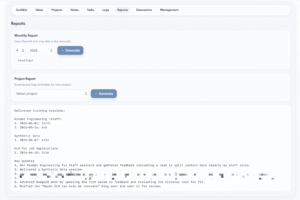
Scribble now has separate spaces for ideas, projects, notes, tasks, logs, reports, discussions, and management. Projects are grouped into categories like active, waiting, and maintenance, so I can quickly see not just what I am working on, but where everything actually stands. The tasks page helps me keep track of what needs doing by project. The logs page gives me a dated record of work as it happens. The discussions page is really useful for meetings and follow-ups, because it keeps track of points by person and by project. And then there is the reports page, which is honestly one of my favourite parts. Getting a monthly report at the click of a button? Yes please. It even drafts the email for me and adds it straight to my email account. No more trying to remember what I did last month, digging through emails for updates, or piecing things together afterwards. Just a simple click (See the image below).
Final Thoughts
A lot of the conversation around tools like this focuses on getting answers faster, writing faster, or automating familiar tasks. That is useful, of course. But I think there is something equally interesting in the way they make personal tool-building much more achievable.
A few years ago, a tool like Scribble would probably have stayed on my long list of maybe one day ideas. Now it is something I use in my day-to-day work, and the first usable version only took a couple of days to build. It started with just one feature: storing logs. And gradually grew into something much more useful. Even now, I still have plenty of ideas for where it could go next: better management of resources and links, automatically drafting emails based on new ideas so I can share or discuss them with the right person, and the feature I am probably most excited about — voice input.
That shift, from maybe one day to something I actually use, is what feels important to me. It is not that LLMs magically build perfect tools. It is that they make it much easier to test ideas, build rough versions, and shape something around real needs.
Of course, none of this removes the need for judgement or effort. These tools do not replace the thinking. You still need to know what problem you are trying to solve. You still need to decide what matters, what is worth keeping, and what is just adding more clutter. You still need to recognise when something feels clunky, overcomplicated, or aimed at the wrong problem. But what they do offer is a much lower barrier between an idea and a working experiment, and I think that is powerful.
That is really what this post comes down to for me. Maybe ELM can help me innovate not because it gives me perfect outputs, but because it makes this kind of experimentation far more possible. It helps me build rough versions of ideas that have been sitting in my head for years. It helps me create tools that are not designed for everyone, but are designed around real needs.
Scribble is still very much a work in progress, and that is part of what I like about it. It will probably keep changing as I keep using it. Some parts will become more useful, some will need rethinking, and some features may disappear entirely. But it is not a fixed product I am trying to force myself into. It is something I can keep shaping around my needs as those needs become clearer.
Sometimes innovation is not about building something huge. Sometimes it is simply about noticing a recurring point of friction in your own life and realising that, now, you might actually be able to build something better.
For me, Scribble is one of those things.
Maybe ELM can help me innovate by helping me turn a long-standing idea into something I can actually use. And honestly, that already feels quite powerful.