

Any views expressed within media held on this service are those of the contributors, should not be taken as approved or endorsed by the University, and do not necessarily reflect the views of the University in respect of any particular issue.

Learn

Learn

Information about updates to the University virtual learning environment.

May 2026 Release Overview

Reading Time: 2 minutes

This post provides a summary of the upcoming changes including those features which we have highlighted due to their impact. This release is subject to change and we will do our best to keep the information up to date before the release to live on the evening of Thursday the 7th of May 2026. For more in depth technical detail additional details are available on the release page.

The second due date for Discussions now appears in the Gradebook’s Overview and Gradable Items pages, allowing instructors to be more aware of and responsive to student discussions needing grading. This improvement reduces instructor confusion around deadlines for student engagement.

For instructors, the second discussion due date now appears in the following pages in Gradebook:

  • Overview
  • Gradable Items

Under Due Date on the Discussion item on each Gradebook page, the item’s second, final due date is displayed. Next to that date is a circle icon with a lower case i inside. Hover over or tab to this icon, and a pop-up bubble displays details of both due dates. For example: This discussion has 2 due dates: Due date 1: 5/1/26, 12:00 PM Due date 2: 5/8/26, 12:00 PM

Image 1: The second discussion due date now appears on the Overview and Gradable Items pages in Gradebook.
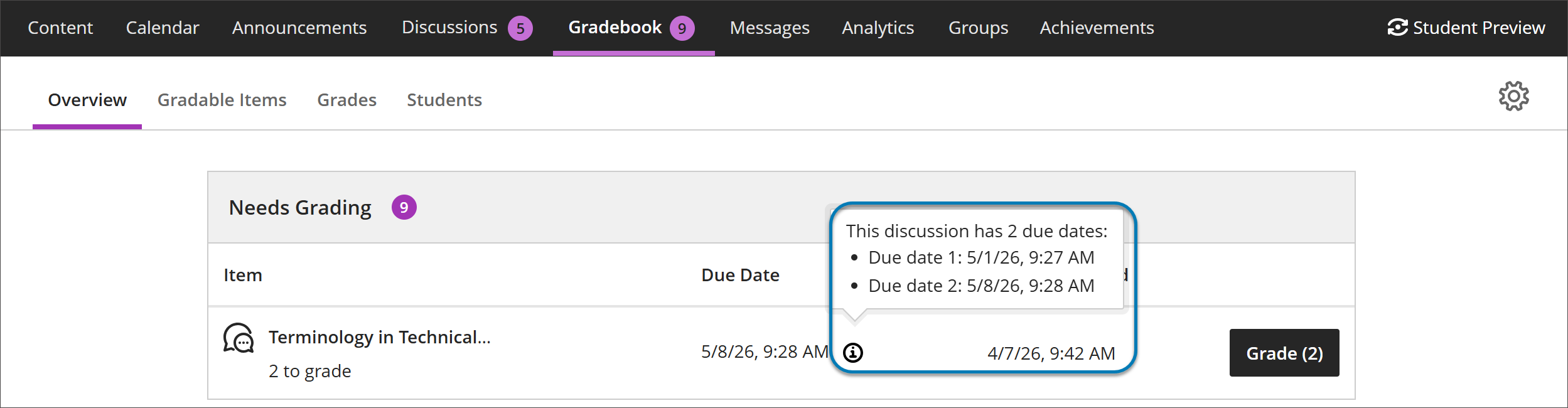
Detail of the Overview page in Gradebook. The needs grading list displays one Discussions assignment. Under due date, the final due date of the assignment appears. Next to that date is a circle icon with a lower-case i inside. Hovering over or tabbing to the icon displays a pop up windows that says: "This discussion has 2 due dates: Due date 1: 5/1/26, 9:27 AM Due date 2: 5/8/26, 9:28 AM."

Instructors benefit from clearer communication of discussion expectations, reducing the need to clarify deadlines and helping ensure students understand how and when their contributions are graded.

This update also ensures that discussions hidden within a learning module are no longer accessible from the Discussions tab. Discussions now respect the release conditions applied at the learning module level.
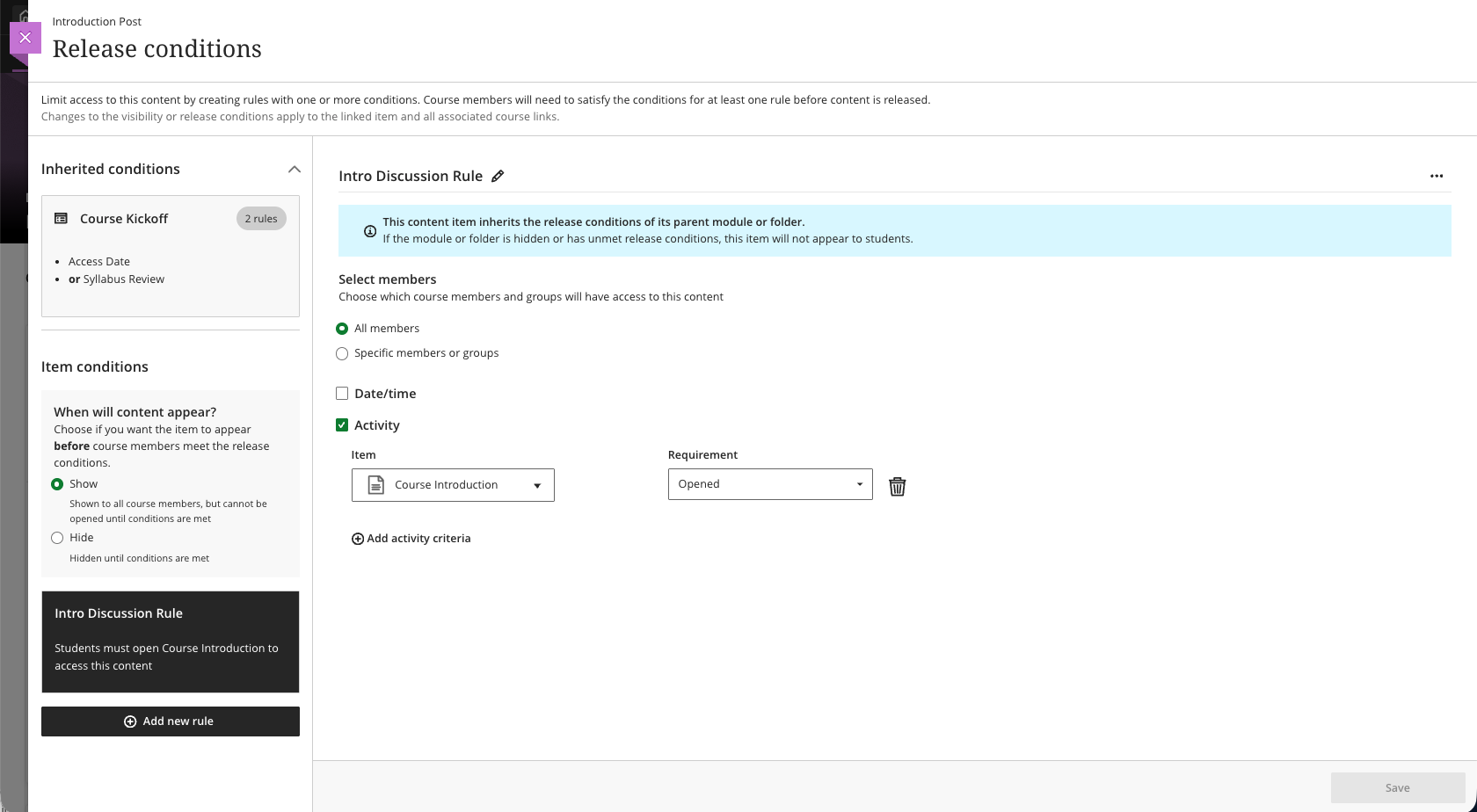
When instructors open the Release Conditions panel for an item inside a learning module or folder, a read-only summary of any conditions inherited from the parent container appears alongside any conditions applied directly to the item. This helps instructors understand the full set of access rules in place and determine whether additional conditions are needed.Image 1: Read-only summary of conditions inherited from the parent container and conditions applied directly to the item appear in the Release Conditions panel.

Read-only summary of conditions inherited from the parent container and conditions applied directly to the item appear in the Release Conditions panel.

Known Issues

This release will look to fix an issue with Journals where selecting editing options such as allowing users to edit and delete entries removes the Grade Journal option if previously selected. The fix will confirm expected behaviour where selection (or de-selection) of any editing options will not reset the Grade Journal option.

Share


Leave a reply

You may use these HTML tags and attributes: <a href="" title=""> <abbr title=""> <acronym title=""> <b> <blockquote cite=""> <cite> <code> <del datetime=""> <em> <i> <q cite=""> <s> <strike> <strong>

css.php

Report this page

To report inappropriate content on this page, please use the form below. Upon receiving your report, we will be in touch as per the Take Down Policy of the service.

Please note that personal data collected through this form is used and stored for the purposes of processing this report and communication with you.

If you are unable to report a concern about content via this form please contact the Service Owner.

Please enter an email address you wish to be contacted on. Please describe the unacceptable content in sufficient detail to allow us to locate it, and why you consider it to be unacceptable.
By submitting this report, you accept that it is accurate and that fraudulent or nuisance complaints may result in action by the University.

  Cancel