

Any views expressed within media held on this service are those of the contributors, should not be taken as approved or endorsed by the University, and do not necessarily reflect the views of the University in respect of any particular issue.

Learn

Learn

Information about updates to the University virtual learning environment.

March 2026 Release Overview

Reading Time: 2 minutes

This post provides a summary of the upcoming changes including those features which we have highlighted due to their impact. This release is subject to change and we will do our best to keep the information up to date before the release to live on the evening of Thursday the 5th of March 2026. For more in depth technical detail additional details are available on the release page.
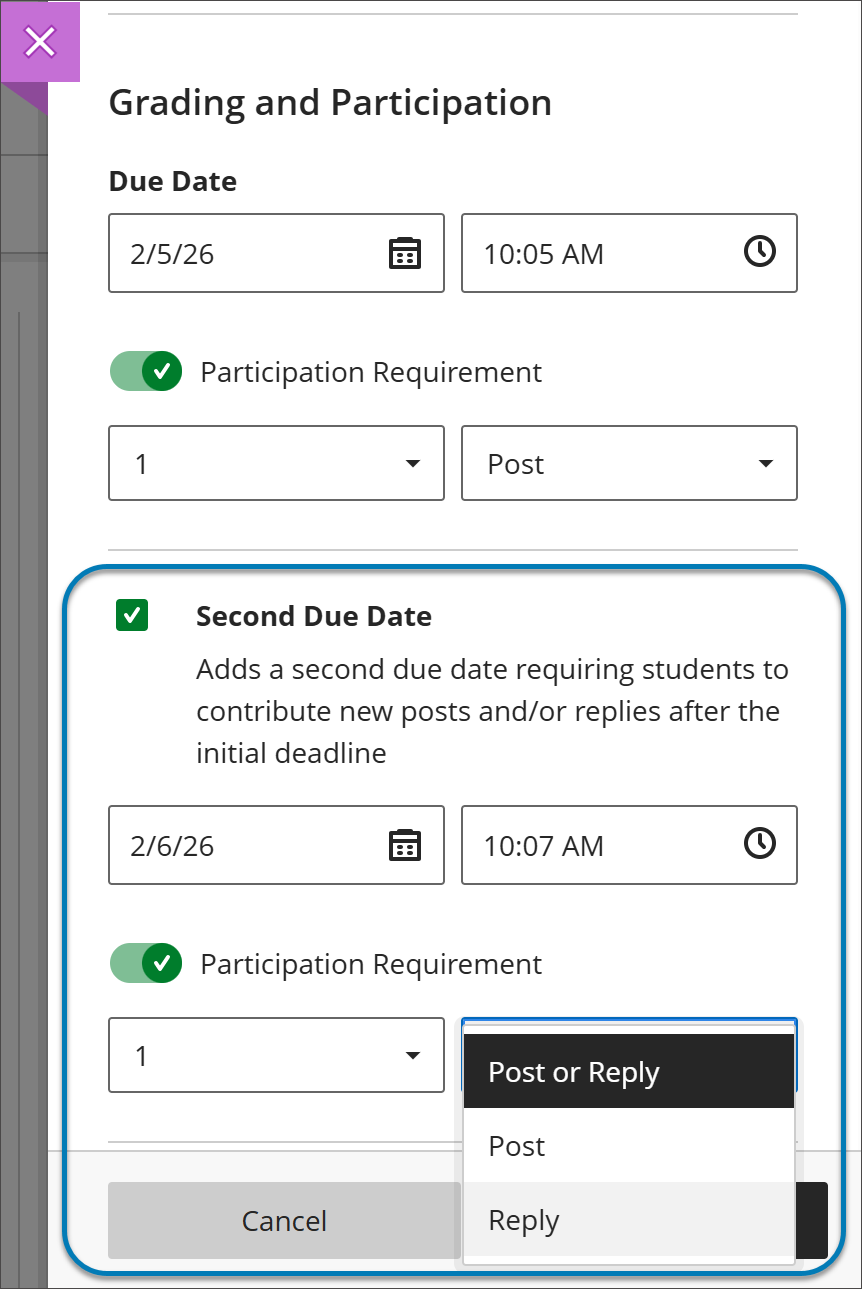
Image 1: Instructors can now add a second due date for Discussions. They can also specify the number and type of posts or replies that a student is required to make.

Grading and Participation section of the Discussion settings panel. Highlighted in a blue box is the following: a checkbox to add a second due date (which is checked on), the date and time fields, the participation requirement switch (which is turned on), the number of times a student must participate and an open dropdown for the type of participation required (Post or Reply, only Post, or only Reply.


For students, when they open a discussion they find two clear participation requirements with separate due dates. As they post and reply, progress indicators update in real time.

Students can complete requirements in any order, but contributions after a due date won’t count toward that requirement. Once all requirements are met, the discussion is marked complete and Progress Tracking updates.

Image 2: In a Discussion, a student can find due dates in the Details & Information section in the discussion assignment.
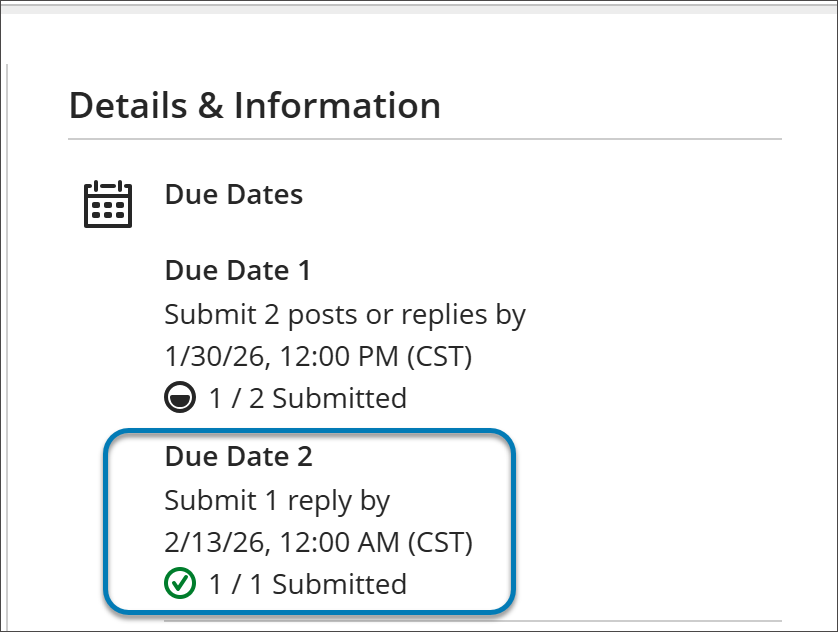
A detail of the student view of the Details and Information section of a Discussion assignment. There are two due dates listed under Due Dates. Each due date indicates how many posts or replies are required, the date and time these requirements are due, and a progress indicator. The progress indicator is a small circle next to the number of submissions made for that due date. The progress indicator in Due Date 1 is shaded black in the bottom half of the circle to indicate an in-progress assignment. Due Date 2 is a green circle with a checkbox inside, indicating that the requirements for the second due date are fulfilled.

When grading anonymous test submissions in Question View, the interface replaces the student name, avatar, and ID with an anonymous identifier and a blank avatar. All functionality available when grading non‑anonymous submissions by question is also available when grading anonymously. When anonymous grading is enabled, related APIs no longer return identifying information.

Known Issues

In an effort to improve the efficiency of information while still maintaining transparency with the community, our Known Issues page has had an update. The more user-friendly layout will aim to inform users of current known issues firstly, laid out consisting of a concise descripion, a workaround (if there is one), as well as the issue’s status. Below that users can then find recently resolved issues, following the same layout as previously mentioned in the current ones.

Share


Leave a reply

You may use these HTML tags and attributes: <a href="" title=""> <abbr title=""> <acronym title=""> <b> <blockquote cite=""> <cite> <code> <del datetime=""> <em> <i> <q cite=""> <s> <strike> <strong>

css.php

Report this page

To report inappropriate content on this page, please use the form below. Upon receiving your report, we will be in touch as per the Take Down Policy of the service.

Please note that personal data collected through this form is used and stored for the purposes of processing this report and communication with you.

If you are unable to report a concern about content via this form please contact the Service Owner.

Please enter an email address you wish to be contacted on. Please describe the unacceptable content in sufficient detail to allow us to locate it, and why you consider it to be unacceptable.
By submitting this report, you accept that it is accurate and that fraudulent or nuisance complaints may result in action by the University.

  Cancel