Dates of Development | February 26th – February 27th 2025
Sound Design Director | Max MSP: Ashley Loera
Process of Development
Equipment
Software:
- TouchDesigner Software
- Max MSP Software
- Wingman – IPhone Application (Name Sound Recorded Sound Files)
Hardware:
- MacBook Air Laptop
- DPA Stereo Microphone Kit
- Sound Devices Mix Pre-6 Interface
- XLR Cable
- SanDisk Extreme Pro 64GB SD Card
Progress Notes
- Successfully connected Touch Designer Output into Max MSP using OSC. Please refer to the video below:
In order to achieve this step in the MaxPatch, I referred to the following Youtube video to assist me in creating a simple Touch Designer Patch to then route the Output information into Max MSP using OSC.
The Interactive & Immersive HQ | “Connect TouchDesigner & Max 8 with OSC – TouchDesigner Tutorial 072”
Youtube Link: https://www.youtube.com/watch?v=AcqC5rRmu3M
- Successfully created delay effect in Max Patch to reflect sound by using Touch Designer Output information into Max & I successfully routed audio input data into a Delay Sound FX via Max MSP
Please refer to the video outlining the delay FX in Max MSP, below:
As shown in the Video above, the Audio Input (Laptop Microphone) is capturing my clapping and snapping movements (sonically) and as I change the rate of the delay (manually), the Claps & Snaps begin to playback at varying delay rates dependent on the delay input under the Touch Designer Max Patch Section.
To help me develop a delay effect, I did some research and found the following Youtube Video by creator “xlfph” that suggested the use of the “tapin~” and “tapout~” objects in Max MSP. I used this framework to create a delay effect in my Max Patch and connected data from the Audio Input and the Touch Designer Output to manipulate the Delay FX in the Max Patch shown above.
- Successfully connected DPA Mic into Interface.
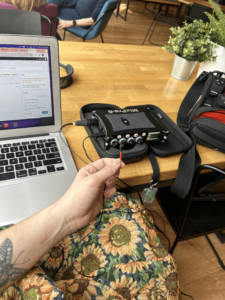
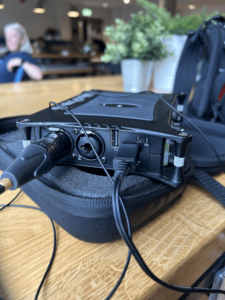
The following video shows that I was able to successfully connect the DPA Microphone to the Sound Devices Mix Pre-6 Interface. I chose this interface with the Intention to connect it to the Wingman phone application which allows me to name Recording Files and save them onto an SD chip inserted into the MixPre-6 Interface.
Trouble Shooting Hardware
-
- Today I spent some time Connecting the DPA Microphone to the Sound Devices – MixPre-6 II – 34225. My aim was to troubleshoot the audio-input portion of my Max Patch (shown below).
- Positives: No issues faced in connecting the DPA Mic to the Sound Devices – MixPre-6 II – 34225
- Issues: Unable to connect DPA Microphone & Interface: missing HDMI Cable. (Noted: Ensure that I have the right cables to connect Interface to Laptop for Max Audio Processing).
Bibliography:
The Interactive & Immersive HQ. “Connect TouchDesigner & Max 8 with OSC – TouchDesigner Tutorial 072.” YouTube, YouTube, 3 Jan. 2022, www.youtube.com/watch?v=AcqC5rRmu3M.
xlfph. “MaxMSP Tutorial: 4 Easy Delays with Tapin~ & Tapout~.” YouTube, YouTube, 20 Mar. 2020, www.youtube.com/watch?v=JoElwILrLKI&t=101s.