Any views expressed within media held on this service are those of the contributors, should not be taken as approved or endorsed by the University, and do not necessarily reflect the views of the University in respect of any particular issue.
Skip to content

How to use the library remotely for your dissertation banner

Introduction

It’s time for the second blog! These dissertation festival blogs are an opportunity for me to share my thoughts on the Dissertation Festival Events I have attended. For those who don’t know, the Library’s Dissertation Festival is a collaborative effort from the Library, Digital Skills department and Institute of Academic Development (IAD). They have shared a series of virtual events to provide students with the knowledge and resources to make the most out of their dissertations or theses.  To find out more about the festival, click HERE, and you can see my previous blog HERE.

The Session

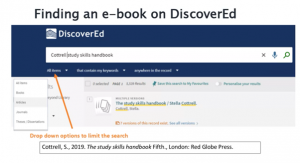
Hopefully, you should all be aware of the University Library and its associated buildings. Something you may not be conscious of are all the online and offline resources they have on offer. I must admit, even I (a student intern within the Library and University Collections department) am not 100% sure what “RaB” means or that you could easily filter your results on DiscoverEd (see the image below). I learned that and more in the “How to use the Library remotely for your dissertation” event.

Image showing how you can limit searches on DiscoverEd
How to limit search options on DiscoverEd

The session began by covering the basics of accessing resources. For online materials, that meant a comprehensive tutorial on how to search on DiscoverEd and a discussion as to why you may need to use the University’s VPN to obtain specific resources. Print was a little bit trickier to communicate (understandably), but directions were given to regularly check the Library Services Update page for the latest information in response to Government Guidelines.

For finding resources about a particular research area, Library Databases are a great place to go. They can give you a window into the literature you are interested in and contain specialist resources produced by experts. If you are unsure what you are looking for, the Library has made searching easier as you can browse databases based on by subject or as a complete A-Z list!

Now, I am sure at this point you are wondering what is “RaB”? During the session, I learned that if the Library doesn’t have the book you require, or it is only available as a print version, you can … Request a Book (RaB). It is such an excellent service that I am sure be beneficial for anyone, not only those completing their dissertation. Another valuable service feature offered by the Library are Inter-Library Loans (ILLs) which enable you to request digital copies of articles and book chapters from other libraries!

Thoughts and Conclusion

If I were to summarise this session in just one saying, it would be “It’s never too late to teach an old dog new tricks”. During the event, I was pleasantly surprised by all the new knowledge I gained, especially about DiscoverEd – a service I have been regularly using over the past 4 years! I was also reminded about other fantastic resources and features supported by the Library, which would help you with your dissertation, thesis, and even general studies!

If you are interested in the session and want to check it out, you can find it HERE!

Thanks for checking out the blog, see you at the next one.

Introduction

Welcome to the first of three blogs, where I document my Dissertation Festival Experience. For those who don’t know, the Library’s Dissertation Festival is a collaborative effort from the Library, Digital Skills department and Institute of Academic Development (IAD). They have come together to host a series of virtual sessions spanning over two weeks, providing students with the knowledge and resources to make the most out of their dissertations. Think Tomorrowland, Glastonbury and Coachella but online, free and hosted by the University of Edinburgh. So not quite the same. However, the Dissertation Festival is a fantastic opportunity to learn tips and tricks to help you write, reference and uncover what support is available to you at the University.  

The Session

The first Dissertation Festival session participated in was titled “What is a Systematic Review dissertation like?”. I decided to attend because was interested in finding out how systematic reviews (SR) differed from other dissertation types. Luckily, this was thoroughly covered within the presentation. After the first 5 minutes of the event, I was able to explain that the goal of a systematic review;  to answer a specific question in a topic area using reproducible review principles.    

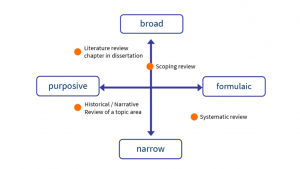
Slide from Dissertation Festival used to help illustrate where different review approaches
Slide from Dissertation Festival used to help illustrate where different review approaches sit

Other key points of the session include “The supporting principles of a SR” which highlighted the need for a pre-defined and detailed methodology. This was an important topic for me as I am typically more of a ‘go-with-the-flow type person when writing pieces of work. However, now knowing the aims of an SR, I am confident that is not the best strategy. Instead, you should develop a clear plan (in advance), have an inclusion criterion for studies you are considering, find ways to avoid bias and document all your SR  activities. 

Thoughts and Conclusion

I would recommend this session for those who are just about to carry out a dissertation or thesis and don’t know where to start. The presentation is designed to help you gain a basic level of understanding a SR and what it entails. For all, you indecisive people out there or those who don’t know what research method to use, the pros and cons list shown in the presentation can help you evaluate if this is the right research method for you! Throughout the session, there were lots of valuable pieces of advice and information given. There were also signposts for further knowledge items to help you further your understanding in your own time.  

If you are interested in the session and want to check it out, you can find it HERE! Thanks for checking out the blog. 

When coronavirus restrictions began in March 2020, the University of Edinburgh had to close some libraries and change some library services. But Academic Support Librarians haven’t gone away. We may have been working from home, but we’ve been busy helping students to get the best out of the library. So what have we been doing?

  1. Keeping you updated

From the start of lockdown the Library Academic Support team web editors have maintained the Library Updates page to provide an overview of the library services available to you during coronavirus restrictions.

  1. Helping you to get the books and journals you need

Coronavirus restrictions made it difficult to access the print library collections for your courses. We listened to what you needed and worked with our Library Acquisitions colleagues to purchase new digital versions of texts you could access remotely. We couldn’t get everything we wanted – sometimes publisher prices were just too high (see this reported in the press) and sometimes what you needed simply wasn’t available as a library e-book. But we worked to spend hundreds of thousands of pounds on new digital content to meet student needs.

  1. Giving help and advice for your dissertation research

We understand that researching your dissertation during coronavirus restrictions is a huge challenge. We’ve offered you help and advice on your library research by email and, if you needed it, a chance to meet online for a chat, with multiple librarian appointments available every week (we’ve met over two hundred students so far this academic year). Plus, we’ve run online Dissertation Festivals in October 2020 and March 2021 with events highlighting the wealth of digital resources available from the library and beyond to support your dissertation research.

  1. Writing an information literacy online course

We want every student to have the digital skills they need to use online library resources, so they don’t miss out on any of the resources and support that’s available to them. So we’ve written an online course, LibSmart, to help you develop key information literacy skills to navigate the library landscape for your studies and succeed at university.

  1. Making videos

We’ve delivered over two hundred live information literacy classes to students this academic year, but during coronavirus restrictions we know that you can’t always make it to a class when it’s happening. That’s why we’ve created over a hundred videos, many of them bitesize, so you can find out what you need to know about the library, when you need to know it.

Christine Love-Rodgers, Academic Support Librarian

1

Image by Gerd Altmann from Pixabay

Unfortunately, not every print book in our collections is available as an e-book.

So what can you do to source a digital copy of an essential book, when the library print collections are not accessible, e.g. due to Lockdown rules?

Firstly, double check on DiscoverEd for the title you need. You can filter your search results by “online resource” to double check in case there is an ebook there. For more guidance on how to do this, check out the recording of our session 'How to find online library resources for your studies using DiscoverEd'.

Then consider whether the Scan & Deliver service could be useful, if you just need one chapter of a print book or 1 journal article.

Consider using the Inter Library Loan service to get digitised journal articles or book chapters.

You can also use the student Request a Book (RAB) service to ask the library to purchase an ebook or another copy of a print book.

You could also try the various online archives of (sometimes ‘out of print’) books. Here is a list, in no particular order:

1: World Digital Library

2: Project Gutenberg

3: OpenLibrary.org

4: Internet Archive

5: Directory of Open Access Books (DOAB)

6: Open Textbook Library

7: OAPEN

8: Directory of Open Access Journals (DOAJ)

If you need a complete book, consider whether you can purchase a cheap second hand copy yourself, eg using an ethical online bookshop such as wordery  https://wordery.com/ or bookshop.org https://uk.bookshop.org/

For more information about open access educational resources and advice, take a look at the University of Edinburgh Open.Ed resource.

You could also explore the digital collections of the British Library and the National Library of Scotland.

If you are feeling very stuck about what to do, please do contact your Academic Support Librarian for help, advice and support.

Jane Furness, Academic Support Librarian

Pixabay License. Free for commercial use. No attribution required

Welcome to the Academic Support Librarians blog! You can find out more about the Library Academic Support team here.

We'll be using this blog to highlight our generic information literacy activity, events and projects. We already have several great ASL blogs for individual Schools, but this will be a blog for every member of the ASL team. Above all we're aiming to tell the story of the work our team does to support students and staff at the University of Edinburgh.

css.php

Report this page

To report inappropriate content on this page, please use the form below. Upon receiving your report, we will be in touch as per the Take Down Policy of the service.

Please note that personal data collected through this form is used and stored for the purposes of processing this report and communication with you.

If you are unable to report a concern about content via this form please contact the Service Owner.

Please enter an email address you wish to be contacted on. Please describe the unacceptable content in sufficient detail to allow us to locate it, and why you consider it to be unacceptable.
By submitting this report, you accept that it is accurate and that fraudulent or nuisance complaints may result in action by the University.

  Cancel