Week 10: On Wednesday and Thursday: first testing in Atrium!
Testing Day 1: Troubleshooting
Firstly, Evan’s computer—which was intended to run the bounced Unity project and the Max patch—was not compatible with the local Fireface soundcard. As a result, we had to transfer all projects to my computer, install RME, and sync the Wwise session to the installed quad system. This significantly delayed our ability to test more hands-on sound settings. Fortunately, we were able to book the room for the following day as well.
Testing Day 2:
Once everything was finally set up and functioning, I was able to begin creating a more refined mix of the five ambiences in each stage, along with a “master mix” to ensure coherence among all five.
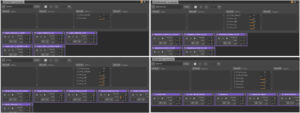
I utilized Wwise’s Soundcaster function, which greatly facilitated testing the maximum possible loudness (i.e., all ambiences at maximum volume per stage) and the dynamics between the consistent base ambience and the variable ones.
Below are several screenshots of the Soundcasters:
While the others were working on Touch Designer to visualise the fades between stages, we set up the sensors on the side, and successfully achieved:
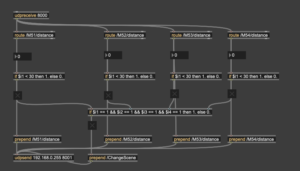
- Controlling all 4 ambiences with the sensors individually
- Fading into the next scene when all 4 sensors are at maximum level
Here’s the Max patch for receiving the OSC from 4 sensors:
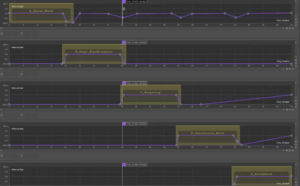
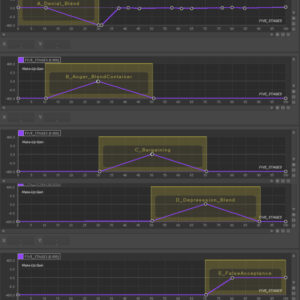
Since the data that controls which state is being played does not move too smoothly, I had to change the blend container fade lengths/shapes a bit, for a slower, smoother transition between the states.
Before:
After:
The individual Proxy RTPCs are currently configured to be at 0 dB when set to 0 (on a scale from 0–100), and are faded to -192 dB (the minimum value available in Wwise) at 30. This configuration is due to the sensor data remaining relatively stable within the 0–30 range; beyond that, it becomes increasingly erratic. This may result in a sudden “on-off” transition for the ambiences rather than a smooth fade-in. However, further testing is required to determine the optimal maximum value. In real-world terms, a sensor value of 30 corresponds to a distance of approximately 0.4 meters from the device.
The girls successfully resolved the issue with Touch Designer, allowing us to test all four sensors, along with the audio and visuals, together for the first time! And luckily, it was a huge success!! The ambiences were triggered and controlled as intended, the sensors influenced the visuals, and both sound and visuals transitioned smoothly between scenes when required.
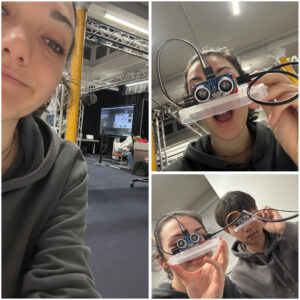
Here are a couple pictures of me, working super hard:))
During the test, the audio was running directly from the Wwise session; however, when we built the Unity project, the sound was played only in stereo. All output settings were correctly configured in both Wwise and Unity—the latter even indicated that the sound was being played in quad—but in practice, it was not.
As Alison House was closing, we had to conclude the test. Despite this bug we run into at the end, I am extremely happy that all other technical components worked!!
We have one full week to resolve the Unity issue, during which I also need to produce a final, improved sound mix and potentially add additional RTPC effects. As we are heading towards the final product, I’m very excited to see how it will all turn out!