For this game sound build, we designed four rooms with a total of 20 key passage sound factors and five endings with different sound designs, as well as other sounds that embellish the rooms and ambient sounds.
All the sounds we recorded in the studio and me at home.
In Studio:
Example of my recording process at home:
All recorded sound involves a lot of editing, whether it’s in the studio or at home or in the past when I’ve recorded my own sounds, it all goes through the iZopote Rx for audio noise reduction, then into Pro Tools for editing and processing with EQ, and then finally into Wwise for integration and processing.
- Hamster Footsteps
The footsteps were recorded on two different materials – wooden floor and tile floor, each with six different tones and walking patterns to achieve a different sense of hearing and increase the vividness of the game.
During the recording process, we struggled with what objects to use to simulate the hamster’s footsteps, and finally found that the touch of a finger and the sound of a finger best matched the hamster’s soft, small-contact paws.
- Hamster Calls
To add to the player’s interest in controlling the hamster, I recorded a series of hamster calls using a human voice and set them to play randomly when the hamster hit the wall in each room.
Hamster jumping sounds
In the game modelling build, the optional sound elements in each room are required for the player to jump to higher platforms in order to hear them, and we used bouncy plastic to simulate the jumping sound.
-
- Key sound elements in each room
Baby Room
- Pig Purse
- Toy Car
- Toy Dog
- Sprung
- Wooden Horse Correct sound:Toy Car
Kitchen
- Boiler
- Bowl
- Chopsticks
- Fork
- Pot Correct sound:Bowl
Restroom
- Shower
- Sprayer
- Toilet Flush
- Towel Wringing
- Water Dropping Correct sound:Shower
Studio
- Host
- Speaker
- Light
- Outlet
- Phone Correct sound:Light
-
- Ambient Sound and Decoration Sound

- Decorative sounds
In Kitchen, I set up a radio that automatically triggers a sound to play when the player enters the room, and for the sounds inside I used two uncopyrighted sounds: weather forecast and Music. these two sounds were made to look like worn out radios playing in order to create ambience. The reason for using these two sounds is to have a professional weather announcer announcing the weather, and a background music to simulate the fading in and out of the music on the radio.
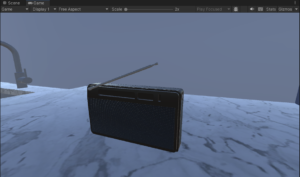
(Screenshots of the radio in the game)
Copyright Source:
Weather forecast:Dave’s Weather Forecast by Beetlemuse — https://freesound.org/s/620358/ — License: Creative Commons 0
Music:💐 Positive Instrumental Rock Music (For Videos) – “Every Day 80’s” by Wayne John Bradley 🇦🇺
brand:Breaking Copyright
address:https://www.youtube.com/watch?v=C4Ko5BBk3W4
- Sound building in Wwise
1.Building sounds for each sound room object
In addition to placing each sound in an event in Wwise, the sound elements are placed in a component in Unity.
In the third room, the Restroom, an Auxiliary Bus was added to Wwise to control the reverb in the Restroom, adding reverb to all the sound elements in the room to change the style of the room.

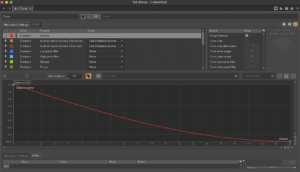
At the same time, from the third room onwards, the sounding method of all the objects changed from touching by the player-controlled hamster to proximity sounding (close to big and far away from small), which made it more difficult to play the game. Attenuation was used in Wwise to adjust the decay curve.
2. Ambient sound build
We placed the four audio for the ambient sound in Wwise and used in Unity by covering the entire room with a large cube and then making it invisible. Add AKTriggerEnter and AKTriggerExit from AKEvent to the cube to start and end the ambient sounds.