- MAX patcher design- Ruotong Wu
- Testing and connecting MAX patcher- Chao Li, Ruotong Wu
We believe that a dog’s sense of smell is an important perspective. Through our research, we discovered that thermal imaging can be used to visualize gases, so we plan to use a thermal imaging effect to represent how dogs perceive smells. After seeking help from Jules, we found out that MAX can generate thermal imaging effects directly.
During our exploration, we realized that if we use MAX to process live footage into a dog’s perspective, it could create a better experience for the audience. Therefore, we decided to set up an interactive experience point based on a video tour of Calton Hill. We will use MAX’s Vizzie modules to apply visual effects to the video in real time, while also recording sound from three directions. The sound will influence the visuals, creating a live experience for the audience.
I divided the entire pacher into three parts. The design of each part is mostly the same, but they represent different aspects.
- The First Aspect-Dog’s Vision
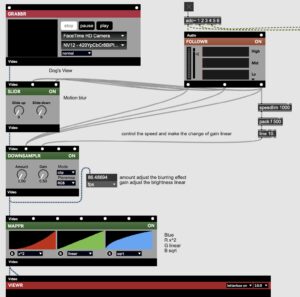
I referred to the patcher from Andrew’s workshop, Jules’ detailed explanation of the Vizzie modules and I combine the ‘help’ for each Vizzie component. Based on my research, I experimented and created a version of how I imagine the world looks through a dog’s eyes. I focused on three main aspects to represent a dog’s vision:
–Color: Mostly blue, with yellow and gray as secondary tones
–Blur: Dogs see with less clarity than humans
• Glow: Dogs are more sensitive to light movement, and fast motion can create a glowing effect
The most difficult part was adjusting the colors. There wasn’t a single Vizzie module that could fully recreate the way I see a dog’s visual world. I originally tried to use the object of ‘jit.gl.pix’ to completely remove red, but after many attempts, it didn’t work as expected. In the end, I used the MAPPR module and its RGB function to achieve the color style of dog vision.
- The Second Aspect-Thermal Imaging Effect
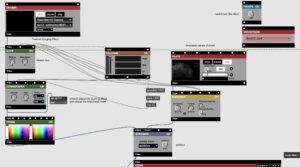
For this part, we still use vizzie to simulate the thermal imaging effect and add the effect of gas to combine it with the video to simulate the sense of smell of dogs. For the color part, I used ‘2 TONR’ to retain the blue and purple to simulate the video effect captured by the thermal imager. Then I collected the smoke effects online and mixed them using the addictive mode of MODEMIXR.
- The Third Aspect-Dog’s Mood
The design of this part is very simple. I only kept the yellow color and then adjusted the frequency of the screen flickering through sound. Because dogs have very sensitive hearing, even the slightest change in sound will attract their attention, even many subtle sounds that we humans never notice.
In addition, each video corresponds to a different microphone. I input the sound into different modules to influence the changes in the video, making the auditory stimulation to the audience more visual. Then I also did a simple mix by MAX to enable it to adjust the frequency of the real-time sound. Additionally, I added the reverb and distortion effects to make the ambience heard by the audience closer to the hearing of a dog.
The day before our presentation, we got help from Jules and Andrew. We used the H6 Essential as an audio interface to record live ambience. Andrew suggested that we add a MIDI controller so the audience could interact and adjust things themselves. This would make the experience more fun and immersive. It was a really helpful suggestion for our project. Luckily, we managed to borrow a MIDI controller just one second before the staff at the music store closed for the day — it was such a close call! I used six knobs to control three video channels and three audio channels. The audience could turn the knobs to mix visuals and sound in real time.
The link of introduction of MAX patcher:
https://media.ed.ac.uk/media/t/1_a41mxuyi
MAX Patcher:
https://drive.google.com/file/d/18VtVyBSB_TXkSPUOz0npl_-im6KSij-Z/view?usp=share_link
Reference:
https://www.dropbox.com/scl/fi/l85vr4wvodzx3c3jjugt9/JR-DMSP-VIZZIE.mp4?rlkey=l58aqdullda4rcjn8m9keqev9&e=2&st=16s7toh5&dl=0
https://drive.google.com/file/d/1-OqBNyjkxgPgQw_my38LQSTLAf_-FZ_j/view?usp=share_link