Contributions and participation during the project’s progress-xiaole liu
1. Early Recording and Sound Library Construction
After defining the sound style and expressive goals for the five emotional stages, I moved on to developing the preliminary recording plan and took charge of collecting and initially organizing the sound materials.
This phase was not just about gathering sounds — it was a process of conceptual sound creation and design, centered around the project’s emotional framework.
The goal of this task was to build a comprehensive sound library that would provide a rich and diverse selection of sounds for other teammates handling the final sound design, significantly boosting their efficiency and creative flexibility.
Categorization and Recording Planning
I first classified the five emotional stages and extracted their core sound characteristics. Combining my previous research and team discussions, I drafted dedicated recording lists and foley plans for each emotion. Here are a few examples:
-
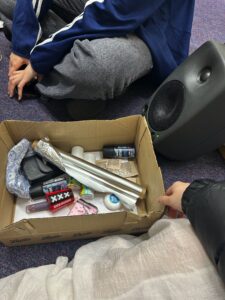
Anger: Focused on high-frequency, sharp, and explosive sounds. I prepared metal rods, glassware, chains, and recorded creative foley through collisions, friction, and dragging to capture tension and confrontation.
-
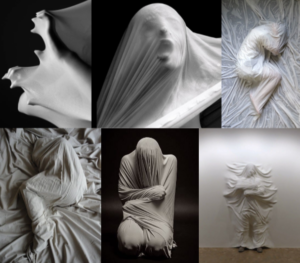
Denial: Aimed to evoke blurriness, disorientation, and undefined spatiality. I recorded blurred voices, fabric friction, and reversed water sounds to express psychological avoidance and confusion.
-
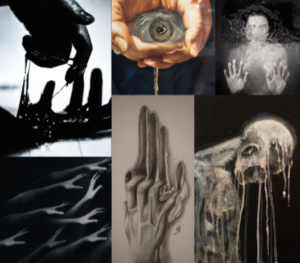
Bargaining: Simulated psychological tug-of-war and indecision. I used paper tearing, cyclic breaking syllables, and unstable rhythmic vibrations to create the texture of psychological uncertainty.
-
Depression: Used low-frequency, slow, continuous sounds to convey oppression. Recordings included deep echoes from buckets, ambient noise, and breathing sounds to create a closed, silent space.
-
Acceptance: Represented gentleness, release, and continuity. I used soft metal friction, wind chimes, bells, and faint melodic fragments to simulate the smooth transition of emotions.
All recordings were independently completed by me.
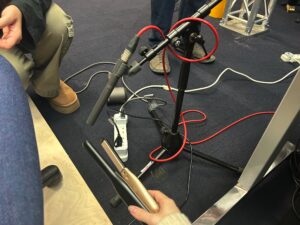
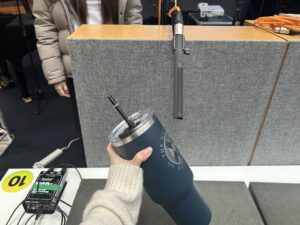
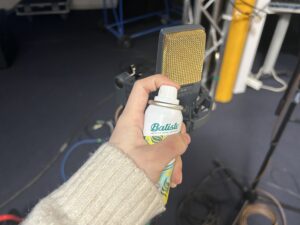
Each week, I rented professional recording equipment and secured sampling locations, striving to ensure high-quality and diversified materials. I also experimented with various techniques (different gestures, force variations, and medium changes) to capture more expressive raw sounds.
Post-Processing and Sound Design
After recording, I imported the raw audio into ProTools for detailed post-production. To tailor the materials to each emotional stage, I applied various acoustic and stylistic transformations, including:
-
Reverb: Simulating spatial extension to evoke impressions of echo, loneliness, vastness, or relief.
-
Pitch Shifting: Lowering pitch for heavier emotions or raising it to induce unease and tension.
-
EQ (Equalization): Enhancing or attenuating specific frequency bands to sharpen, deepen, clarify, or blur the sound textures.
-
Delay and Time Stretching: Extending audio length, creating echoes, and simulating auditory time suspension.
-
Filtering: Applying high-pass or low-pass filters to make sounds feel distant, muffled, or veiled.
-
Reverse and Reconstruction: Reversing and rearranging audio clips to break naturalness and create surreal psychological effects.
-
Compression: Controlling dynamic range differences to enhance the emotional cohesion and impact.
Processing Examples
-
Denial (Denial):
When editing fabric friction sounds, I applied a low-pass filter to reduce high frequencies, making the sound blurrier. Then, I added slight reverb and reversed segments to enhance the feeling of spatial confusion and psychological escape. -
Anger (Anger):
For metal collision sounds, I pitch-shifted the recordings up by half an octave to sharpen the harshness, applied saturation to introduce distortion, and added light delay to create chaotic spatial echoes, enhancing the tension.
Through these techniques, I not only boosted the expressive power of the recordings but also made them highly adaptable for real-time triggering and transformation within the interactive system.
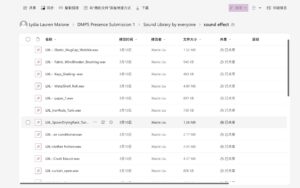
The outcome of this phase was a well-organized Foundational Emotional Sound Library, allowing teammates to quickly and efficiently select materials based on the emotional scene they were designing.
2. Sound Design for Specific Emotional Stages
After completing the foundational sound library and preliminary editing, I took further responsibility for building the complete sound design for three emotional stages: Bargaining, Depression, and Acceptance.
At this stage, the work was no longer simply about recording or editing sounds.
It became a systematic design practice — exploring how sound and emotion interact and express together.
I needed to not only imagine sound reactions that would match the visual animations but also design dynamic sound scenes triggered by various sensors, ensuring that all sound elements fit together harmoniously, immersing the audience in a powerful emotional atmosphere.
This was not just sound creation — it was a process of translating sound into emotional language.
My Workflow
-
Refining sound style definitions: For each emotional stage, I clarified the desired sound characteristics, rhythmic logic, and spatial expressions.
-
Targeted recording and secondary creation: Based on sensor trigger types, I re-recorded critical materials and selected the best-fitting fragments from the sound library for deep processing.
-
Sound construction in ProTools: I completed multitrack mixing, rhythm deconstruction, sound field design, and dynamic layering to ensure adjustability and stability within the system.
-
Organized sound assets by functionality: Grouped materials by “background ambiance,” “behavioral triggers,” and “emotional transition responses” for easy system integration.
-
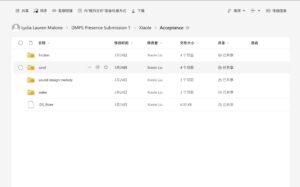
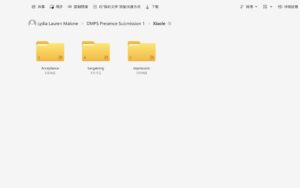
Established structured interactive sound libraries: Created clearly named and uniformly organized folders for each emotion, with usage notes (scenario, trigger method, dynamic range) to allow seamless integration by teammates working on Wwise, Unity, and Max/MSP.
Through this phase, I pushed the project from “sound materials” toward “systematic emotional sound expression,” ensuring cohesion, functionality, and artistic integrity within the interactive framework.
🎧 Sound Design Examples
Bargaining (Bargaining)
To express the inner wavering and repetitive struggle, I designed multiple loopable sound units simulating hesitant and anxious emotional flows.
Example 1: The struggle between tearing and re-coiling
-
Foley materials: Paper tearing, fabric crumpling, wood scraping
-
Design techniques:
Cut tearing sounds into rapid fragments, time-stretch selected parts, overlay slight reversed audio and high-frequency filtering to simulate psychological “fracture and repetition.”
Layered with background friction sounds to create a tactile tension. -
Emotional intent: Express the constant push-and-pull between hope and denial.
Depression (Depression)
For this stage, I aimed to convey deep emotional downpour, loss, immersion, and self-isolation, avoiding strong rhythms to create a “slow-time” and “emotional stagnation” atmosphere.
Example 1: Damp, Oppressive Interior Space
-
Foley materials: Water echoing inside metal buckets, slow palm movements across wood flooring, low-frequency ambient noise
-
Design techniques:
Pitch-down metal water echoes by about 5 semitones; add long-tail reverb and room simulation; overlay low-frequency brown noise to create pressure.
Palm sliding sound filtered to preserve only the low-mid range, maintaining subtle motion tension.
Emotional intent: Build a psychological space that’s damp, heavy, and hard to escape, reflecting the chaotic silence of depression.
Acceptance (Acceptance)
As the most peaceful and open stage, the sound design for Acceptance needed to create a gentle, transparent, spatially flowing atmosphere — while maintaining emotional richness and avoiding flatness.
Example 1: Clear Ambiance of Wind Chimes and Metal Friction
-
Foley materials: Light metal taps, wind chimes, copper wire friction, glass resonances
-
Design techniques:
Overlay wind chime sounds with fine metallic friction; EQ to emphasize the high-frequency clarity; set glass resonance as the background layer with long reverb; add subtle modulation to copper friction for liveliness.
Control overall volume dynamics to maintain a slow, flowing texture.
Emotional intent: Create a “clear, peaceful, continuous but not hollow” emotional atmosphere, expressing release and inner stability.
Example 2: Fragmented Melodies and Shifting Harmonies
-
Foley materials: Finger-plucked music box, toy piano, breath sounds, small chime bells
-
Design techniques:
Cut piano notes into fragments and reassemble into irregular melodic lines; add unstable synthetic harmonies and low-frequency fluctuations; convert breath sounds into airy resonances for delicate spatial textures.
Emotional intent: Express the idea that even under a calm surface, traces of emotional echoes persist.
These sounds were set to trigger dynamically based on audience proximity and movement, enhancing the feeling of flowing emotions across space.
Conclusion
By the end of this phase, all sound assets were meticulously categorized by emotional type, functionality, and acoustic features, ensuring that teammates could directly integrate them into the interactive system without further editing.
This work greatly improved the team’s sound integration efficiency while preserving the emotional consistency, controllability, and artistic completeness of the final installation experience.