This week, I focused on setting up a distance sensor. We envisioned this as the primary source of user input for our installation. The idea is to place sensors throughout the room and modulate the audio and visuals based on where the user is. All the user needs to do is move through the space, and their surroundings will noticeably shift in response.
To accomplish this, we’re using HC-SR04 ultrasonic distance sensors, which have the following pins: GND, 5V, Echo, and Trig. When the Trig pin is set to HIGH, it sends out a burst of ultrasonic sound (around 40 kHz, well above human hearing). If there’s an object in front of it, the sound reflects back, and the Echo pin reads HIGH once it detects the return pulse. From this, we can calculate the time it took for the sound to travel to the object and back—then convert that time into physical distance.
Wiring the Sensor
I followed Joe Hathaway’s guide for wiring and programming the sensors. I used female-to-male jumper wires to connect the SR04 to the Arduino Uno as follows:
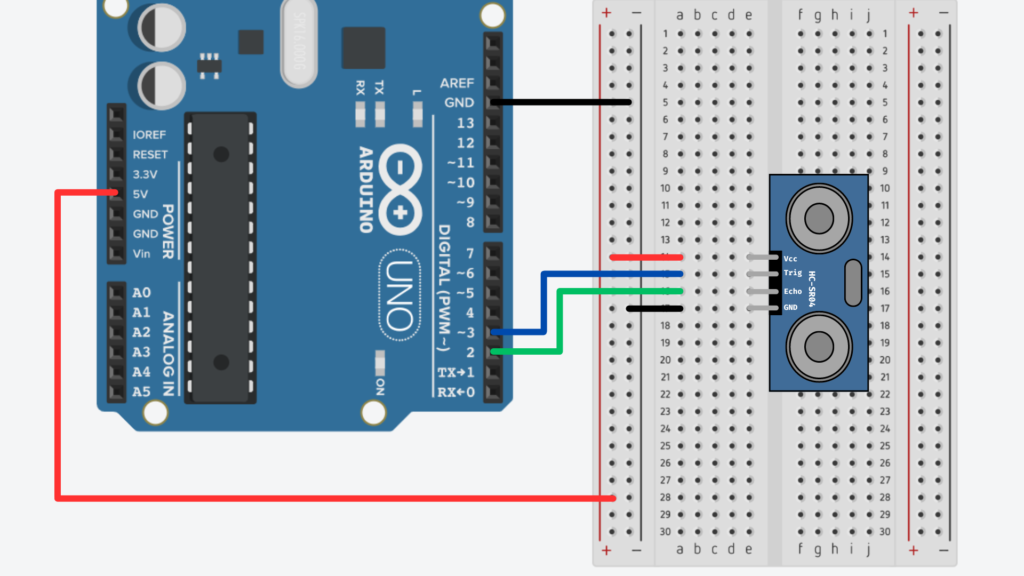
Coding the Sensors
First, I defined the trigger and echo pins in my Arduino sketch:
int trigPin = 3;
int echoPin = 2;

void setup() {
  Serial.begin(9600);
  pinMode(trigPin, OUTPUT);
  pinMode(echoPin, INPUT);
}
In the main loop, I began by clearing the trigger pin (setting it to LOW), then pausing for 2 microseconds to stabilize the signal:
digitalWrite(trigPin, LOW);
delayMicroseconds(2);
Then I triggered the ultrasonic burst by setting the pin HIGH for 10 microseconds:
digitalWrite(trigPin, HIGH);
delayMicroseconds(10);
digitalWrite(trigPin, LOW);
To measure how long it took for the sound to return, I used the pulseIn() function:
float duration = pulseIn(echoPin, HIGH);
This gives the round-trip travel time in microseconds. To convert that into distance:
- Sound travels at approximately 0.034 cm per microsecond, or 0.0135 inches per microsecond.
- Since the sound travels to the object and back, we divide by 2.
So the distance calculations look like this:
float cm = (duration * 0.034) / 2.0;

float inches = (duration * 0.0135) / 2.0;
Finally, I printed the results to the serial monitor:
Serial.print("Distance in cm = ");

Serial.print(cm);

Serial.print(", inches = ");

Serial.println(inches);
Observations and Next Steps
The sensor was pretty accurate at short distances—when I moved my hand back and forth in front of it, the values responded clearly and consistently.
At longer distances, the values became more erratic, which aligns with what Joe notes in the documentation: ultrasonic sensors can be noisy, especially over larger ranges. To improve stability, I plan to implement some smoothing—possibly by averaging several readings—and maybe add a max range limit.
Just like in my last blog (where I used a button input), I’ll bring this sensor data into TouchDesigner using a Serial DAT. I’m testing this with my group soon, and we’ll explore how to map the sensor input to real-time audio changes.