Since I am responsible for the multiplayer system part of the project MM&NN, this blog is about sharing some basic information and common techniques and logic about multiplayer system implementation.
Implementation
This section is detail about multiplayer system implementation in MM&NN. The scripts and functionalities related to the multiplayer system can be divided into two main parts:
- Core Multiplayer Features
These include synchronization between players (ensuring both game instances remain in sync across two computers), avoiding duplicated input across clients, creating and joining rooms. These core systems and scripts are provided by the Alteruna package. I directly implemented these by dragging the appropriate components into the scene or applying them to the relevant prefabs.
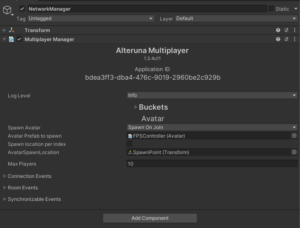
Multiplayer Manager: A network manager from Alteruna’s prefab script. Responsible for network connection between devices.
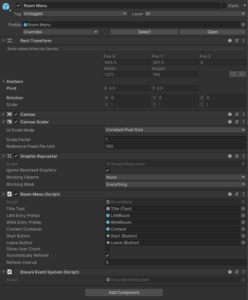
RoomMenu: A lobby-like menu from Alterunas’ prefab script for players to create, join and leave game rooms. This object is in the scene and can be customized depend on project’s needs.
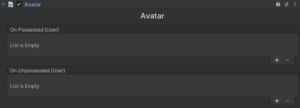
Avatar: A script for Alteruna multiplayer system to locate the player prefab and spawn.
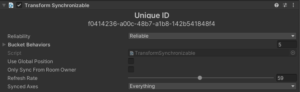
Transform Synchronizable: A script to enable information synchronization between devices.
- Player-Specific Settings
This part is my customization to meet project’s needs mainly in First Person Controller prefab. The differentiation between host and client, as well as between “is me” and “not me,” plays a crucial role in separating character logic and visuals (camera) for MM and NN. I added identification logic within the First Person Controller script (see screenshots below).
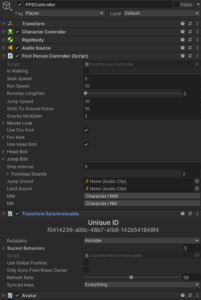
First Person Controller Prefab Overview
All character models and post-processing settings are stored under the single prefab of first person controller. The multiplayer system “enable” or “disable” different elements depending on whether the current player is the host or client, and whether the character being controlled is “me” or “not me,” before spawning it in the game scene.
Below is an enabling/disabling logic using “if” within the script.
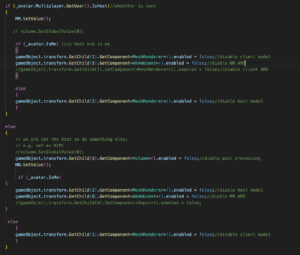
This part is basically two small “if” of self-identification under one big “if” host and client identification. Because character MM and NN ‘s settings are activated based on player’s identity to the server, which is host and client. MM’s settings are bind with host while NN’s settings are bind with client. After clarifying player’s identity, program can allocate different character settings to different devices. However, that’s not enough. Two small “if” is responsible for identifying whether the player “is me” in order to enable the correct model to the right player. Without this layer, the player will have wrong model for the other partner player.
In terms of the game audio, since we are using Wwise implemented into Unity and there are two Ak Audio Listeners present in the same scene (one per player), I disabled the listener on the not “is me” player’s object to avoid audio conflicts. Besides, there are two different play events of ambient sound in the Wwise project for two characters, I have the GetChild() to enable/disable two events in the big “if” script.
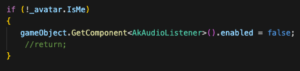
With this setup, the basic individual character settings are successfully implemented.
Multiplayer in Two Perspectives

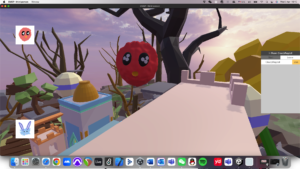
Basic Structure
During the research and hands on experience, I found a basic structure and rules for online multiplayer system implementation which works for both packages I have experienced:
- A manager which in charge of the network connection
Online multiplayer system needs scripts to let the device gets access to the sever / host in order to connect with other devices.
- A player prefab (avatar) in Asset for the system to spawn players
Player prefab has all the information of the player controller. When a new device comes in, it will spawn a new player to the scene.
- Synchronization scripts (transformation, animation …)
To get other players’ movement, location and other information precisely and lively, system need scripts to transform other player’s information to the device through network.
- Input collision avoiding script
A script to ensure the input commands from a device are only controlling the local player instead of all the players.
- Multiple listeners avoiding script
If the game is implemented with Wwise, it has to make sure the local device only has one listener.
Although there are a lot of methods for online multiplayer system, they all follow this basic structure in some way.
Multiplayer vs Single player
When implementing multiplayer into the project, it’s better to previously consider what content in the project may change when there is more than one player in the game scene.
Players:
Firstly, multiplayer system always needs a player prefab to spawn players. Besides, if the game has different settings to players, an extra player identification and functionalities switches have to be aligned with the player prefab. (Examples in implementation of MM&NN)
Audio:
As we introduce multiplayer system to the project, every player has a listener. However, a running game cannot hold more than one listener except special circumstances. We have to disable all other listener except the local one.
Game Objects:
Some game objects may include interactions with players which means they have to be synchronized in multiplayer system too.