I’ve been doing some research on multiplayer in Unity and integrating multi-listener in it. There are mainly two separate ways to achieve multiplayer project in Unity – local multiplayer and online multiplayer. Based on the research I have been doing, local multiplayer project can only support split-screen in one device and online multiplayer can replicate parent model to multi individual clients through networking. Since our game will be displayed in two individual screens back to back and two audio output, online multiplayer can better fulfill our basic needs.
So I started my testing project with Unity official tutorial, only replacing the third-player controller with first-player controller.
The basic idea of online multiplayer through networking concepts of Unity is replicating player’s feature based on parent player setting by scripts in netcode. I made the FPS multiplayer test scene running well.
In case of further design and realization in multiplayer project, it may involves extra script in network transforming for every interactive component or animation.
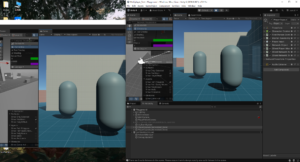
There are three problems I am working on:
- Because I completely followed the tutorial, there’s no script about FPS camera replication. The FPS camera contains two components-cinemachine brain and player follow camera. How to replicate them to different players is my next step.
- For now, I don’t know how to give players’ characters different features (blurred camera, footsteps SFX, etc.) through netcode or other networking methods.
- An error occurred when I integrate Wwise into this test project. I am trying to solve this problem in order to test multiplayer listener.