Any views expressed within media held on this service are those of the contributors, should not be taken as approved or endorsed by the University, and do not necessarily reflect the views of the University in respect of any particular issue.
Week 11 is the presentation week and our project has reached its final stage. We have completed 80% of the video and sound.
On Monday, we went to Calton Hill to test the video ourselves. During the test, we found that the video speed was faster than the actual speed, which made it impossible for viewers to keep up with the video speed. That evening, we adjusted the video and sound to the normal viewing speed, and the video and sound were finalized. After finalizing, we uploaded the video to the vimeo website, and also uploaded the video to Jules’ account for backup.
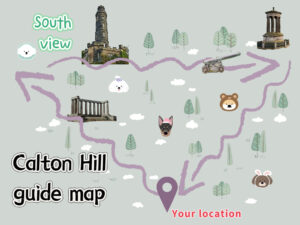
On Tuesday, we conducted a max test to test whether the microphone and camera could work properly. Before that, we also conceived a map and promotional cards for viewers. On Tuesday afternoon, the cards and maps were completed and printed.
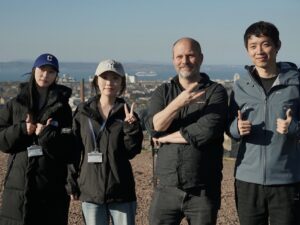
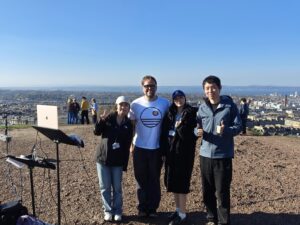
On Wednesday, the day of the presentation, we prepared three computers, three microphones, three cameras, a sound card and a midi controller. At one o’clock in the afternoon, we took all the equipment to Calton Hill for advance arrangements, and pointed three microphones and cameras in three different directions of Calton Hill to capture different sounds and images. Viewers will first receive a project introduction card to learn about the project overview, and then take the project map to watch the video and take a walk on Calton Hill, which takes about 10 minutes. After the tour, return to the starting point of the project for a real-time max audio and video experience. After each viewer completes the experience, we record their feedback so that we can present better projects in the future.
A dog’s hearing range is much wider and farther than a human’s, so it can hear sounds from beyond Calton Hill. Based on this characteristic, we explored the area around the hill and thought it would be great to add the sound of church bells in our project. We researched nearby churches with scheduled bell ringing times, and then checked if they were visible from Calton Hill. In the end, we chose St Mary’s Episcopal Cathedral.
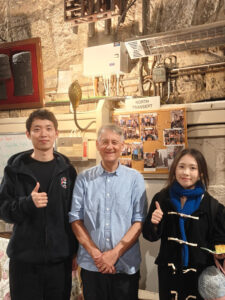
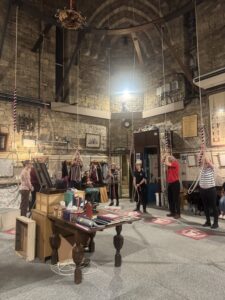
On the evening of March 27th, we arrived at the cathedral, hoping to record the sound of the bells. It was raining at the time, so we couldn’t really record anything from outside. Then we noticed a small side door and thought maybe we could go in to avoid the noise of the rain. Luckily, we met one of the bell ringers. After we explained what we were doing, he kindly offered to take us up to the bell tower.Getting up there wasn’t easy, we made great efforts to get there.
At first, we were a bit worried that our unexpected visit might be a bother, but every bell ringer we met was so kind and welcoming. They even took the time to explain the whole bell-ringing process to us. Before this experience, I always thought the sound of the bell came from one person ringing it. But I only learned today that this is a job that requires teamwork to complete. Each bell strike depends on timing, teamwork, and precision. Standing in the bell tower, watching them move in sync in such a small space, I could really feel the dedication and tradition behind their work. It’s not just about ringing the bell—it’s about trust, teamwork, and respect for time, rhythm, and tradition.
Even though the sound only made it into our project for a few seconds, the experience gave us a strong sense of connection to the city and its people. This is an experience I will cherish for the rest of my life.
After deciding on a video-based format, we discussed how to create an immersive experience that also highlights the differences between a dog’s and a human’s perspective. Through two rounds of prototype testing, we finalized the current presentation style.
The format involves a dog and its owner roaming Calton Hill together, switching between the dog’s and the owner’s viewpoints to help the audience appreciate the uniqueness of the canine perspective.
We consulted Mia, a dog expert, to better understand canine behavior, she provided valuable insights. This greatly helped us mimic a dog’s state during filming.
We attempted to use a GoPro mounted on a real dog to capture the roam, but encountered two major challenges: 1) We couldn’t find a dog that would fully cooperate, and renting one exceeded our budget. 2) Although a kind stranger on Calton Hill allowed us to test with their dog, the dog was unwilling to work with the GoPro harness, so we had to abandon this approach.
Ultimately, we conducted three formal shoots and cleverly edited footage from all three sessions into the final film. We were fortunate to have good weather for all shoots, which made it easier to blend the footage seamlessly.
Post-Production
Before editing, we conducted extensive research on canine hearing and vision to inform our audio-visual production choices.
Dogs have a wider hearing range than humans, especially in the high-frequency region (up to 60kHz). We decided to enhance the high-frequency elements in the audio to make sounds sharper and clearer, simulating a dog’s sensitivity to high-pitched noises.
We also added emotional elements, such as reverb and amplifying subtle sounds that humans might overlook, to simulate a dog’s heightened emotional response to certain auditory cues.
In terms of vision, dogs differ from humans in several key ways:
Color Perception: Dogs have dichromatic vision, seeing primarily shades of blue and yellow, while red and green appear as shades of gray.
Visual Acuity: Dogs have poorer visual acuity (about 20/75), meaning they need to be much closer to objects to see them clearly compared to humans.
Motion Detection: Dogs excel at detecting motion due to more rod cells in their retinas and a higher flicker fusion rate (~75 Hz).
Field of View: Dogs have a wider field of view (about 240° depending on breed) but narrower binocular overlap (about 60°), resulting in reduced depth perception.
Light Sensitivity: Dogs are more sensitive to brightness and shades of gray, thriving in dim environments, while humans are optimized for bright light and color differentiation.
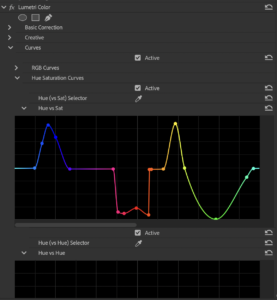
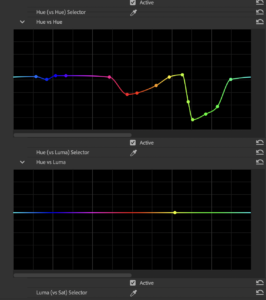
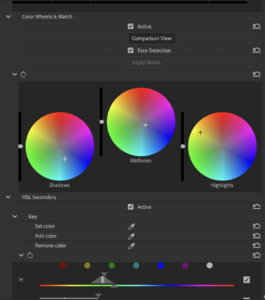
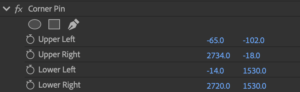
Based on this research, I used color curves in editing software to adjust for canine vision characteristics, including edge distortion and color grading. To simulate the difference in depth perception, I selectively blurred parts of the image. For the human viewpoint, I applied a LUT to make colors more natural and vibrant, emphasizing the contrast with the dog’s perspective.
Specific Editing Steps
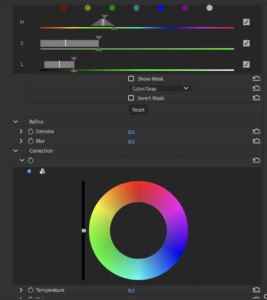
Step 1: Adjust Color Perception
Use the Lumetri Color effect on the dog’s clips or an adjustment layer.
In the Curves Panel, utilize the Hue vs Saturation Curve:
Reduce saturation for red and green tones.
Enhance saturation for blue and yellow tones.
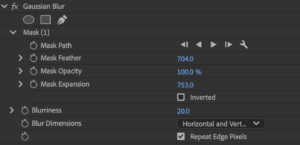
Step 2: Simulate Reduced Visual Acuity
Apply the Gaussian Blur effect to the dog’s clips or adjustment layer.
Set the blur radius to subtly reduce sharpness without making the footage unrecognizable.
Use masking tools to isolate areas and feather edges for a natural look.
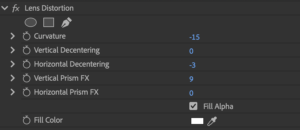
Step 3: Adjust Field of Vision
Apply Lens Distortion.
Adjust curvature settings to slightly widen the perspective, creating a fisheye-like effect.
Reflection and Summary
During the color grading process, I spent a significant amount of time trying to achieve a more pronounced yellow tone, but was never fully satisfied with the results. Since yellow and red are close on the spectrum, adjusting one often brought out unwanted green tones. After weighing the options, I settled on the current version, which features predominantly blue, cooler tones, creating a strong contrast with the human perspective. If I had more time, I would continue refining the grading to bring out more yellow tones and achieve a more satisfying result.
Testing and connecting MAX patcher- Chao Li, Ruotong Wu
We believe that a dog’s sense of smell is an important perspective. Through our research, we discovered that thermal imaging can be used to visualize gases, so we plan to use a thermal imaging effect to represent how dogs perceive smells. After seeking help from Jules, we found out that MAX can generate thermal imaging effects directly.
During our exploration, we realized that if we use MAX to process live footage into a dog’s perspective, it could create a better experience for the audience. Therefore, we decided to set up an interactive experience point based on a video tour of Calton Hill. We will use MAX’s Vizzie modules to apply visual effects to the video in real time, while also recording sound from three directions. The sound will influence the visuals, creating a live experience for the audience.
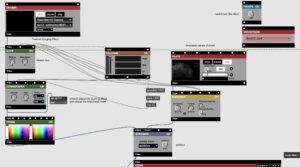
I divided the entire pacher into three parts. The design of each part is mostly the same, but they represent different aspects.
The First Aspect-Dog’s Vision
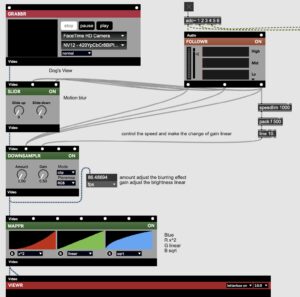
I referred to the patcher from Andrew’s workshop, Jules’ detailed explanation of the Vizzie modules and I combine the ‘help’ for each Vizzie component. Based on my research, I experimented and created a version of how I imagine the world looks through a dog’s eyes. I focused on three main aspects to represent a dog’s vision:
–Color: Mostly blue, with yellow and gray as secondary tones
–Blur: Dogs see with less clarity than humans
• Glow: Dogs are more sensitive to light movement, and fast motion can create a glowing effect
The most difficult part was adjusting the colors. There wasn’t a single Vizzie module that could fully recreate the way I see a dog’s visual world. I originally tried to use the object of ‘jit.gl.pix’ to completely remove red, but after many attempts, it didn’t work as expected. In the end, I used the MAPPR module and its RGB function to achieve the color style of dog vision.
The Second Aspect-Thermal Imaging Effect
For this part, we still use vizzie to simulate the thermal imaging effect and add the effect of gas to combine it with the video to simulate the sense of smell of dogs. For the color part, I used ‘2 TONR’ to retain the blue and purple to simulate the video effect captured by the thermal imager. Then I collected the smoke effects online and mixed them using the addictive mode of MODEMIXR.
The Third Aspect-Dog’s Mood
The design of this part is very simple. I only kept the yellow color and then adjusted the frequency of the screen flickering through sound. Because dogs have very sensitive hearing, even the slightest change in sound will attract their attention, even many subtle sounds that we humans never notice.
In addition, each video corresponds to a different microphone. I input the sound into different modules to influence the changes in the video, making the auditory stimulation to the audience more visual. Then I also did a simple mix by MAX to enable it to adjust the frequency of the real-time sound. Additionally, I added the reverb and distortion effects to make the ambience heard by the audience closer to the hearing of a dog.
The day before our presentation, we got help from Jules and Andrew. We used the H6 Essential as an audio interface to record live ambience. Andrew suggested that we add a MIDI controller so the audience could interact and adjust things themselves. This would make the experience more fun and immersive. It was a really helpful suggestion for our project. Luckily, we managed to borrow a MIDI controller just one second before the staff at the music store closed for the day — it was such a close call! I used six knobs to control three video channels and three audio channels. The audience could turn the knobs to mix visuals and sound in real time.
Sound Editing and Sound Mixing-Ruotong Wu, Yiting Liu
Final Mixing-Chao Li
1. Synchronous Recording
In the early stage, we captured the ambience by recording both point sources and area sound sources. We went to Calton Hill and used the Zoom H6 recorder to record the ambience in different directions of Calton Hill.
We also went to the target locations to record the ambient sounds, such as Prince Street, the church, etc., in preparation for the subsequent video switching.
In the middle stage, we recorded additional point sound sources and used the shotgun microphone Sennheiser MKH416 to record more precise point sound sources, such as bells, chirps, kids and so on. In addition, we re-record some ambience use this microphone to collect high-quality audio and improve the sound quality of the project.
2. Post-production Sound Design
When designing from the human perspective, we focused mainly on building the soundscape. From the dog’s perspective, we used abstract sound and visuals to express the cultural and historical significance of key locations around Calton Hill.
– Human Perspective
Based on our multiple recordings at Calton Hill, we combined the natural sounds and human activities we collected to recreate and restore the soundscape of the area. We tried to blend distant city ambience with nearby sounds such as footsteps and visitors’ laughter, aiming to build the unique sound texture of Calton Hill through sound.
With this reconstruction, we hope the audience cannot only hear the place, but also feel the memories and emotions that exist within it.
However, one regret is that if we had been able to use binaural recording, the immersive experience for the audience would have been even stronger. But on the one hand, the dummy head recorder was too heavy to carry around while walking and recording, which made it difficult to use in the field. On the other hand, due to limited time for post-production, we were not able to create a binaural version of the audio.
– Dog’s Perspective
From the dog’s perspective, we added footsteps, sniffing sounds, and panting to help the audience better imagine the experience of being a dog.
We also set Arthur’s Seat, the National Monument of Scotland, the Portuguese Cannon, Princes Street, and St Mary’s Episcopal Cathedral as key stop points. When the audience reaches these locations, sounds related to each site will be triggered. Our goal is to use abstract sound to express the history, culture, and deeper meaning of these landmarks.
At the stop at Arthur’s Seat, I wanted to use sound to evoke a sense of the Iron Age site and convey its deep, weighty history.
I added the sound of turning bearings as a symbol of the “wheels of time.” As the dog runs toward Arthur’s Seat, time seems to reverse, and the path of history slowly begins to emerge. At the foot of the hill, I layered low rumbles, granular textures, the sound of rolling stones, and wind to create a rich, multi-layered soundscape. The goal was to let listeners feel the ancient power held by this land.
These sounds are more than just representations of the environment — they are echoes of the past. Through the dog’s perspective, we wanted to show how memory and myth settle into the landscape, and how they still resonate in invisible ways today.
On Tuesday of the tenth week, we showed the demo to Andrew. Andrew suggested adding a transition between the human and dog perspectives, and mentioned using thermal imaging to show the smell.
On Wednesday we went to Calton Hill again to record additional video and sound materials. This time we used a shotgun microphone to record a single point sound source. We also went to the church to record bells to provide more sound effects for later sound design (Blog- Cathedral Recording).
In addition, we are also preparing to provide project easter eggs for the audience. When the audience walks along Calton Hill and reaches the end, they can use Max to perform real-time sound and picture conversion and experience the changes in the picture brought about by the sound on the spot. I think this will be very interesting.(Blog- Live Experience by MAX)
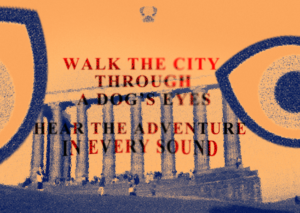
Coincidentally, there was also an exhibition on Calton Hill recently. After finishing the work, I visited the exhibition and found it quite inspiring. We’re planning to design a postcard for our project and have come up with a slogan:
“Walk the City Through a Dog’s Eyes, Hear the Adventure in Every Sound.”
We also included a brief overview of the project on the postcard and plan to imbed a QR code linking to the final roaming video. This way, even if someone doesn’t make it to Calton Hill in person, they can still experience the world through a dog’s eyes and enjoy the landscape of Calton Hill.
This weeks have been mostly busy with practice. The Wednesday, we went to Calton Hill again and used two cameras to simulate the perspectives of humans and dogs respectively. We also developed a shooting route map and main stop points around Calton Hill. The main stops are the National Monument, Arthur’s Seat, and Princes Street. We encountered a dog in the mountains and tried to use a real dog to restore the dog’s vision, but the effect was not good. In the end, we decided to use a handheld camera to simulate the dog’s perspective to shoot. After obtaining the Carlton Hill footage, we spent the rest of the time on video editing, color grading, and sound design. The dog’s footsteps, sniffs, and panting were added to the sound design to better immerse the audience in the dog’s perspective. In addition, relevant architectural sounds were triggered when arriving at major stop points.
I want to test whether we can tell stories primarily through sound from dog perspective. In other words, by creating a soundscape of the dog world, we can show the dog’s world. I exaggerate some effects in the human world that go unnoticed, such asgrating, chirp, vibration and so on.
But I found it is difficult to create sound without screen. So I think we can still use the video as an aid(do some abstract processing).on this basis, creating soundscape to show the dog’s perspective in our view. In addition, it is important to increase the audience’s interaction and sense of experience. We need to explore how to complete it.
Demo Recording and Photography- Chao Li, Yiting Liu
Editing Demo of Video- Yiting Liu
Editing Demo of Audio-Chao Li
This week was an online meeting, during which we discussed making a demo first and sorted out the equipment that might need to be rented. On Friday, Chao Li and Yiting headed to the location Andrew recommended: Jacob’s Ladder. Unfortunately, the trail was closed due to poor condition. We could only record some sound and video materials at the edge of the path. On the way back, we passed Prince Street. We sat on the benches on Prince Street, and the camera and recorder simultaneously recorded the passers-by. It was fascinating.
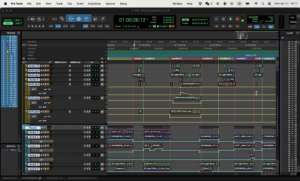
On Sunday Mar 09th, we integrated the audio and video, performed editing, color grading, transitions, special effects and other processing on the video, and performed pitch, EQ, and vocal extraction on the audio.
We successfully completed the demo and will show it to Andrew on Tuesday. I hope he will like it.