Any views expressed within media held on this service are those of the contributors, should not be taken as approved or endorsed by the University, and do not necessarily reflect the views of the University in respect of any particular issue.
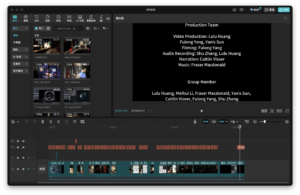
For the final submitted video, our initial editing structure was as follows: the first part would introduce the overall concept, the second part would explain the production process, the third would present the on-site installations, and the final section would feature interviews. However, during the actual editing process, we found that this structure made some sections overly lengthy and caused the overall pacing to feel sluggish, which affected the viewing experience. After several rounds of adjustments, I decided to adopt a new structure: starting with the core concept, then interweaving the installation introductions with interview footage, and ending with behind-the-scenes clips. This restructuring made the video more dynamic and better organized in terms of rhythm and narrative flow.
All audio materials used in the video were originally created by our team. These include musical compositions and sound effects tailored for each moon, ambient ocean sounds, background music, and recorded narration. The narration script was written based on the core concept of our project — The Breath of Tidal Force. It begins with the natural phenomenon of tidal force and gradually leads the audience through various aspects of the exhibition, including spatial layout, visual design, soundscapes, interactive elements, and the construction of the installation. The video was carefully edited to align with the narration’s pacing, ensuring a cohesive and logically structured presentation.
Finally, we sincerely thank every team member for their dedicated effort, as well as the teachers who offered us valuable guidance and support throughout the process.
Tidal force — a subtle yet powerful natural phenomenon.It arises from the gravitational interactions between celestial bodies in the universe,silent and unseen, yet day after day, it shapes the breathing rhythm of the ocean.
In this installation — “The Breath of Tidal Force”,we give form to this invisible pull through visual, auditory, and musical experiences.You are invited to step into a sensory universe we have created,where light and movement intertwine,and feel the pulse and resonance that echo from the depths of the moon and the far reaches of the cosmos.
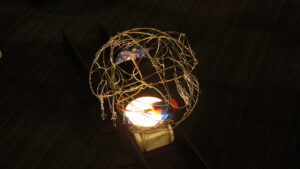
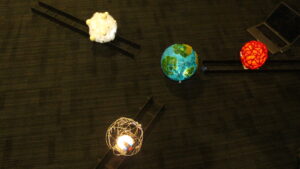
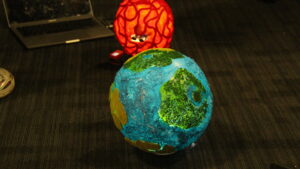
We blocked most of the light with black curtains to create a quiet, immersive universe. Four planets are arranged in a triangle around a central star, guiding the audience into the space. Each planet has its own texture—twisted wire for metal, chunky wool for lava, light cotton for gas, and a handmade Earth-like center.
The orbiting planets sit on 3D-printed trains and tracks, and visitors can pull handles to move them, becoming a tidal force in the universe.
On both sides, atmospheric videos made with TouchDesigner and Premiere express abstract feelings of water and time. Projectors cast visuals onto sheer black fabric, which ripples gently with passing movement, creating a tide-like effect. The central projection connects planets and ripples with the central star.
We have embedded the M5StickC Plus, which is connected to an ultrasonic sensor, inside a sphere, allowing it to measure the real-time distance between the “celestial body” and the “Earth.” This data is wirelessly transmitted to the host machine and then sent to the MAX/MSP project. Through the calculation of tidal force formulas, the distance data is dynamically converted into music, sound effects, and particle visual controls, thus creating an interactive system that blends scientific logic with sensory experience.
In terms of sound design, we control the dynamic sound effects of each planet through changes in tidal gravitational forces, and adjust the intensity of the sound of the waves based on the planet’s movement speed. This allows the audience to intuitively perceive the interaction between the “force” and the environment during the interactive process.
Regarding the music, the fluctuations in melody, instrumentation, and volume correspond to the strength of gravitational forces. The main melody of each celestial body is played by the closest speaker in a 4.0 channel system, enhancing the sense of immersion and presence for the audience in space.
In the visual aspect, we have created a dynamic particle system that simulates the movement of celestial bodies and the flow of waves. The attraction between the particles is controlled in real-time by the distance data. The color gradient from white to blue showcases the visual tension brought about by the changes in gravitational force.
Additionally, we have set up a water pool with a Bluetooth vibrating speaker embedded in it. The vibration frequency synchronizes with the emotional intensity of the music. The vibrations create real ripples on the water’s surface, which are projected onto the wall by a top-mounted projector, making the sound “visualized” in the form of water. This provides the audience with a multi-dimensional, tactile sensory experience.
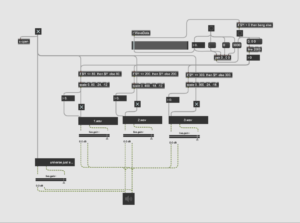
This is a demo max patch that takes the data from three planets, generating MIDI notes in set rhythmic and bar patterns, moving through seven modes, with seven chord possibilities for each mode.
The following video shows the integrated atmosphere engine, made with samples from Shu and Fulong, working within the wider MIDI engine:
2025.2.12
Since the project involves tides, the sound part must include the sound element of waves.
In the early stage of the project, we simply used three relatively different sounds, which lacked interactivity. In order to achieve the purpose of the installation, we need to let the audience feel the influence of tidal forces. When pushing the planet, the sound of the waves will also change. It should be interactive, not static.
2025.2.25
So the direction of our wave sound effect design is to enhance the changes of the wave sound effect while ensuring the auditory experience.
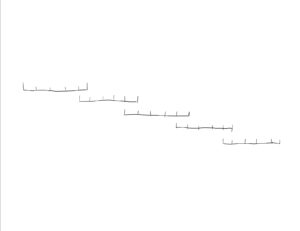
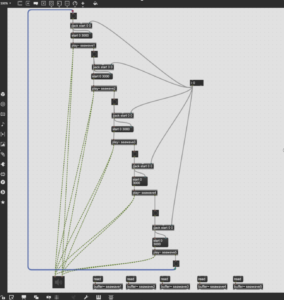
First, we tried to use a method similar to the simulated particle synthesizer in max to edit a wave sound effect into multiple sound clips with a duration of 5s. Then there is a variable to determine its playback time and end time. When we want the waves to have obvious changes, each one starts from the first second and ends in the second second. (At that time, it was not decided whether to use the distance variable between the planets or the speed variable of the planets). The logic diagram is as follows:
3.20
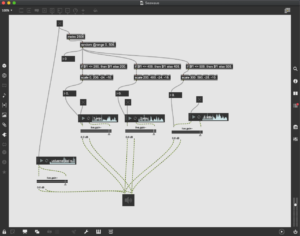
After Jules’s reminder, we thought it would be more convenient to mix the complete long audio together, so we made a new design for the changes in the waves. We mixed three long, complete, and different waves together, and used the size of the variable to affect the volume changes of the three audios, so that the sound quality is also good while the waves are changing.
The Max demo at that time was as follows: Design, mixed three long, complete, and different waves together, and used the size of the variable to affect the volume changes of the three audios, so that the sound quality is also good while the waves are changing.
The Max demo at that time was as follows:
The max demo at that time was as follows:
3.23
In the end we decided to use the speed of movement between the planets and the Earth as a variable affecting the sound of the waves, and merged this part into the final Max patch along with the music and other interactive parts.
The final edited sound of the waves are as follows:
Each track represents a different orb, combining a generated musical element with atmospheric planetary sounds. Each planet has three VST instruments that are receiving MIDI from MAX, generated algorithmically in response to user interactions with the system.
Full Music Track: generated entirely by audience input through the three sensors into the MAX MIDI machine:
Earth: waves, whale song, the universe atmos:
Metal: rhythmic percussion, stuttering and fizzing metalic screeching:
Before we finalized the design direction and technical logic of the ocean wave sound, we determined the design concept of the ocean wave sound, which will guide our subsequent promotion.
Ocean Wave Sound Design Concept
Tides are a silent dialogue between the universe and the ocean. In this sound design, we turned the speed of the planet into an invisible baton, allowing the breathing of different waves to rise and fall with it. The change in the speed of the planet is like the gentle gesture of gravity, constantly stirring the rhythm of the ocean: when the stars move slower, the sound of the waves is low and low; when the stars move faster, the waves become more turbulent. This metaphorical sound experience poetically presents how tidal forces – this invisible cosmic dance – silently shape the world around us.
Designing and creating interaction data calculations and sound and visual interaction logic fell under my role in the development process. In an iterative collaborative process with my teammates, we created an exhibition experience that was multi-sensory, visual, auditory, and interactive.
3/3/2025 – 7/3/2025 | Tidal Force Data Calculation and Logic Design 1
I started by creating the data model because this project relied upon tidal forces as its premise. The formula that I used was:
The two variables considered were the mass of the planets and the distance from Earth. In order to make this a reality in Max/MSP, I created a customized patch to generate tidal forces in real time.
I first used the rough volume and weight of Mars, the Moon, and Earth to simulate three planets and calculate total tidal force (FR) and direction. I then assigned all planets identical masses to harmonize their sound interaction.
22/3/2025 | Tidal Force Data Calculation and Logic Design 2
I added an extra variable to generate ocean sounds based on planetary motion: movement speed. The patch reads in every 200ms the past and present distance from Earth to another planet, computes their differences, and then divides by interval to approximate speed.
15/3/2025 | Planet Sound Interaction 1
This speed data also came in handy for sound effect triggers such as planet movement sound effects. To aid in simulating immersion, I included a sound effect that, when moving a planet, would trigger a “whoosh” sound. I reused the same speed detection method again (every 200ms). When speed exceeds 0, the sound starts fading in; when speed is reduced to 0, the sound starts fading out immediately. This created a natural, intuitive, motion-based sound effect.
20/3/2025 | Planet Sound Inter
action 2
Fraser then devised a second interaction idea: directly correlating all of the planets’ volumes to the value of tidal force. The group discussed both options and agreed to use Fraser’s “greater force = greater sound” idea. It felt more intuitive and worked more effectively in the exhibition.
25/3/2025 | Ocean Wave Sound Interaction
Following speed calculation, I created a three-phase sound interaction with ocean waves. There is a background sound of waves of low volume at zero speed. The sound of waves becomes more potent as speed increases over the first threshold, coming in more clearly. Upon crossing the second threshold, full-volume waves are heard, producing a powerful audio effect.
25/3/2025 | Visual Particle Interaction 1
This system correctly represented how the user interacted with the planets and facilitated the immersive ocean setting. After completing the initial patch by the visual team that could handle particle motion and RGB-based colour, I added to their work by correlating particle action with tidal force. Particles move quickly under high tidal force and clump together. Particles disperse under low force and move very slowly.
I also tried to symbolize different planets using particle colours – red for fire, white for air, and black for metal. RGB blending, however, turned out to be quite challenging in achieving gradient colours from white to black, so I gave this idea up. I tried to use red, blue, and yellow to differentiate among the three planets later. Even though transitions were more technically sound, usability test results indicated that participants did not understand the colours to symbolize.
1/4/2025 | Visual Particle Interaction 2
As red-blue-yellow was not intuitive to the audience, I also redesigned colour interaction to make them more intuitive. In the eventual release, particle colour represents tidal force strength: weak force = white; stronger force = dark blue. The simple design was much more intuitive for the audience during the exhibition.
2/4/2025 | System Integration and Arduino Testing
As a finishing touch, I combined all elements of interaction. Physical Arduino sensor inputs were routed to Max/MSP. Tidal force and speed were computed and translated to ocean sounds, planetary sound effects, and particle system visualization.
This concluded the entire cycle of interaction: physical action → data input →instant calculation, → audio/visual feedback. It caused the entire system to work fluidly and presented a completely immersive experience for the final performance.
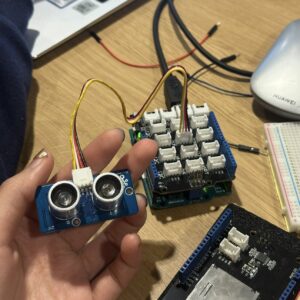
In order to achieve the functions of distance measurement and wireless data transmission at the same time, we finally chose the solution of connecting the ultrasonic sensor using M5StickC Plus. In terms of hardware connection, the VCC, GND, and SIG pins of the Grove ultrasonic sensor are connected to 5V, GND, and GPIO 26 of the M5StickC Plus, respectively.
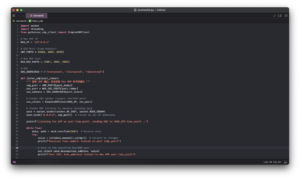
In actual operation, the ultrasonic sensor is responsible for measuring the distance between the two devices, and the M5StickC Plus reads the distance measurement results and sends them to the computer via UDP protocol and Wi-Fi. The computer runs a Python-based programme that receives the UDP data from the M5StickC Plus, converts it into OSC compliant data, and then transmits it to the Max/MSP patch for interactive control.
15/03/2025
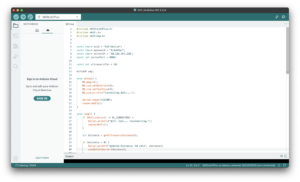
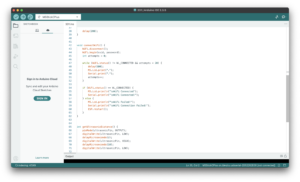
In actual development, I first wrote and uploaded an Arduino programme for the M5StickC Plus to read the distance data from the Grove ultrasound sensor and transmit it wirelessly to the computer. Wireless transmission is based on the devices being connected to the same Wi-Fi network and communication is accomplished by setting the IP address of the host computer.
Once the data could be transferred, I made certain optimisations according to the actual situation: – Disconnection detection and automatic reconnection: when the Wi-Fi connection is interrupted, the M5StickC Plus screen will display an alert message and automatically try to reconnect to the network;
– Increased data collection frequency: Increase the frequency of sensor readings to make the system more responsive to changes in distance;
– Measuring range limitation and data filtering: according to the actual needs of the device, the effective distance range is limited to 1~200cm, and outliers or invalid data are filtered out;
– Data smoothing: read three distance measurements each time and take their average value to reduce the measurement error and improve the stability and accuracy of the data.
In the Python project, our goal is to receive the UDP data sent from M5StickC Plus, convert it to OSC protocol format, and finally send it to Max/MSP for subsequent processing. To do this, I wrote a Python program that listens on the local IP address (127.0.0.1) to receive the data. Since we are receiving a total of three sets of data, we set up separate UDP listening ports for each set of data, and configured the three OSC receiving ports in the Max project accordingly. In the end, all three sets of data were successfully transmitted through the local network and connected to Max.
In practice, we also encountered some technical challenges:
Unstable Wi-Fi network: Initially, we tried to connect M5StickC Plus to the mobile phone hotspot, but the connection was frequently disconnected and the communication was unstable. Later, after seeking help from our mentor, we successfully connected M5StickC Plus to the campus Wi-Fi network, which significantly improved the reliability of the connection.
Power supply problem: The M5StickC Plus has a limited built-in battery life, which makes it difficult to support prolonged operation. In order to solve this problem, we have connected a small rechargeable battery to the device, which ensures a continuous and stable power supply.
Sensor Accuracy: The common ultrasonic sensor used initially had a large error in distance measurement, which could not meet the actual needs. After replacing it with the Grove ultrasonic sensor, the measurement results became significantly more stable and accurate, effectively improving the overall reliability of the system.
In our group’s conception, the tidal force is sensed by moving a specific device. According to physical principles, the magnitude of the tidal force is inversely proportional to the cube of the distance between celestial bodies, so we need to simulate the change of the tidal force by varying the distance between the two ‘celestial’ devices.
25/2/2025
For this purpose, we chose to use an ultrasonic sensor at the beginning of the project, which transmits and receives ultrasound waves to obtain the distance between the two devices. We borrowed the Grove Arduino kit and looked up the tutorials for connecting and using it on the official Grove website. After plugging the ultrasonic sensor(Grove – Ultrasonic Ranger) into the main control board and connecting it to the computer, data reading was successfully achieved. Test results show that the sensor performs well in terms of measurement sensitivity and accuracy, and can meet our needs for real-time distance change perception.
Since our design requires the viewer to move three separate spheres simultaneously and detect the distance between them in real time, the sensors had to be embedded inside the spheres and have wireless communication capabilities to be able to transmit the data to a computer for processing via Wi-Fi. This required us to optimise the original wired connection solution.
7/3/2025
First, I began testing the M5StickC Plus, a miniature device with wireless data transfer capability. After several rounds of testing, it turned out that its own IMU (Inertial Measurement Unit) was the closest to what we were looking for: it could acquire acceleration data by detecting its own motion. However, the IMU only provides acceleration information, making it difficult to directly derive the distance data we needed. In the end, I decided to abandon the M5StickC Plus-only solution and to re-evaluate and optimise the implementation of distance measurement and wireless communication.