Any views expressed within media held on this service are those of the contributors, should not be taken as approved or endorsed by the University, and do not necessarily reflect the views of the University in respect of any particular issue.

Final Video Editing Statement

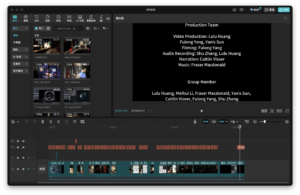
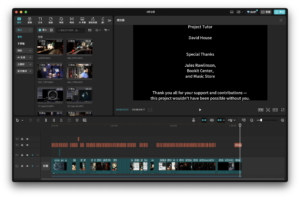
For the final submitted video, our initial editing structure was as follows: the first part would introduce the overall concept, the second part would explain the production process, the third would present the on-site installations, and the final section would feature interviews. However, during the actual editing process, we found that this structure made some sections overly lengthy and caused the overall pacing to feel sluggish, which affected the viewing experience. After several rounds of adjustments, I decided to adopt a new structure: starting with the core concept, then interweaving the installation introductions with interview footage, and ending with behind-the-scenes clips. This restructuring made the video more dynamic and better organized in terms of rhythm and narrative flow.

All audio materials used in the video were originally created by our team. These include musical compositions and sound effects tailored for each moon, ambient ocean sounds, background music, and recorded narration. The narration script was written based on the core concept of our project — The Breath of Tidal Force. It begins with the natural phenomenon of tidal force and gradually leads the audience through various aspects of the exhibition, including spatial layout, visual design, soundscapes, interactive elements, and the construction of the installation. The video was carefully edited to align with the narration’s pacing, ensuring a cohesive and logically structured presentation.

Finally, we sincerely thank every team member for their dedicated effort, as well as the teachers who offered us valuable guidance and support throughout the process.
Installation Introduction

Tidal force — a subtle yet powerful natural phenomenon.It arises from the gravitational interactions between celestial bodies in the universe,silent and unseen, yet day after day, it shapes the breathing rhythm of the ocean.

In this installation — “The Breath of Tidal Force”,we give form to this invisible pull through visual, auditory, and musical experiences.You are invited to step into a sensory universe we have created,where light and movement intertwine,and feel the pulse and resonance that echo from the depths of the moon and the far reaches of the cosmos.

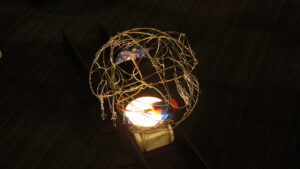
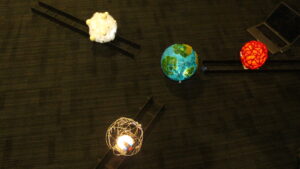
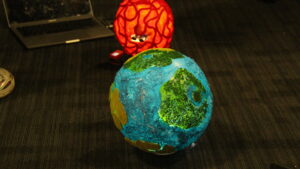
We blocked most of the light with black curtains to create a quiet, immersive universe. Four planets are arranged in a triangle around a central star, guiding the audience into the space. Each planet has its own texture—twisted wire for metal, chunky wool for lava, light cotton for gas, and a handmade Earth-like center.

The orbiting planets sit on 3D-printed trains and tracks, and visitors can pull handles to move them, becoming a tidal force in the universe.

On both sides, atmospheric videos made with TouchDesigner and Premiere express abstract feelings of water and time. Projectors cast visuals onto sheer black fabric, which ripples gently with passing movement, creating a tide-like effect. The central projection connects planets and ripples with the central star.

We have embedded the M5StickC Plus, which is connected to an ultrasonic sensor, inside a sphere, allowing it to measure the real-time distance between the “celestial body” and the “Earth.” This data is wirelessly transmitted to the host machine and then sent to the MAX/MSP project. Through the calculation of tidal force formulas, the distance data is dynamically converted into music, sound effects, and particle visual controls, thus creating an interactive system that blends scientific logic with sensory experience.

In terms of sound design, we control the dynamic sound effects of each planet through changes in tidal gravitational forces, and adjust the intensity of the sound of the waves based on the planet’s movement speed. This allows the audience to intuitively perceive the interaction between the “force” and the environment during the interactive process.

Regarding the music, the fluctuations in melody, instrumentation, and volume correspond to the strength of gravitational forces. The main melody of each celestial body is played by the closest speaker in a 4.0 channel system, enhancing the sense of immersion and presence for the audience in space.

In the visual aspect, we have created a dynamic particle system that simulates the movement of celestial bodies and the flow of waves. The attraction between the particles is controlled in real-time by the distance data. The color gradient from white to blue showcases the visual tension brought about by the changes in gravitational force.

Additionally, we have set up a water pool with a Bluetooth vibrating speaker embedded in it. The vibration frequency synchronizes with the emotional intensity of the music. The vibrations create real ripples on the water’s surface, which are projected onto the wall by a top-mounted projector, making the sound “visualized” in the form of water. This provides the audience with a multi-dimensional, tactile sensory experience.

The Integrated Device for Distance Measurement and Wireless Data Transmission

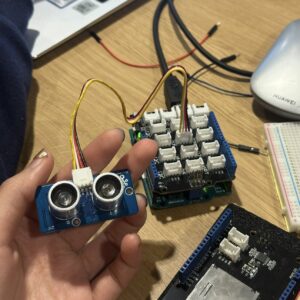
In order to achieve the functions of distance measurement and wireless data transmission at the same time, we finally chose the solution of connecting the ultrasonic sensor using M5StickC Plus. In terms of hardware connection, the VCC, GND, and SIG pins of the Grove ultrasonic sensor are connected to 5V, GND, and GPIO 26 of the M5StickC Plus, respectively.

In actual operation, the ultrasonic sensor is responsible for measuring the distance between the two devices, and the M5StickC Plus reads the distance measurement results and sends them to the computer via UDP protocol and Wi-Fi. The computer runs a Python-based programme that receives the UDP data from the M5StickC Plus, converts it into OSC compliant data, and then transmits it to the Max/MSP patch for interactive control.

15/03/2025

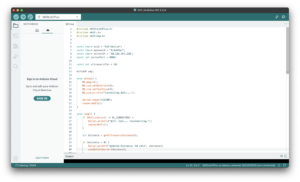
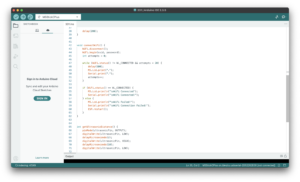
In actual development, I first wrote and uploaded an Arduino programme for the M5StickC Plus to read the distance data from the Grove ultrasound sensor and transmit it wirelessly to the computer. Wireless transmission is based on the devices being connected to the same Wi-Fi network and communication is accomplished by setting the IP address of the host computer.

Once the data could be transferred, I made certain optimisations according to the actual situation: – Disconnection detection and automatic reconnection: when the Wi-Fi connection is interrupted, the M5StickC Plus screen will display an alert message and automatically try to reconnect to the network;

– Increased data collection frequency: Increase the frequency of sensor readings to make the system more responsive to changes in distance;

– Measuring range limitation and data filtering: according to the actual needs of the device, the effective distance range is limited to 1~200cm, and outliers or invalid data are filtered out;

– Data smoothing: read three distance measurements each time and take their average value to reduce the measurement error and improve the stability and accuracy of the data.

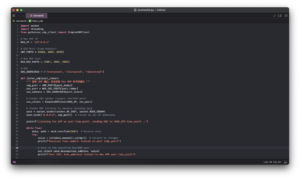
In the Python project, our goal is to receive the UDP data sent from M5StickC Plus, convert it to OSC protocol format, and finally send it to Max/MSP for subsequent processing. To do this, I wrote a Python program that listens on the local IP address (127.0.0.1) to receive the data. Since we are receiving a total of three sets of data, we set up separate UDP listening ports for each set of data, and configured the three OSC receiving ports in the Max project accordingly. In the end, all three sets of data were successfully transmitted through the local network and connected to Max.

In practice, we also encountered some technical challenges:

Unstable Wi-Fi network: Initially, we tried to connect M5StickC Plus to the mobile phone hotspot, but the connection was frequently disconnected and the communication was unstable. Later, after seeking help from our mentor, we successfully connected M5StickC Plus to the campus Wi-Fi network, which significantly improved the reliability of the connection.

Power supply problem: The M5StickC Plus has a limited built-in battery life, which makes it difficult to support prolonged operation. In order to solve this problem, we have connected a small rechargeable battery to the device, which ensures a continuous and stable power supply.

Sensor Accuracy: The common ultrasonic sensor used initially had a large error in distance measurement, which could not meet the actual needs. After replacing it with the Grove ultrasonic sensor, the measurement results became significantly more stable and accurate, effectively improving the overall reliability of the system.

Selection and Exploration of Sensors and Wireless Devices Based on Arduino

In our group’s conception, the tidal force is sensed by moving a specific device. According to physical principles, the magnitude of the tidal force is inversely proportional to the cube of the distance between celestial bodies, so we need to simulate the change of the tidal force by varying the distance between the two ‘celestial’ devices.

25/2/2025

For this purpose, we chose to use an ultrasonic sensor at the beginning of the project, which transmits and receives ultrasound waves to obtain the distance between the two devices. We borrowed the Grove Arduino kit and looked up the tutorials for connecting and using it on the official Grove website. After plugging the ultrasonic sensor(Grove – Ultrasonic Ranger) into the main control board and connecting it to the computer, data reading was successfully achieved. Test results show that the sensor performs well in terms of measurement sensitivity and accuracy, and can meet our needs for real-time distance change perception.

Since our design requires the viewer to move three separate spheres simultaneously and detect the distance between them in real time, the sensors had to be embedded inside the spheres and have wireless communication capabilities to be able to transmit the data to a computer for processing via Wi-Fi. This required us to optimise the original wired connection solution.

7/3/2025

First, I began testing the M5StickC Plus, a miniature device with wireless data transfer capability. After several rounds of testing, it turned out that its own IMU (Inertial Measurement Unit) was the closest to what we were looking for: it could acquire acceleration data by detecting its own motion. However, the IMU only provides acceleration information, making it difficult to directly derive the distance data we needed. In the end, I decided to abandon the M5StickC Plus-only solution and to re-evaluate and optimise the implementation of distance measurement and wireless communication.

ScreenRecording_04-15-2025 15-46-54_1

css.php

Report this page

To report inappropriate content on this page, please use the form below. Upon receiving your report, we will be in touch as per the Take Down Policy of the service.

Please note that personal data collected through this form is used and stored for the purposes of processing this report and communication with you.

If you are unable to report a concern about content via this form please contact the Service Owner.

Please enter an email address you wish to be contacted on. Please describe the unacceptable content in sufficient detail to allow us to locate it, and why you consider it to be unacceptable.
By submitting this report, you accept that it is accurate and that fraudulent or nuisance complaints may result in action by the University.

  Cancel