Small screen touch designer and video interaction
To make the breathing more noticeable, we used two electronic screens. The smaller screen is used to convey interaction prompts, and our small screen also uses a breathing sensor for interaction.
- To enhance the overall experience, we provide users with guiding prompts. The real-time audio stream is deconstructed into geometric fluctuations, while the background patterns represent the physical form of sound within a digital field. This serves as a simplified, gamified expression, allowing users to perceive the meaning conveyed by the installation in a more multidimensional way as they follow the guidance.
This work features a TouchDesigner-based generative system driven by the music of six nations. It uses audio analysis algorithms to map rhythmic data onto dynamic geometric forms, resulting in a post-produced audiovisual narrative that explores cross-cultural themes through synchronized media.
video design
Keep breathing.
Now, place one hand on your chest.
Can you feel the movement?
Notice the air entering your body.
Notice the air leaving your body.
Move your hand to your throat.
Can you feel the air passing through?
Now slow down.
Take a deeper breath.
This is your breath.
Or is it?
What shapes your breathing
Can you control it?
Or are you following it?
Touchdesigner2 Note:Assistance from AI and professional td teachers
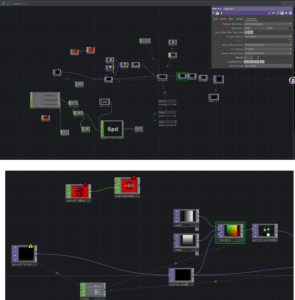
- Data is transmitted through the main TouchDesigner (TD) file using port 7001, while another TD file receives the data on the same port (7001).
Node Logic Description
Ramp 1 & 2: Generate horizontal and vertical gradients respectively (commonly representing U and V coordinates).
Reorder 1: Combines the two gradients into a single RG image. From the preview, the horizontal gradient is mapped to the red channel (R), and the vertical gradient is mapped to the green channel (G).
Point Transform 1: A node used to process coordinate data. It takes the combined coordinate information from the Reorder node and applies transformations such as rotation, scaling, or translation.
Visual Post-Processing
Through nodes such as RGB Key, Bloom, and Transform, the original particle data undergoes color filtering and visual enhancement, improving the overall visual quality and lighting effects.
Input & Control Layer
Using Keyboard In and Slider components, real-time adjustments can be made to particle physical properties, such as gravity, velocity, and mass.
Simulation Engine
The core node is particles-Gpu , which performs large-scale particle position and behavior calculations on the GPU, enabling efficient and high-performance particle simulation.
REFERENCE
Reactive GPU Particles – TouchDesigner Tutorial 052
Audio-reactive psychedelic visuals | TouchDesigner Beginner Tutorial